Store Credit
A balance a customer can spend with you instead of paying in full. It is held per currency rather than as one figure, so one customer can carry two balances at once, it can be taken back as easily as it is given, and the Enable store credit toggle in Settings is a different thing from the balance on a record.
On this page
Store credit is a balance held against a customer that they can spend with you instead of paying in full. You put it there, and it stays on their record until it is spent or taken back.
It is the thing to reach for when you owe a customer something and both of you would rather it stayed in the store: a goodwill gesture after a problem, a refund the customer agrees to keep as credit, a deposit against a future order. Issue Store Credit walks the dialog that puts it there.
Two places carry this name, and only one of them gives credit
This catches people out, so it comes before anything else.
| Where | What it is | What you can do there |
|---|---|---|
| A customer's record, the Store credit card | One person's balance | Give credit, or take it back. This is the one the rest of this article is about |
| Settings > Customer accounts, the Store credit row | A single store-wide toggle, Enable store credit | Turn something on or off for the whole store. No amount is entered here and no customer is named |
If you have opened Settings and found only a switch, you are in the wrong place for issuing credit. Go to Customers, open the person, and work from their record.
Store credit is also not a gift card. Gift cards are a separate feature with their own settings, and nothing in this article applies to them.
Before you begin
- Your role includes Manage store credit, which is the permission this sits behind.
- You know which currency you are working in, since a balance exists per currency.
- Go to Customers and open the customer whose balance you are changing, not Settings.
Where the balance lives
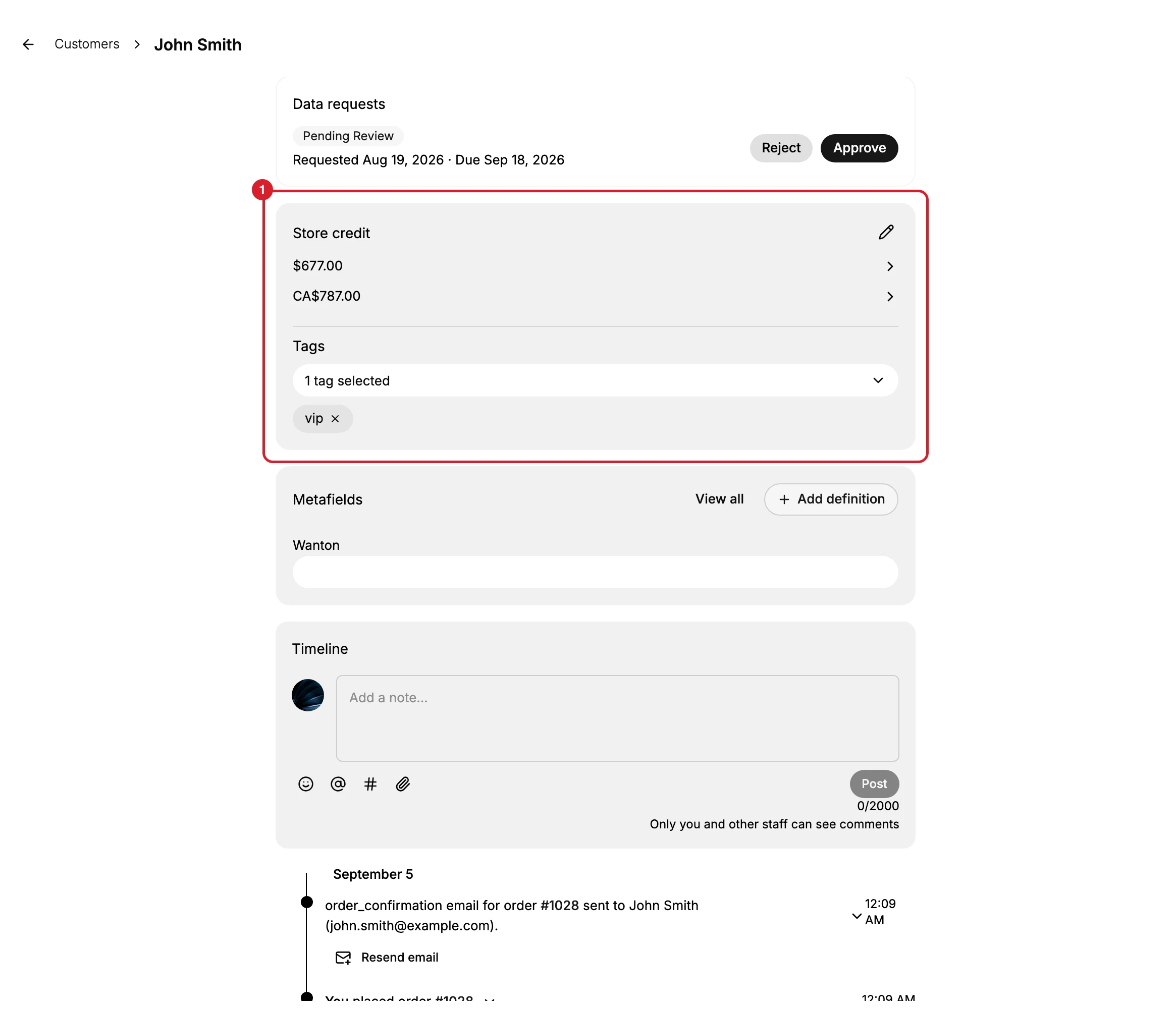
The route is Customers, then the customer's name, then down their record. The breadcrumb at the top left of the picture is that path.
The card (1) is easy to walk past. It is in the main column, below Draft orders, and it does not have a card to itself: Store credit and Tags share one, with the balances above the divider and the tag selector below it. The only control is a small pencil at the top right, labelled Adjust for a screen reader and carrying no visible words.
| Where | What you see |
|---|---|
| The customer's record | A Store credit heading sharing a card with Tags, listing a balance for each currency, or nothing |
| More actions on the same record | Issue store credit, which opens the same dialog as the pencil |
| The customer's timeline | An entry carrying the amount, such as You added $1 store credit |
| Settings > Customer accounts | An Enable store credit toggle, described there as giving customers credit to use on your store |
The timeline entry matters more than it looks. It is the only place the history of a balance is written down, and it carries the figure, so credit given can be traced without leaving the customer's page.
A balance per currency, not one balance
Store credit is not a single number. The dialog asks which currency each adjustment is in, so a customer can end up holding one amount in US dollars and another in Canadian dollars at the same time, listed one under the other on the card. The customer in the picture holds exactly that.
Each is spendable only in its own currency. So read which currency the balance you are looking at is in before you promise the customer anything, and choose that same currency when you add to it. Picking a different one does not warn you. It creates a second balance.
The setting and the balance are not the same thing
Settings > Customer accounts carries an Enable store credit toggle, and it is easy to read as the master switch. On the store this article was checked against it is off, while customers hold balances and while the admin can still issue and adjust them.
So the toggle is not proof of anything about the admin side. What it governs was not established here, and this article does not claim it. If you need to know whether customers can spend their credit, look at your own storefront rather than at the switch.
What it means for your store
Credit is a promise, not a payment. Issuing it does not move money. It records that you owe the customer value they can take in goods, so the cash stays with you until they spend it and the obligation sits on the record until they do.
It can be taken back. The same dialog debits as well as credits, so a balance given in error is corrected rather than written off.
Nobody tells the customer. The dialog's own notice says customer notification emails are not available yet, so a credit sits there silently. If you want it used, say so yourself, and say which currency it is in.
If something goes wrong
- The balance did not move. Check the currency. A new balance may have been created beside the old one instead of changing it.
- You issued too much. Open the same dialog and use Debit for the difference.
- There is no control on the card. Your role may lack Manage store credit.
- You only found a switch. That is Settings > Customer accounts. Balances are on the customer's own record.
Next steps
Related articles
Still stuck?
- Ask Tanqory AIAsk in your own words. It answers from these articles and links the ones it used.
- Ask in your adminThe assistant in your Tanqory admin answers and makes the change for you once you confirm.
- Contact TanqoryWrite to our privacy, security or legal teams, or talk to sales about a plan or a move.