Customer Events
A catalogue of what the store writes into a customer's Timeline: orders, returns, sent emails, tags, addresses, store credit and privacy requests, in the wording each entry actually uses. Some name the thing they changed and some only say that something changed, which decides how far the timeline can answer a question on its own.
On this page
An event is one line the store writes into a customer's Timeline when something happens to them. This article is the catalogue: what gets recorded, in the store's own wording, and what each entry is actually telling you.
Customer Events Timeline covers the Timeline itself, how to read it and how to post to it.
What gets recorded
Reading any of this takes the View customers permission. Go to Customers, open a customer, and scroll to the Timeline at the foot of their page.
Every wording below was read off a real customer's timeline. They fall into five groups.
The record itself. These are the changes someone on your team made to the person rather than to an order, so this is the group to read when a record looks different from how you left it.
| Entry | What it tells you |
|---|---|
| You created this customer. | The record was made by hand rather than by an order or a sign-up |
| Staff added an address, Staff updated an address, Staff deleted an address | An address changed, and which of the three things happened to it. It does not say which address |
| Staff added a tag, Staff removed a tag | A label changed. It does not say which tag |
| Staff changed tax exemption status | The customer's tax treatment was changed |
| Staff subscribed to a channel | A marketing consent was turned on, and the entry names the channel |
Orders. Four wordings cover the life of an order: You placed, You edited, You fulfilled and You cancelled, each followed by the order number. These are the only entries that link anywhere, so the number is a way into the order itself and the group doubles as a route out of the customer's page.
Money and returns. Anything that moved value back towards the customer. These carry figures where the rest do not, which makes this the one group you can audit from without opening anything else.
| Entry | What it tells you |
|---|---|
| You requested return for order #1017 | A return was started against a specific order. The same order can appear more than once |
| You issued refund for order # and the order number | Money went back to the customer |
| You added $1 store credit | The amount is in the entry, so credit given is auditable from the timeline alone |
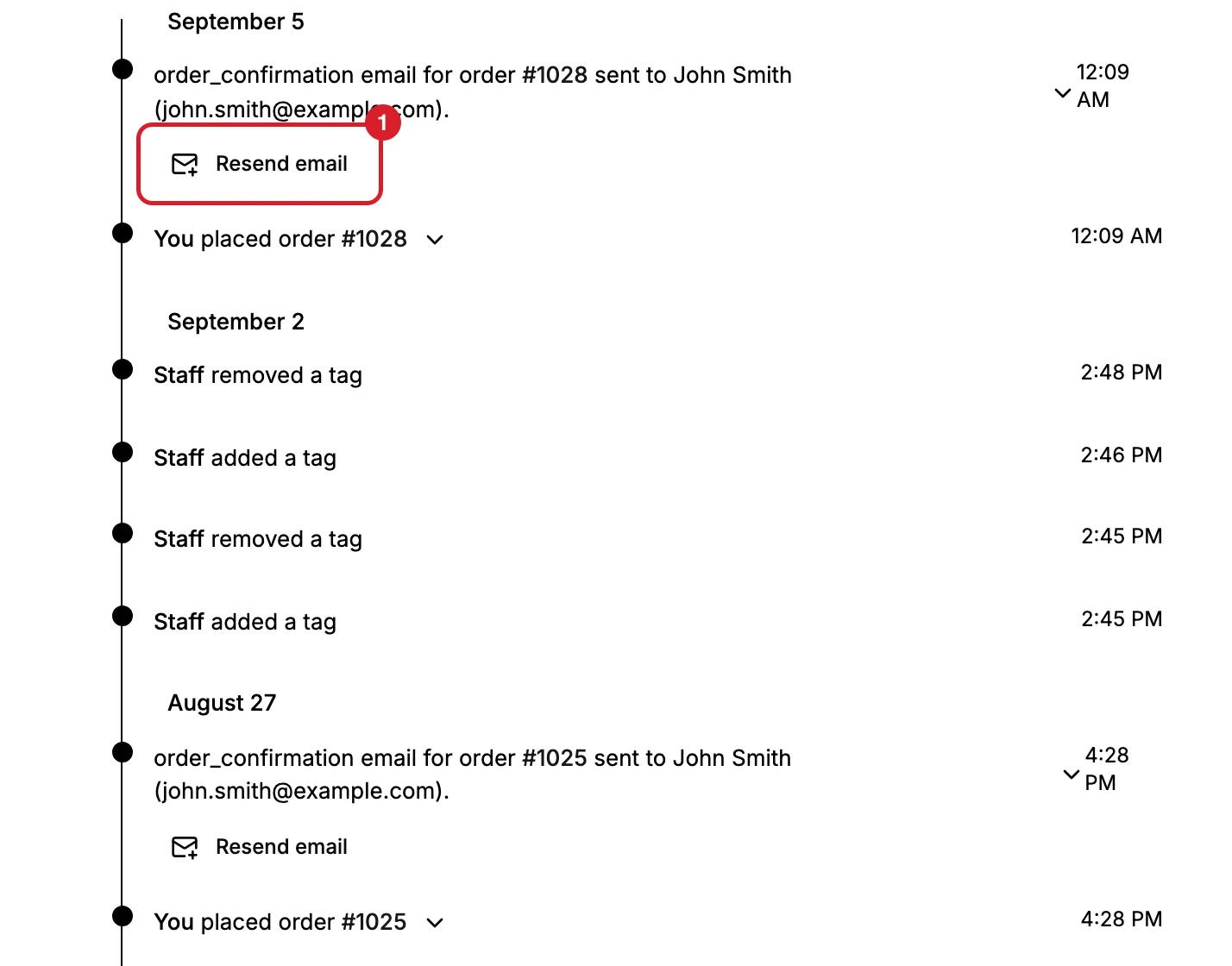
Emails the store sent. One entry per email. Each line names the email in the store's own wording, the order it belongs to, and then the recipient, as a name followed by their address in brackets, which is the only place the timeline prints an address. This is the group that answers "I never received anything", and every row in it can be acted on rather than only read.
| Entry | What it tells you |
|---|---|
| order_confirmation email for order and its number | A confirmation went out, with the customer's name and their address in the line |
| draft_order_invoice email for order and its number | An invoice for a draft order |
| gift_card email for order and its number | A gift card was sent |
Every one of these carries a Resend email control (1).
Notes and privacy. Two entries, and the only two that somebody set out to create rather than leaving behind while doing something else. You added a note to the customer records that a note was posted here, so writing in the timeline is itself part of the history. You submitted a customer data request. records that a privacy action was started on this person.
What the wording is doing
The first word is the attribution. You means the account you are signed in as; Staff means someone on the team. There is no name either way, so the timeline tells you whether it was you and nothing more precise than that.
Some entries name the thing, some do not. An order entry gives you the order number and a link to it, an email entry gives the recipient in full, and a store credit entry gives the amount. A tag entry says a tag changed but not which one, and an address entry says an address changed but not which. So the timeline is a reliable answer to when and a partial answer to what, and for tags and addresses you have to look at the record itself to see the current state.
The address entries are the most specific of that group. They separate added, updated and deleted, so you can tell a correction from a removal without opening anything, even though none of the three says which address it was.
The email entries carry the most. They name the email, the order and the recipient, so a customer who says nothing arrived can be answered from that line alone, and answered again with Resend email without composing anything.
What is not here
The timeline records what the store did. It does not record:
- Anything that happened outside Tanqory. A phone call, a chat, an agreement made by email elsewhere.
- Reading. Nobody opening the customer leaves an entry.
- A name. Entries say only You or Staff, never who.
More of the record writes an entry than the list above suggests: tags, all three address actions, tax exemption and marketing subscription all appear. What was not seen writing one is a plain change to the contact details.
If it matters and the store cannot know it, post a note, which lands in the same history in date order.
What it is for
Answering a customer without asking them anything. A message asking where an order is will usually be answered here already: whether it was placed, whether it was cancelled, whether a return was started, and whether the confirmation email went.
Working out what happened. When a record looks wrong, the timeline is the only account of how it got that way, and the times let you line it up against when the customer says they did something.
Checking money moved. A store credit entry carries its amount, so credit given can be traced without leaving the customer's page.
If something goes wrong
- An action you took is missing. Not every change writes an entry. Tags, addresses, orders, returns, store credit, sent emails and privacy requests do.
- You cannot tell who did something. The timeline distinguishes only you from other staff.
- An email is listed but the customer says it never arrived. Use Resend email on that entry.
- The timeline is empty on a customer who clearly has history. A record that was merged into another one has its timeline emptied, and the note on its Notes card says where everything went.
Next steps
Related articles
Still stuck?
- Ask Tanqory AIAsk in your own words. It answers from these articles and links the ones it used.
- Ask in your adminThe assistant in your Tanqory admin answers and makes the change for you once you confirm.
- Contact TanqoryWrite to our privacy, security or legal teams, or talk to sales about a plan or a move.