Discount Usage Limits
The Usage limits section controls how many times a discount can be redeemed. You can cap the total number of uses across all customers, and you can limit each customer to one use. Because a discount with no limit can be shared and reused without bound, these two settings are how you keep a code from being redeemed far more than you planned.
On this page
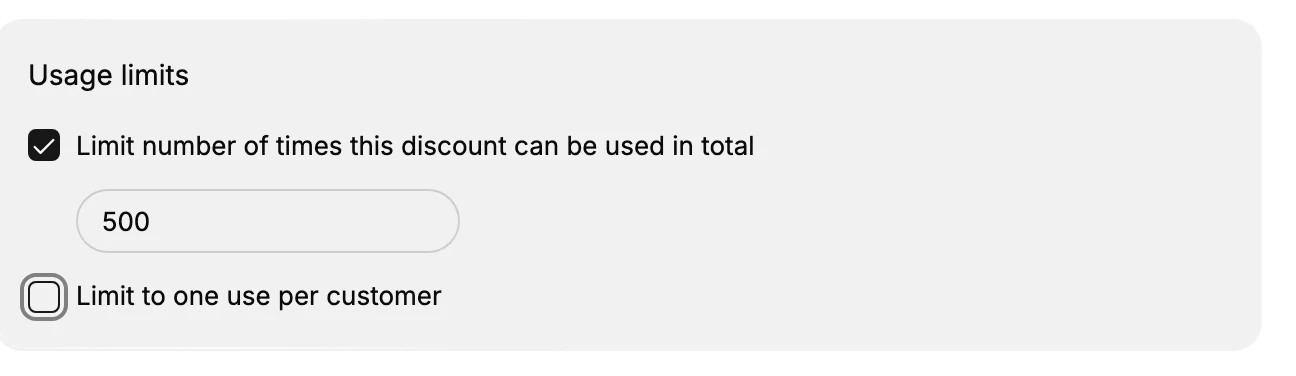
The Usage limits section decides how many times a discount can be redeemed before it stops working. It has two settings that work independently. Limit number of times this discount can be used in total caps the combined number of redemptions across every customer, and when you turn it on a field appears where you enter that number. Limit to one use per customer stops any single customer from redeeming the discount more than once.
These settings matter because a discount with no limit keeps applying for as long as it is active, which means a public code can be shared and reused far beyond what you intended. Setting a total cap protects a fixed budget, since the discount turns itself off once it reaches the number you set. Limiting one use per customer keeps a welcome offer, or an offer meant for a customer's first order, from being claimed again by the same person. You can use either setting on its own or both together, depending on how tightly you want to control the discount.
The two limits
| Setting | What it caps | Result when on |
|---|---|---|
| Limit number of times this discount can be used in total | The total redemptions across all customers | A number field appears; once total uses reach that number, the discount stops applying for everyone |
| Limit to one use per customer | How many times one customer can redeem it | Each customer can redeem the discount only once, so it cannot be reused by the same person |
Before you begin
- Your role includes Edit discounts.
- You know how exposed the discount should be, such as a fixed number of total uses or one use per customer.
- Open Discounts in the admin sidebar, then create a discount or open an existing one, since this section is part of every discount form.
Steps
1. Open the discount form
Create or open a discount. The Usage limits section is part of every discount form, so you set the caps in the same place as the value and the other rules. See Create a Discount Code.
2. Cap the total number of uses
Turn on Limit number of times this discount can be used in total and enter a number in the field that appears. This is the combined number of redemptions allowed across all customers, so once the discount has been used that many times it stops applying for everyone. Use this to protect a fixed promotion budget or to run a limited offer, such as the first 500 orders.
3. Limit each customer to one use
Turn on Limit to one use per customer so a single customer cannot redeem the discount more than once. This keeps a welcome offer, or an offer meant for a customer's first order, from being claimed repeatedly by the same person, which is important for any code you share publicly. You can turn this on with or without the total cap.
4. Save
Save the discount. From this point the limits are enforced at checkout on their own, so a customer who has reached a limit, or a total cap that has been met, blocks further redemptions without any action from you.
Verify the result
- With a total cap set, the discount stops applying once its total uses reach the number you entered.
- With one use per customer set, a customer who has already used the discount cannot redeem it again.
- With neither set, the discount keeps applying for as long as it is active.
Best practices
- Turn on one use per customer for welcome codes and codes meant for a first order, so the same person cannot claim the offer repeatedly.
- Set a total cap when the promotion has a budget, because the discount stops on its own once the cap is met and cannot overrun the budget.
- Match the total number to the offer, for example a round figure for a limited run, so the cap reflects how many uses you can afford.
Common mistakes
- No limits on a public code, which lets it be shared and redeemed without bound and can cost far more than planned.
- A total cap without one use per customer, which lets a single customer use up much of the cap on their own.
If something goes wrong
- The discount stopped working for everyone. Its total uses may have reached the cap you set under Usage limits.
- A customer cannot use the discount again. With one use per customer on, they can redeem it only once.
- You cannot edit the discount. Your role may not have permission to manage discounts.
Next steps
Related articles
Still stuck?
- Ask Tanqory AIAsk in your own words. It answers from these articles and links the ones it used.
- Ask in your adminThe assistant in your Tanqory admin answers and makes the change for you once you confirm.
- Contact TanqoryWrite to our privacy, security or legal teams, or talk to sales about a plan or a move.