Buy a Domain
Registering a domain through Tanqory, from the search to the point where you pick one. Covers what the results show you, why the same name costs very different amounts on different endings, and what to weigh before you commit to a yearly bill.
On this page
If you do not already own a domain, you can buy a new one through Tanqory. You search for the name you want, Tanqory shows which options are available and what each costs per year, and you buy the one that fits. Buying through Tanqory means the domain is registered from inside your store admin, so you do not have to set up a separate provider. This article walks through the search and how to read the results.
You will find this at Settings, in the Domains area.
Before you begin
- Your role includes Domain settings.
- You can complete a purchase in your store.
- Open Settings > Domains in the admin sidebar. The search for a new domain starts there.
Buy a domain
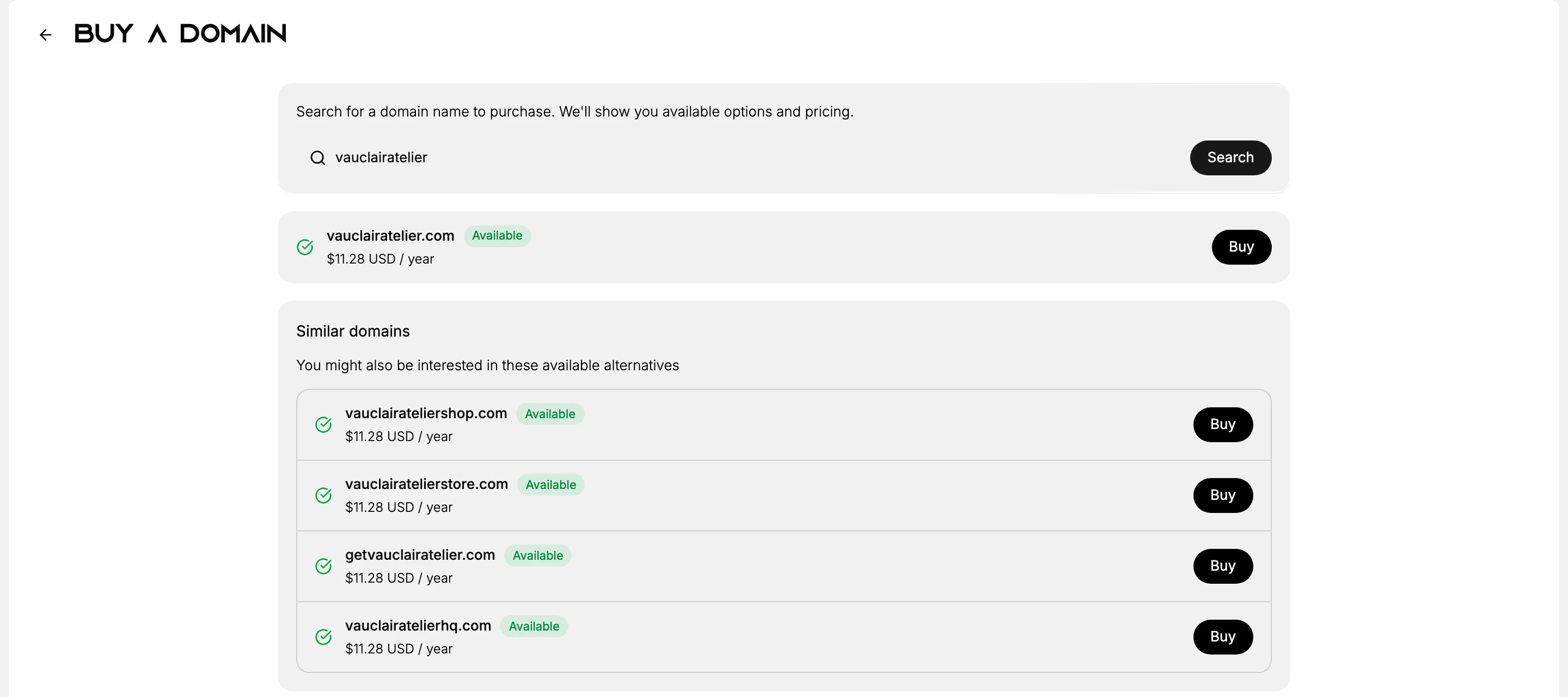
Open the search. On the Domains page, select Buy new domain. The Buy a domain screen opens, described as a place to search for a domain name to purchase, where you will be shown available options and pricing.
Search for the name you want. The field's placeholder shows mywebsite.com, but you do not need to type an ending. Enter the name on its own and Tanqory checks it against the endings it can sell you.
The search takes a few seconds and shows Searching... while it runs.
Read the results. They come back in three groups.
Group What it holds The exact name The name you searched, on .com, with Available and a price per year if it can be registered Similar domains Variations on your name that are free, described as available alternatives you might also be interested in, such as the same word with shop or store added Other endings The same name on .store, .shop, .online, .co, .io, .net and .org Every row that can be bought carries an Available badge, its price per year, and a Buy button.
Compare the prices before you pick. They are not close to each other. On one search, the same name came back at $11.28 a year on .com, $12.48 on .net, $7.98 on .org, $19.98 on .co, $34.98 on .io, and $0.98 on .store, .shop and .online.
Two things follow from that spread. A very cheap ending is usually cheap for the first year only, so check what it renews at rather than what it costs today. The price is also per year for as long as you keep the domain, which makes this a recurring bill rather than a one-off.
Select Buy on the row you want. That takes you to the checkout, where you confirm the registration period and enter the contact details a domain registration requires. Buy a Domain Checkout covers that screen.
Note: The ending you choose is not only a price. Customers type .com by reflex, so a store on .store or .shop will lose some traffic to whoever holds the .com version of the name. That is worth more than the few dollars a year the cheaper ending saves.
Verify the result
- Your searched name shows a result: either it is taken, or available options appear.
- Each available domain shows an Available badge, a price per year, and a Buy button.
- Names that cannot be registered are marked This domain is already taken.
Best practices
- Keep the name short and easy to say. A domain customers can spell and remember is easier to share.
- Consider the alternatives Tanqory suggests. If your first choice is taken, the Similar domains list gives close options that are available.
- Check the yearly price before you buy. The price shown is per year, so factor in renewing it each year.
- Match the ending to your store. A .com is widely recognized, but a retail ending such as .shop can suit some brands.
Common mistakes
- Buying a name that is hard to spell, which makes it harder for customers to reach you.
- Overlooking the price per year, since the domain renews annually.
- Assuming any result can be bought, when only those marked Available can.
Next steps
Related articles
Still stuck?
- Ask Tanqory AIAsk in your own words. It answers from these articles and links the ones it used.
- Ask in your adminThe assistant in your Tanqory admin answers and makes the change for you once you confirm.
- Contact TanqoryWrite to our privacy, security or legal teams, or talk to sales about a plan or a move.