Collection SEO Settings
A collection carries its own Search engine listing card holding three fields: Page title, Meta description and URL handle. It looks like the one on a product and is not quite the same, and the differences are the part worth knowing. This covers what belongs in each field, what the counters allow, and what the storefront does with a field you leave empty.
On this page
A collection is the page that groups related products together, the one a customer lands on when they follow a link for blazers rather than for a single blazer. It answers a broader question than any single product on it, which is why its own search settings are worth as much attention as a product's.
Its search settings sit in a card headed Search engine listing, on the collection's own page under Products. The card looks like the one on a product and holds one field fewer, with a different name on the first field and a different allowance behind it. Those differences are what this article is really about.
Opening the card
Open Products > Collections and select the collection you want. The card is low on the page, below the list of products the collection holds.
It opens closed, showing a preview of the search result: your store name, the address the collection lives at, and its title. The fields are behind the control at the bottom right of the card, labelled Edit search engine listing; once open it reads Hide search engine listing fields.
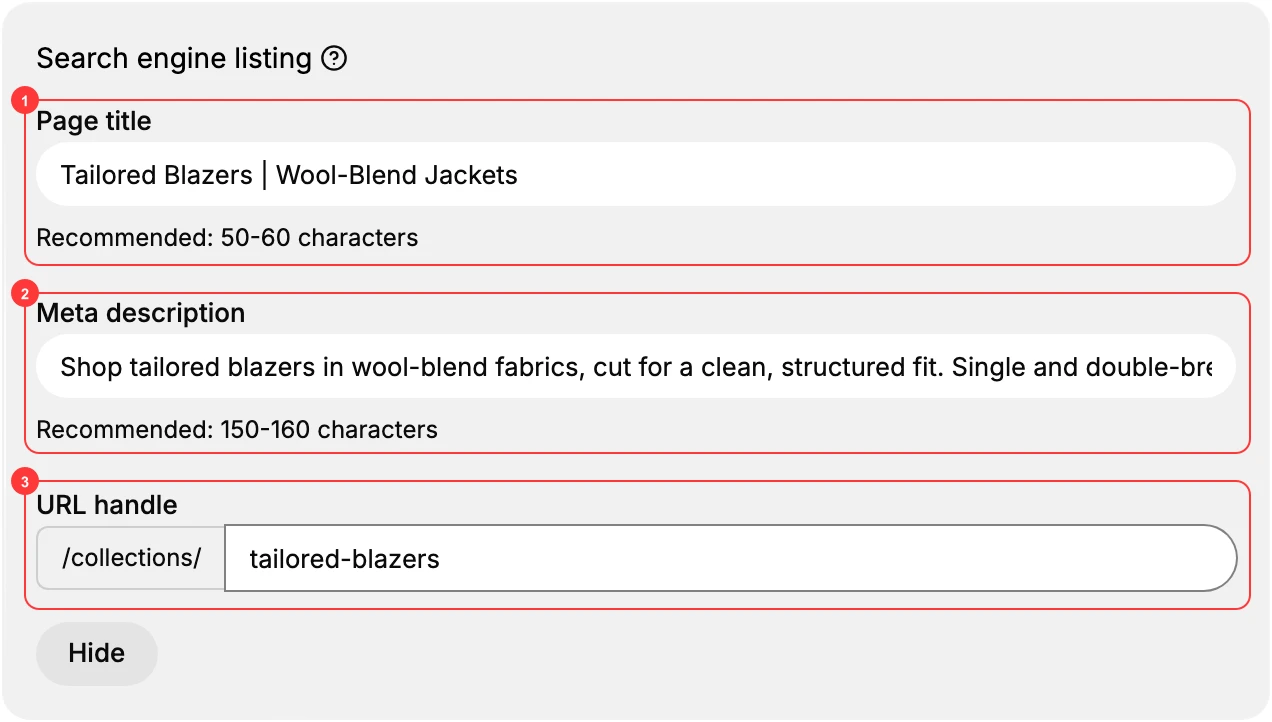
The three fields
- Page title. The line a person clicks in a search result, and the wording that appears in the browser tab. The counter beneath it reads as a number of characters used out of 70. Left empty, the collection's own name is used, which is why a collection called Sweets arrives in search as the single word Sweets.
- Meta description. The summary under the title, counted to 160. This is the field that decides whether the result is worth clicking, and it is the one with nothing to fall back on if you leave it empty.
- URL handle. The end of the collection's address, after the fixed /collections/. As you set it the card shows the whole address it will produce underneath the field, so there is no guessing what the result will be. Changing it changes the address, and a link shared earlier points at the address as it was then.
What is different from a product
Three things, and each one catches somebody.
The first field is called Page title here and Meta title on a product. They do the same job, and only the label differs.
The counter allows 70 characters rather than the 60 a product allows. A title written to the product limit fits here with room over; one written to this limit may be cut short if you paste it onto a product.
There is no Keywords field. A product has one and a collection does not, so a collection is described to a search engine by its title and description alone.
What the storefront does with them
The Page title becomes the page's own title, which is both what a search engine reads and what shows in the browser tab. A collection whose Page title is its name gets a one-word title, which is accurate and says nothing.
The Meta description is the part worth filling in, because an empty one leaves the page with no description at all rather than with a fallback. Where a product leans on its own name, a collection with an empty description gives a search engine nothing to quote and lets it choose whatever text from the page it likes.
If something goes wrong
- The search result shows one word. The Page title is empty, so the collection's name is standing in. Write a title that says what the collection holds.
- Your title reads fine here and is cut short on a product. The limits differ: 70 characters on a collection, 60 on a product.
- You cannot find the Keywords field. Collections do not have one. Only products do.
- You cannot see the fields, only a preview. The card is closed. Select the control at its bottom right.
Next steps
- Collection SEO is the other half of this subject: what to write in these fields, and the collection's own Description, which is a different field again.
- Product SEO Fields covers the same card on a product, where there is a fourth field.
- Page SEO Settings covers the third form these fields appear in.
Related articles
- SEO Overview maps which fields exist on which item type.
- URL Handles takes the handle on its own.
- Create a Collection covers building the collection itself.
Still stuck?
- Ask Tanqory AIAsk in your own words. It answers from these articles and links the ones it used.
- Ask in your adminThe assistant in your Tanqory admin answers and makes the change for you once you confirm.
- Contact TanqoryWrite to our privacy, security or legal teams, or talk to sales about a plan or a move.