Meta Title and Meta Description
The meta title and the meta description are the headline and the summary of a search result, which makes them the two fields with the most say in whether anyone clicks. This covers what each is for, how long the admin allows on each item type, and which of the two has a fallback when you leave it empty. The two behave differently there, and it catches people out.
On this page
A search result is two lines and an address. The first line is what someone clicks, the second is what persuades them to, and both come from fields you fill in yourself.
Tanqory calls them the meta title and the meta description. They sit together on every item that can be found in search, and the two are worth learning once because the three item types present them slightly differently.
The same pair, three different forms
| Item | Title field | Title limit | Description limit |
|---|---|---|---|
| Product | Meta title | 60 | 160 |
| Collection | Page title | 70 | 160 |
| Page | Meta title | none | none |
| Home page | Home page title | 70 | 320 |
Four things follow from that table.
A collection calls the first field Page title rather than Meta title. It is the same field doing the same job, so there is no separate meta title to go looking for.
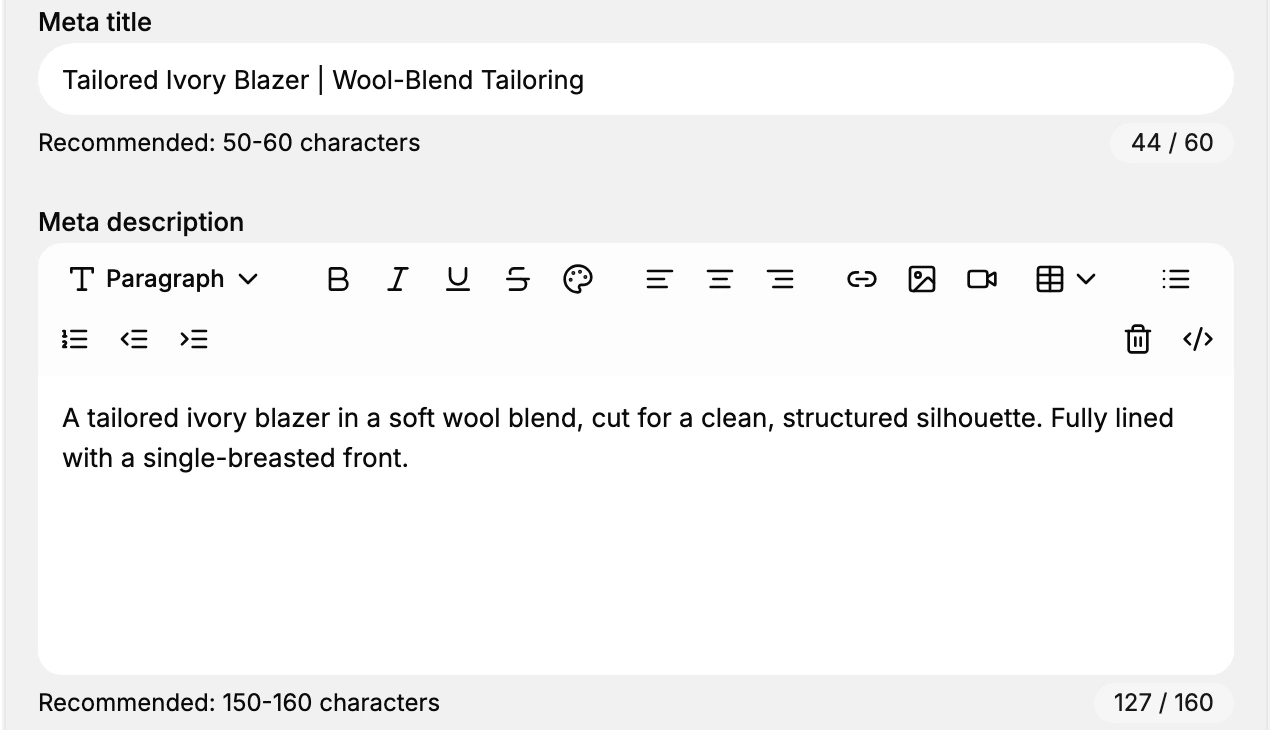
A collection allows 70 characters where a product allows 60. The two also word it differently: a product spells out Recommended: 50-60 characters under the field, while a collection counts the characters used and leaves you to draw the conclusion. Carrying one item type's rule to the other is the usual way a title ends up looking wrong on screen.
A page counts nothing at all. Neither field has a counter, so on a page the length is yours to judge.
The home page is the odd one out twice over. Its fields are not on any item form but on Online Store > Preferences, under Social sharing image and SEO, and its description is counted to 320, twice what a product or a collection allows. Storefront Preferences covers that page.
Writing the title
Name the thing, then the store, and stop. A title reading About could belong to any store on the internet; About Vauclair | Tailoring House says whose page it is and what they do.
Put the words that matter at the front. A line that is shortened loses its end, so a title opening with your store name and reaching the product afterwards loses the part that was doing the work.
Write it as something a person would read out. A row of repeated terms reads as a row of repeated terms.
Writing the description
Add what the title could not fit rather than saying it again. The title names the item; the description is where the fabric, the cut, the delivery promise or the reason to choose this one goes.
One or two sentences is the whole of it. The counter is generous where there is one at all, so the limit that matters is the reader's patience rather than the field's.
What happens if you leave them empty
This is the part where the two fields differ, and the difference is easy to miss.
An empty title falls back. The item's own name is used instead, which is why the empty field shows that name in grey. The result is accurate and says almost nothing: a collection called Sweets arrives in search as the single word Sweets.
An empty description does not fall back. Nothing stands in for it. A collection whose description is empty serves a page with no description on it at all, which leaves a search engine to quote whatever text it finds there, or nothing.
That asymmetry is the argument for writing the description first if you only have time for one.
If something goes wrong
- Your title is cut short in search. It ran past what the counter allows. Check which item you are on: 60 on a product, 70 on a collection.
- You cannot find Meta title on a collection. It is called Page title there.
- There is no counter on your page. Pages do not have one. Judge the length by eye, or write it alongside a product for comparison.
- The result shows your internal item name. The title field is empty and the name is standing in.
Next steps
- Product SEO Fields covers the pair on a product, where they sit beside a preview and a Keywords field.
- Collection SEO Settings covers the version with the longer title count.
- Page SEO Settings covers the version with no counters.
Related articles
- SEO Overview maps which fields exist on which item type.
- URL Handles covers the third part of a search result, the address.
Still stuck?
- Ask Tanqory AIAsk in your own words. It answers from these articles and links the ones it used.
- Ask in your adminThe assistant in your Tanqory admin answers and makes the change for you once you confirm.
- Contact TanqoryWrite to our privacy, security or legal teams, or talk to sales about a plan or a move.