Page SEO Settings
A page such as About or FAQ keeps its search settings in two places rather than one: a URL handle out in the open and a collapsed SEO settings section holding a Meta title and a Meta description. This covers where each sits, what fills itself in as you type, and what the two fields are for on a page nothing else describes.
On this page
Pages are the parts of a store that sell nothing: About, Contact, a size guide, an FAQ. Nothing else in the catalog describes them, so whatever you put in their search settings is all a search engine has to go on.
A page keeps those settings differently from a product or a collection. There is no single card holding everything. The address sits in the open, and the two text fields are folded away in a section of their own.
Finding a page
Pages are under Online Store > Pages in the sidebar, which is the part people hunt for, since their web address begins with /content/ and the menu entry does not. A store that has never made one opens on an empty list with an Add page button and nothing else. Building the page itself, its title, its content and whether it is published, is covered in Create and Edit Pages; this article picks up at the search settings on the same form.
What the form holds
Title is the page's own name, the heading a visitor reads.
Content is the body, in a rich text box that also accepts HTML.
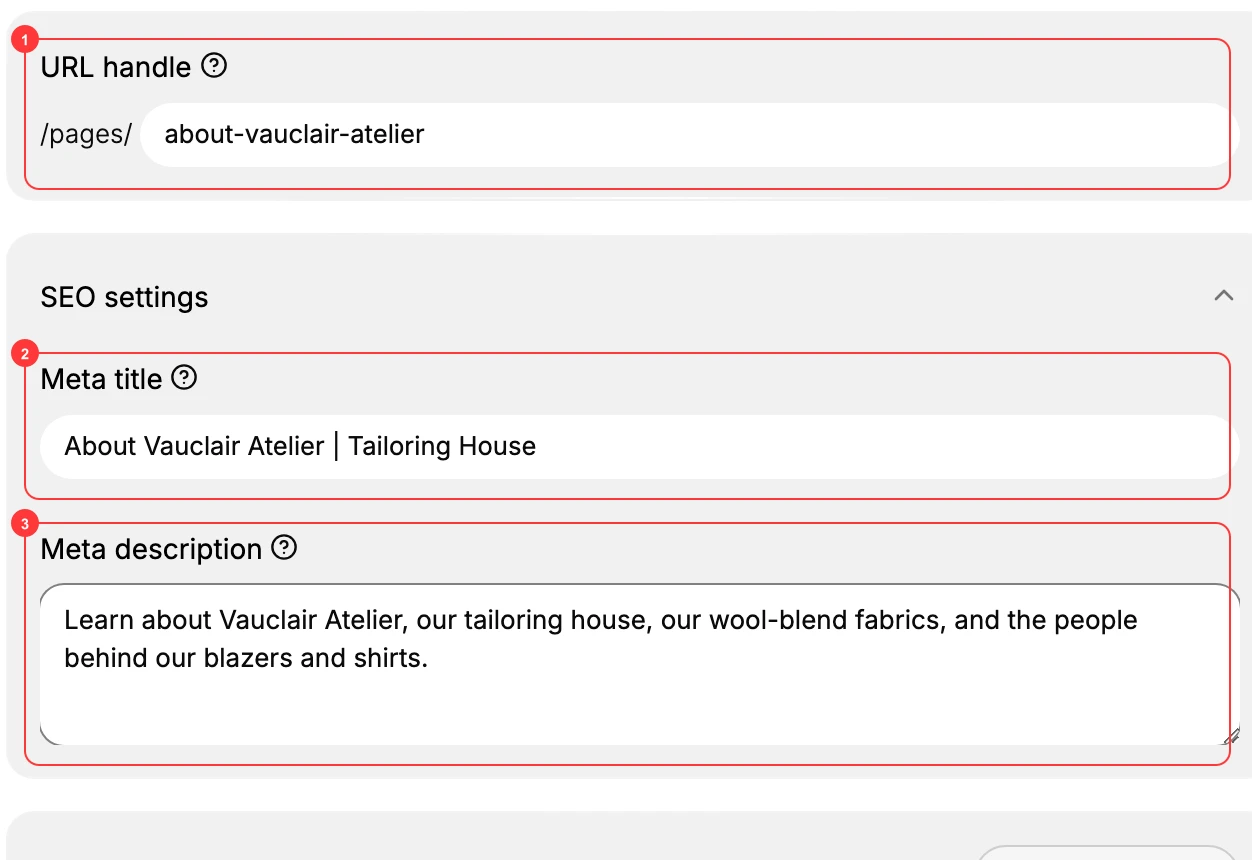
URL handle sits below the content, after a fixed /pages/. It fills itself in as you type the title, turned into lower case with hyphens for spaces, so a page called About Vauclair arrives with about-vauclair already in the field. You can overwrite it. What you cannot do is leave the page without one.
SEO settings is a section below the handle, and it is closed when the form opens. Until you select it, the two fields inside are not on the page at all, which is why a reader who has not opened it may conclude a page has no search settings.
Underneath sit Metafields, Visibility, which arrives set to Published, and Theme template.
The two fields inside SEO settings
Meta title is the line a person clicks in a search result, and the wording a browser tab carries. Its placeholder, Page title for search engines, is a hint about the job rather than a default. It is one line describing the page to someone who has not found it yet, where Title is the heading for someone already reading.
Write it for that stranger. A page titled About reads as About in a search result and could belong to anyone, where About Vauclair | Tailoring House says whose page it is and what the business does. Name the page, then the store, and stop there.
Meta description is the summary under that line, and its placeholder reads Brief description for search engines. On a page there is nothing else for a search engine to summarise, no product text and no collection, so this is the one place the pitch can be written.
Answer the question the page exists to answer, in a sentence or two. For an About page that is who you are and where you work; for a contact page, how to reach you and when. A description that repeats the title tells a reader nothing they did not already have.
Neither field counts characters the way a product or a collection does, and a page has no search preview and no Keywords field. What you type is what is stored.
Saving
Editing anything raises a bar across the foot of the screen reading You have unsaved changes, with Discard and Save in it. Nothing is kept until Save is selected, and the bar is the only prompt you get.
If something goes wrong
- You cannot find the search fields. The SEO settings section is collapsed. Select it and the two fields appear.
- You cannot find Pages in the menu. It is under Online Store, not under Content, even though the address it opens says otherwise.
- The handle is not what you wanted. It was filled in from the title. Type over it before saving rather than after, since changing it later changes the page's address.
- Your changes are not there when you come back. The unsaved changes bar was still showing when you left. Save is what commits them.
Next steps
- Product SEO Fields covers the fuller version of these settings on a product.
- URL Handles takes the handle on its own, across all three item types.
Related articles
- SEO Overview maps which search fields exist on which item type.
- Collection SEO Settings covers the middle case, which has counters a page does not.
- Content Overview covers the rest of what a store publishes alongside its pages.
Still stuck?
- Ask Tanqory AIAsk in your own words. It answers from these articles and links the ones it used.
- Ask in your adminThe assistant in your Tanqory admin answers and makes the change for you once you confirm.
- Contact TanqoryWrite to our privacy, security or legal teams, or talk to sales about a plan or a move.