SEO Overview
Search settings in Tanqory sit inside each item rather than on a page of their own, so a product, a collection and a page each carry their own title, description and web address. This maps what each of the three actually offers, since they differ more than they look, and points to the article that takes each field in full. It also covers what a search result shows for an item nobody has set.
On this page
Search engine optimization, or SEO, is the work of making your store readable to a search engine, so that the result someone sees before they ever reach you says what you would have said. In Tanqory that work is done item by item. A product, a collection and a page each carry their own title, description and web address, and each is set inside the item you are editing.
Almost nothing below is a switch you set once for the whole store. Every field described here belongs to the item it sits in, so an item nobody opens keeps whatever it was given when it was created. The one exception is the home page, which has settings of its own and is covered at the end. What follows is the map: what each item type offers, where it is, and which article carries the detail.
What a search result is made of
Three things decide how an item reads in search, and every item type has all three.
The title is the line a person clicks. Tanqory calls it Meta title on a product and on a page, and Page title on a collection.
The description is the few lines under that title, and it is what decides whether someone clicks or scrolls on to the next result. It is called Meta description on all three item types.
The URL handle is the end of the web address, the part after /products/ or /collections/. It is what a customer reads in any link you send them, and changing it changes the address, so a link you shared last month no longer matches the one the item has now. It takes letters, numbers and hyphens, and the helper under the field says your own language is fine, so it does not have to be English.
Every one of them is optional. Leave the title empty and the item's own name is used instead, which is why an unset product often shows a bare name in search where a sentence would have done more work.
The same idea, three different forms
The section looks similar on all three, so the differences are easy to miss until one of them costs you.
| Product | Collection | Page | |
|---|---|---|---|
| Where it lives | Search engine listing section | Search engine listing section | SEO settings section |
| The title field | Meta title, counted to 60 | Page title, counted to 70 | Meta title, not counted |
| The description | Meta description, counted to 160 | Meta description, counted to 160 | Meta description, not counted |
| The URL handle | Inside the section, after /products/ | Inside the section, after /collections/ | A separate field above, after /pages/ |
| Keywords | Yes | No | No |
Two of those are worth reading twice. A collection title is counted to 70 while a product title is counted to 60, so a rule of thumb carried from one to the other will look wrong on screen. The Keywords field is the other one: it exists on products only, so there is nothing to fill in on a collection even if you go looking for it.
Opening the section on a product
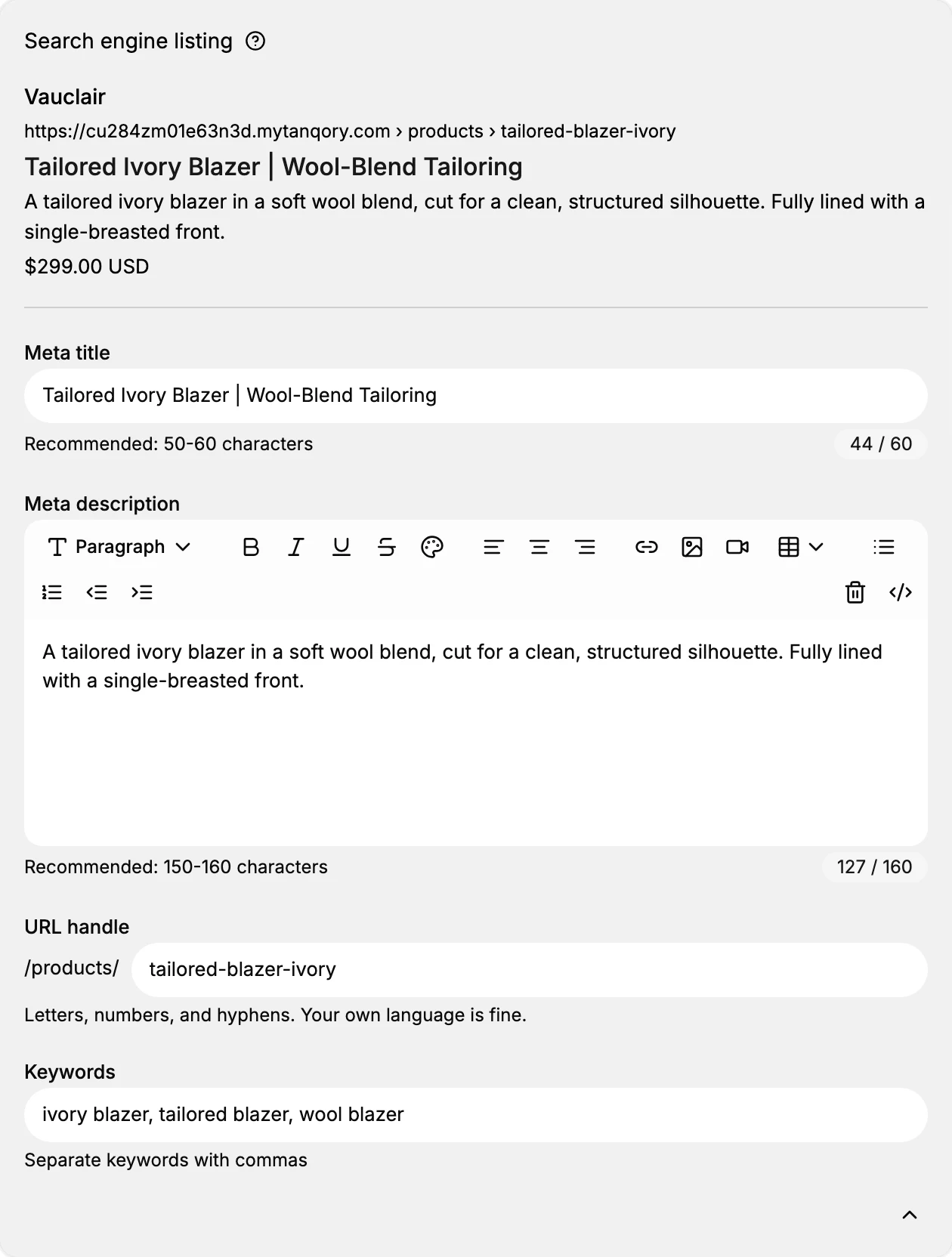
On a product the section opens closed, showing only a preview of the search result: your store name, the address with the handle in it, the product title and its price. That preview is the point of reading it, because it shows the result as it stands rather than as you imagine it.
The fields are behind the small control at the top right of the card, whose label reads Edit search engine listing. Select it and the four fields appear below the preview, each with the guidance the admin gives: the recommended 50 to 60 characters on the title, the recommended 150 to 160 on the description, and a live count beside each. Selecting the same control again, now labelled Hide edit fields, folds them away.
The description is a small rich text box rather than a plain one, so it carries formatting controls. A search result is plain text, so the words are what matter here and the formatting is not worth your time.
The home page is set somewhere else
The home page is not an item in a list, so it has no form of its own to carry search settings. They live instead on Online Store > Preferences, in a section headed Social sharing image and SEO, together with the image used when someone shares your store.
The two fields there are called Home page title, counted to 70, and Meta description, counted to 320. That description allowance is the largest anywhere in the store, and it is the field a search engine has to describe your store as a whole. Storefront Preferences covers that page section by section.
Where the three item types live
Products and collections are both under Products in the sidebar, collections on their own page beneath the catalog. Pages sit somewhere less obvious, under Online Store > Pages, and a store that has never added one has nothing in that list. A storefront can still show an About or Contact page that came with the theme, which is a different thing from a page you own and can set search settings on.
Where to start
Set the items that already get traffic before the ones that do not. That usually means your best-selling products and the one or two collections a customer actually lands on, rather than working alphabetically through the catalog.
Then write for the person reading the result. A title that says what the thing is beats one padded with repeated words, and a description that answers why to click beats one that lists them.
Next steps
- Meta Title and Meta Description takes both fields in full, including what gets cut off and where.
- URL Handles covers what a handle is allowed to contain and what changing one does to links already out in the world.
- Product SEO Fields walks the fullest of the three, Keywords and preview included.
- Collection SEO Settings covers the collection form and its longer title count.
- Page SEO Settings explains where a page keeps its settings and why its handle sits apart from them.
If something goes wrong
- The search result shows the item's name rather than your wording. The title field is empty, so the fallback is doing the work. Fill it in.
- A rule about title length looks wrong. Check which item you are on. Products count to 60, collections to 70.
- You cannot find the Keywords field on a collection. It is not there. Only products have one.
- You cannot find where a page keeps its search settings. They are in the SEO settings section of the page, while its URL handle is a field of its own higher up the same form.
Related articles
- Sitemap Overview covers what a search engine reads to find those items in the first place.
Still stuck?
- Ask Tanqory AIAsk in your own words. It answers from these articles and links the ones it used.
- Ask in your adminThe assistant in your Tanqory admin answers and makes the change for you once you confirm.
- Contact TanqoryWrite to our privacy, security or legal teams, or talk to sales about a plan or a move.