Product SEO Fields
A product carries the fullest set of search fields in the store: Meta title, Meta description, URL handle and Keywords, set against a preview of the result. This covers what each one does, what the admin recommends for its length, and what happens to a field you skip. It also follows the four out to the live storefront, where each of them ends up in the page a search engine reads.
On this page
A product is the item type with the most search settings in Tanqory, and all of them sit in one card on the product's own page, headed Search engine listing. Four fields, a preview of the result, and no other screen involved.
What you write there does not stay in the admin. Each of the four ends up in the storefront page a search engine reads, which is worth knowing before you decide a field is not worth filling in. The last section of this article follows them out there.
Opening the card
The card is near the foot of the product form, under the variants and the metafields. It opens closed, showing a preview and nothing else: your store name, the product's address, the title, the description and the price.
The fields are behind one control at the bottom right of the card, a chevron labelled Edit search engine listing. Select it and the four fields appear under the preview. The same control then reads Hide edit fields, which folds them away again and is the only way back to the short view.
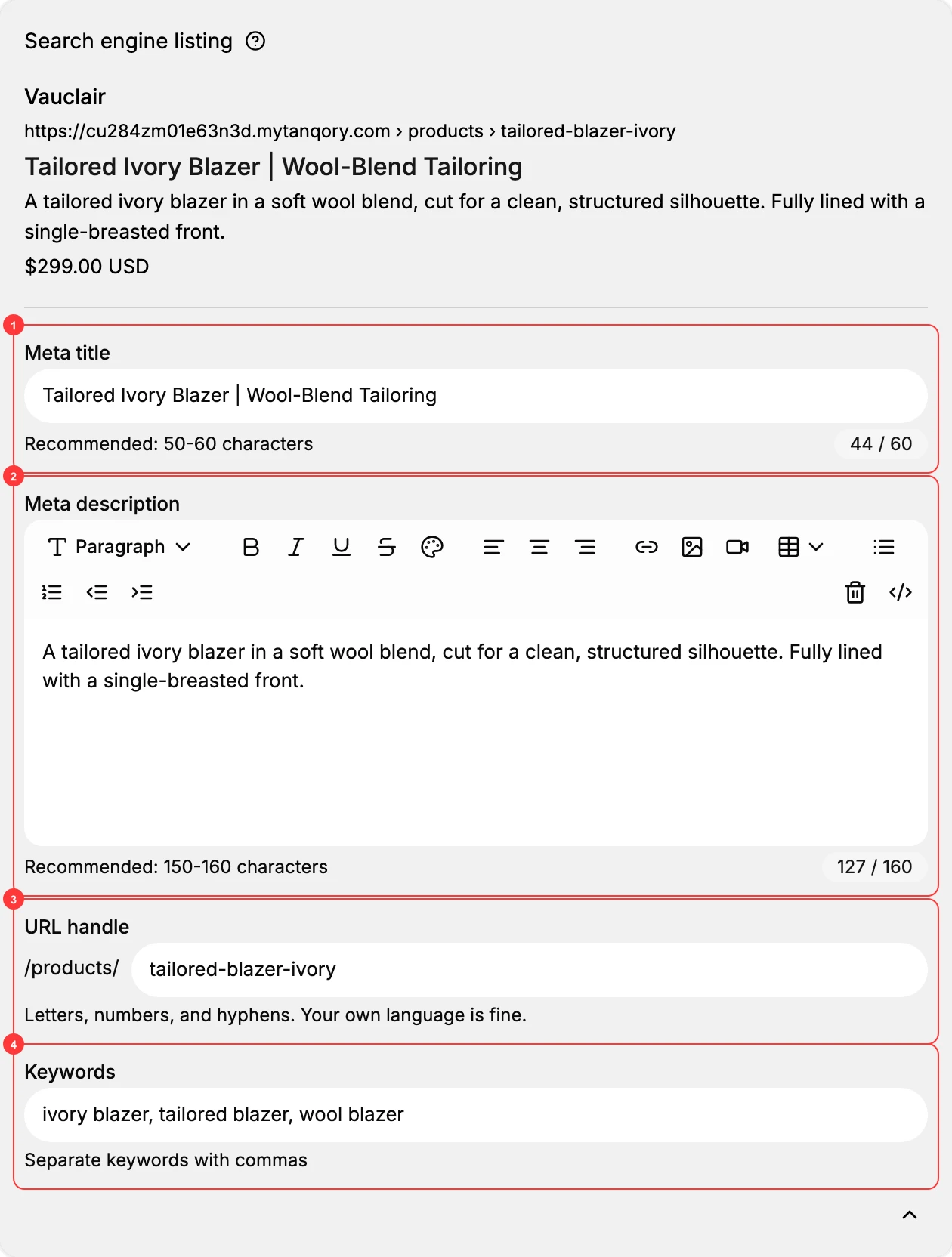
The four fields
- Meta title. The line a person clicks in a search result. The helper under it reads Recommended: 50-60 characters and a counter sits beside the field, counting to 60. Name the product the way a customer would say it rather than the way your catalog files it: Tailored Ivory Blazer | Wool-Blend Tailoring does more work than the internal name Tailored Blazer - Ivory. Leave it empty and the product's own title stands in, which is why the field shows that title as its placeholder.
- Meta description. The couple of lines under the title, and the part that decides whether someone clicks or reads on down the page. Its helper reads Recommended: 150-160 characters with a counter to 160. On a product where nothing has been written yet, the box shows the words Enter meta title, which names the field above it rather than this one; the counter to 160 and the helper beneath are what tell you where you are. Write what the product is and one reason to choose it, the way the fabric, the cut and the lining are named in the example. The box carries formatting controls, but a search result is plain text, so they change nothing that matters here.
- URL handle. The end of the product's web address, after the fixed /products/. The helper reads Letters, numbers, and hyphens. Your own language is fine., so it does not have to be English. Keep it short and settle it early: changing it changes the product's address, and a link you have already put in a newsletter or a post points at the address as it was then.
- Keywords. A comma-separated list of the terms the product should be found by, with the helper Separate keywords with commas. Three or four that a customer would actually type is the useful shape, as in ivory blazer, tailored blazer, wool blazer.
Nothing here is required. A product with all four empty still sells and still appears in search. What it loses is any say in how it reads there.
What the four become on your storefront
This is the part that is easy to take on trust and worth seeing once. Open the product on your storefront and the four fields are all there in the page itself, which is what a search engine reads before it decides how to list you.
| What you set | Where it ends up |
|---|---|
| Meta title | The page title, which is also the wording in the browser tab |
| Meta description | The page description a search engine quotes under the title |
| URL handle | The address of the page itself |
| Keywords | The page's keywords list |
The title and the description are reused a second time, for the preview card that appears when someone pastes your product link into a chat or a social post. That is a good reason to keep the description readable as a sentence rather than packing it with terms: it is shown to people as often as it is read by machines.
If something goes wrong
- The search result shows your internal product name. Meta title is empty, so the product's own title is standing in. Fill it in and the result follows your wording instead.
- The end of your title is missing in search. It is over the recommended length. The counter beside the field is the check, and 50 to 60 characters is what the admin advises.
- You cannot see the fields, only a preview. The card is closed. Select the chevron at its bottom right, labelled Edit search engine listing.
- An old link no longer lands on the product. The URL handle has been changed since that link was shared, so the address in it is not the product's address any more.
Next steps
- Collection SEO Settings covers the same card on a collection, which is close but not identical.
- Page SEO Settings covers where a page keeps the same fields.
- URL Handles takes the handle on its own, across all three item types.
Related articles
- SEO Overview maps which fields exist on which item type.
- Meta Title and Meta Description is the reference for the two text fields.
- Product Detail Page covers the rest of the form this card sits in.
Still stuck?
- Ask Tanqory AIAsk in your own words. It answers from these articles and links the ones it used.
- Ask in your adminThe assistant in your Tanqory admin answers and makes the change for you once you confirm.
- Contact TanqoryWrite to our privacy, security or legal teams, or talk to sales about a plan or a move.