Collection SEO
A collection page is what a category search lands on, and two separate pieces of text decide how it reads: the description on the page itself and the search listing behind it. This covers what to write in each, how to choose the term the collection should be found for, and which of the two the admin keeps where.
On this page
A collection groups related products under one address, which makes its page the natural landing spot for a category search such as linen suits rather than for one suit. A category search reaches more shoppers than a product search, so the words on a collection page are worth deciding rather than leaving to chance.
Two separate pieces of text do that work, and the admin keeps them in different places. This article is about what to write in each. The card that holds the search fields is covered field by field in Collection SEO Settings.
Before you begin
- Your role includes Manage collections, one of the permissions in the Products group.
- You have decided the term the collection should be found for, since every piece of text below is written around it.
The two kinds of text, and where each one lives
Open Products > Collections and select the collection you are writing for. Everything below is in that one editor.
The Description sits in its first card, directly under Collection name. It is a rich text box, and it is the collection's own writing rather than anything addressed to a search engine.
The search listing sits much lower, in a card headed Search engine listing, and holds Page title, Meta description and URL handle.
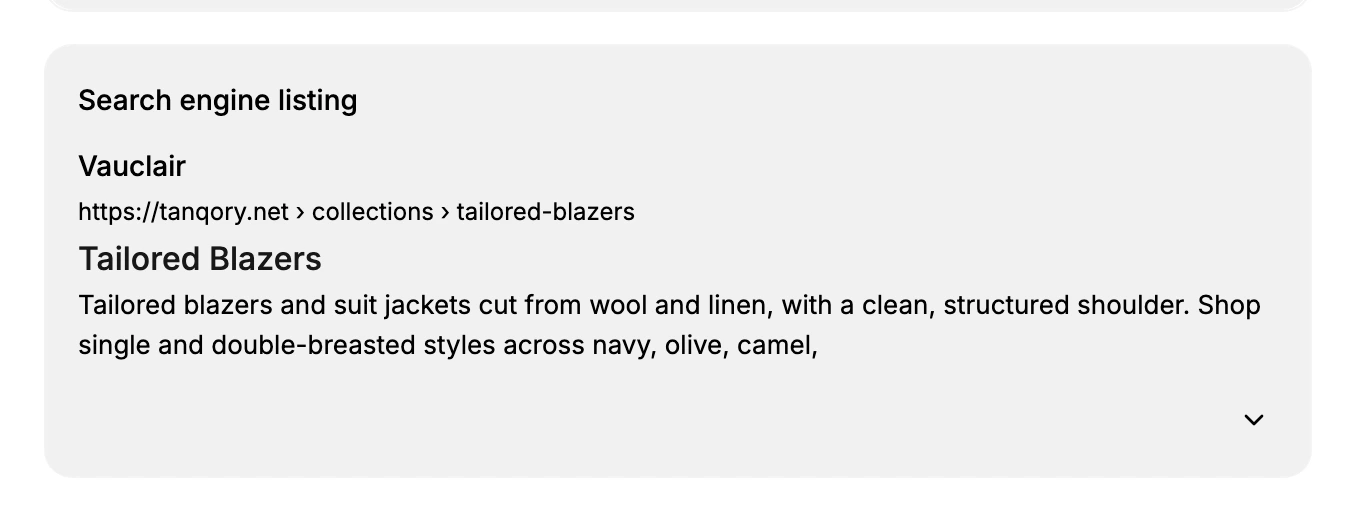
The pair that causes confusion is Description and Meta description. They are different fields, in different cards, doing different jobs: one is the text belonging to the collection, the other is the summary written for a search result. Filling one does not fill the other.
Write the description
Write a short introduction to the category, roughly 100 to 200 words, that tells a shopper what the group offers and who it suits. Use the term you chose naturally, in a sentence you would have written anyway.
Keep it unique to each collection. Two collections sharing a paragraph give a reader the same answer twice and give a search engine no way to tell them apart.
Write the page title
The Page title is the line a shopper clicks. Lead with the category, then add the brand, so the first words are the ones being searched for.
| Pattern | Example |
|---|---|
| Category, then brand | Women's Linen Suits - Vauclair |
| Category with use case | Linen Suits for Summer Weddings - Vauclair |
| Category with benefit | Men's Cotton Shirts, Everyday Essentials - Vauclair |
A collection counts this field to 70 characters, which is ten more than a product allows, so a pattern that fits here is not guaranteed to fit on a product.
Write the meta description
This is the summary under the title in a search result, counted to 160 characters. Say what the category holds and give one reason to open it rather than the result above it. It is the field with nothing to fall back on: left empty, the page carries no description at all.
Set the handle, then save
The URL handle is the address the collection loads at, after /collections/. Keep it short and readable, and settle it before the page is shared. Changing it changes the address, so a link sent out earlier points at the address as it was then.
Save the collection when the four are written. The values apply to the collection's page and to how it reads in search from that point on.
If something goes wrong
- Your search result shows one word. The Page title is empty, so the collection's name is standing in.
- Two collections compete for the same search. They share a title or a description. Give each the wording of its own category.
- A title that fits a collection is cut short on a product. The limits differ: 70 characters here, 60 there.
- You cannot open the search listing fields. The card is closed. Its control sits at the bottom right and reads Edit search engine listing.
Next steps
- Collection SEO Settings takes the search listing card field by field, with its counters and what each field becomes on the storefront.
- Create a Collection covers building the collection in the first place.
Related articles
- Smart Collections
- Manual Collections
- SEO Overview maps which search fields exist on which item type.
Still stuck?
- Ask Tanqory AIAsk in your own words. It answers from these articles and links the ones it used.
- Ask in your adminThe assistant in your Tanqory admin answers and makes the change for you once you confirm.
- Contact TanqoryWrite to our privacy, security or legal teams, or talk to sales about a plan or a move.