Attribution in Detail
Beyond sessions and sales, the attribution report carries deeper metrics like ROAS, CPA, CTR, and AOV, and tools to focus the view. This explains what those metrics mean and how to use filters and columns to read a channel's performance in detail.
On this page
The attribution report gives you a headline read on your channels through sessions, orders, and sales, but it also carries a set of deeper metrics for judging how efficiently each channel spends and converts. These are the numbers you turn to once you are past the question of which channels bring traffic and into the question of which ones are worth the money. This article explains those detailed metrics and the tools the report gives you to focus on them, so you can read a channel's real performance rather than just its volume.
Before you begin
- Read Attribution first, since this article assumes you know what the report measures.
- Connect a supported marketing app if you want Cost, ROAS, CPA, and CTR to hold values.
- Open Marketing > Attribution in the admin sidebar, then use Manage columns if the detailed metrics are not shown.
The detailed metrics
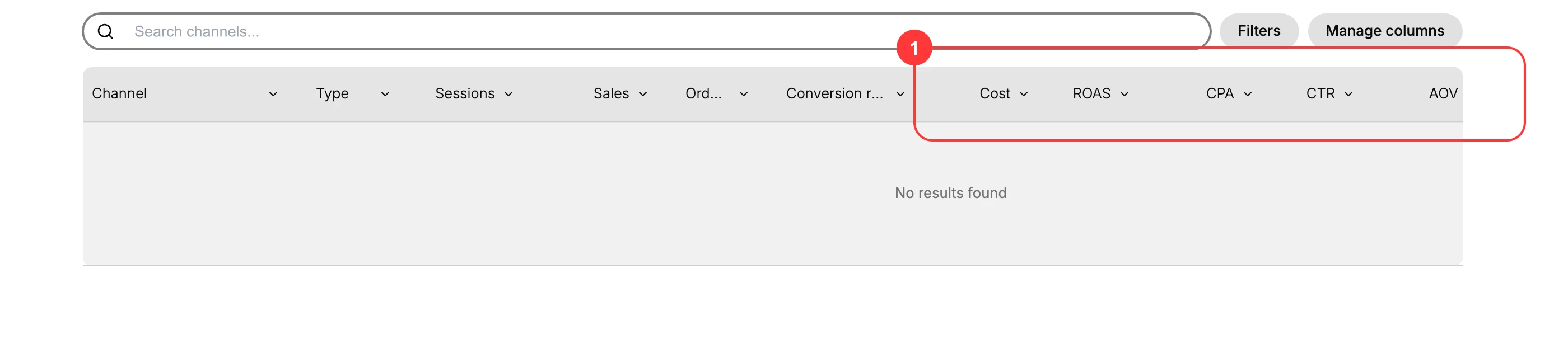
Alongside sessions, orders, and sales, the report offers columns that connect spend to results. Cost and the return metrics appear for channels whose traffic comes through a supported marketing app, as the report notes.
- Cost is what you spent on the channel.
- ROAS, return on ad spend, is the sales produced for each unit of spend, so a higher number means the spend worked harder.
- CPA, cost per acquisition, is what it cost to win one order, so a lower number is better.
- CTR, click-through rate, is how often people who saw an ad clicked it.
- AOV, average order value, is the typical order size from that channel.
- Orders from new customers and Orders from returning customers split the channel's orders by whether the buyer had ordered before.
That last pair is the one most often overlooked, and it changes how you read the others. A channel with a high CPA that brings mostly new customers may still be worth its cost, because you are paying once for a customer who can buy again. The same CPA on a channel that only brings back existing customers is buying you an order you might have received anyway. Read cost against new customers before deciding a channel is too expensive.
Focus the report on what matters
The report gives you three ways to narrow it down so the detail you need is not lost in the whole table.
- Search channels finds a single channel quickly.
- Filters narrows the table to the rows that meet a condition.
- Manage columns lets you show the metrics you care about and hide the rest, so a comparison stays readable.
Setting the date range and keeping the attribution model in mind matters here too, since every one of these metrics is calculated for the period shown and credited under the model. See The Attribution Model.
Reading a channel in detail
Put the metrics together rather than reading one in isolation. A channel with high sales but poor ROAS is expensive for what it returns, while one with modest sales but strong ROAS and a low CPA may deserve more budget. Conversion rate and AOV add the quality picture: a channel with fewer but higher-value, better-converting orders can be worth more than one with more but weaker ones.
Tip: Judge a channel on efficiency, not just volume. A channel can bring the most sales and still be your worst performer once cost is counted, so read ROAS and CPA next to sales before you decide where the next unit of budget goes.
Verify the result
- The report shows the cost and return columns for channels that come through a supported marketing app.
- Filters and Manage columns let you narrow the table to the channel and metrics you want.
- You can compare channels on efficiency, using ROAS and CPA alongside sales.
Best practices
- Read ROAS and CPA next to sales, so a high-volume channel is not mistaken for an efficient one.
- Compare channels over the same date range and model, so the numbers are calculated on the same basis.
- Use Manage columns to keep only the metrics relevant to the decision you are making.
- Connect a supported marketing app to see cost and return metrics, since they do not appear without one.
Next steps
Related articles
Still stuck?
- Ask Tanqory AIAsk in your own words. It answers from these articles and links the ones it used.
- Ask in your adminThe assistant in your Tanqory admin answers and makes the change for you once you confirm.
- Contact TanqoryWrite to our privacy, security or legal teams, or talk to sales about a plan or a move.