The Attribution Model
The attribution report decides which channel gets credit for a sale using an attribution model, which opens as Last non-direct click and can be switched to four others. This explains what each model means, how they divide credit across a customer's visits, and how the one you choose shapes the numbers you read.
On this page
A customer often visits your store several times before they buy, arriving from different places along the way, such as a social post, a search, and finally a direct visit. When they purchase, the attribution report has to decide which of those visits gets the credit for the sale, and the rule it uses to decide is called the attribution model. The report opens on Last non-direct click and lets you switch to four other models, each of which divides the credit differently. Knowing which model is selected is what lets you read the channel numbers correctly rather than assuming they mean something they do not, and knowing what the others do lets you ask better questions of the same data.
Before you begin
- Know that the model is a setting you can change, not a fixed property of the report.
- Expect the channel figures to move when you switch models, since only the rule for assigning credit has changed.
- Open Marketing > Attribution in the admin sidebar, where the model control sits at the top of the report.
Where the model is shown
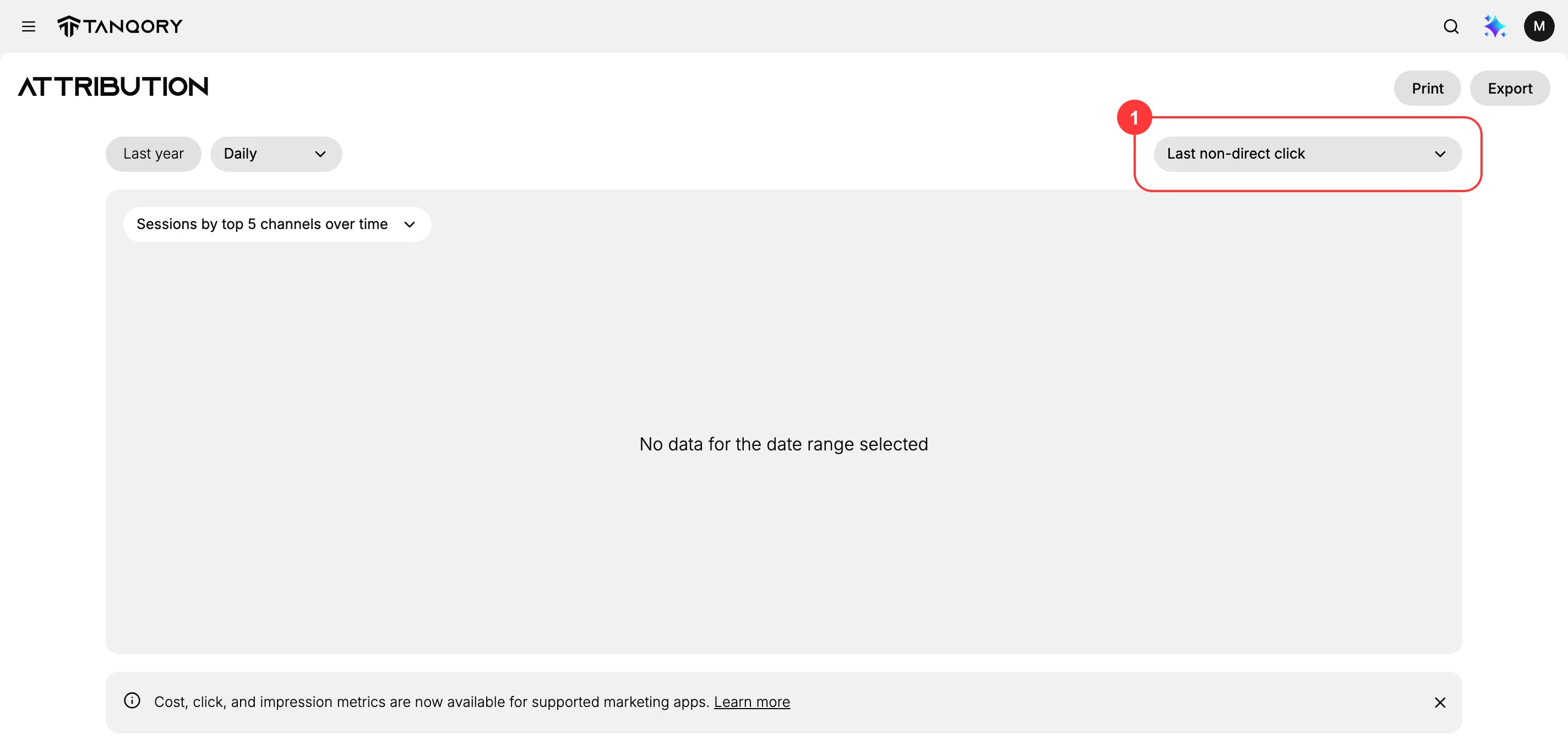
At the top of the Marketing Attribution report, alongside the date range and the time granularity, is the attribution model control. It names the model the report is currently using, which is Last non-direct click when you first open the report. The control is also where you change it: selecting it opens a list of the models available, each with a one-line description of how it hands out credit.
What Last non-direct click means
Under the Last non-direct click model, the sale is credited to the last channel the customer arrived from before buying, but direct visits are skipped when assigning that credit.
- The last channel before the purchase gets the credit, not the first one that introduced the customer.
- If the customer's final visit was direct, meaning they typed your address or used a bookmark, that visit is not credited. Instead, the credit goes to the last channel before the direct visit.
The reason direct visits are set aside is that a direct visit rarely explains why a customer came back. Skipping it passes the credit to the marketing that actually brought them, so your channels get a fairer share of the result.
The models you can choose from
Last non-direct click is where the report starts, but it is one of five models. They differ in which visit in a customer's journey receives the credit, so switching between them changes how the same sales are divided across your channels.
| Model | How it assigns credit | When it is the useful view |
|---|---|---|
| Last non-direct click | Credits the last non-direct click before the conversion | The default, and the fairest general read, because it ignores a final direct visit that explains nothing |
| Last click | Credits the last click before the conversion | When you want the closing touch exactly as it happened, including direct |
| First click | Credits the first click in the customer journey | When you want to see which channels discover new customers |
| Any click | Credits all clicks in the customer journey | When you want to see every channel a customer touched, rather than picking one winner |
| Linear | Distributes credit equally across all touchpoints | When you want a balanced view that neither favors discovery nor closing |
Two of these work differently from the rest, and it is worth reading their totals carefully. Any click and Linear both spread credit across several channels rather than picking one, which the first three models do. That means a channel's figure under either of them answers a different question from the same channel's figure under Last click, and the two are not directly comparable even over the same date range.
When you switch to Any click or Linear, check the Total row against what you know your sales to be before drawing conclusions from individual channels. Reading the total first tells you how that model is counting, and a comparison between models is only meaningful once you know that.
The same sale, read five ways
A worked example makes the difference concrete. Say one customer buys a $200 jacket, and before buying they visit your store four times.
- They see an Instagram post and click through.
- Two days later they search your brand name and click a search result.
- That evening they click a link in your newsletter.
- The next morning they type your address straight into the browser and buy.
One sale, four visits, four different sources. Here is who each model gives the $200 to.
| Model | Credited to | Why |
|---|---|---|
| Last non-direct click | The last visit was direct, so it is skipped and the newsletter before it takes the credit | |
| Last click | Direct | The last click is taken exactly as it happened, direct included |
| First click | Social | Instagram is what introduced the customer |
| Any click | Social, Search, Email and Direct | Every source that took part is credited |
| Linear | $50 each to Social, Search, Email and Direct | The credit is split evenly across the four visits |
Nothing about the customer changed between those rows. The same visits and the same $200 are being divided by five different rules, which is why a channel can look like your best performer under one model and unremarkable under another.
Reading it this way also shows what each model is blind to. Last click alone would tell you the newsletter did nothing, when it was the last real nudge. First click alone would tell you email did nothing, when it was what brought them back the evening before they bought.
Choosing a model
There is no single correct model, because each answers a different question. A practical approach is to keep Last non-direct click as your normal view, then switch deliberately when you have a specific question.
- Switch to First click when you suspect a channel is bringing new people in but never gets credit because another channel closes the sale.
- Switch to Linear or Any click when you want to see the full set of channels involved in your sales rather than only the one credited at the end.
- Compare a channel across two models rather than reading one in isolation. A channel that looks strong under First click and weak under Last click is doing discovery work, and one with the reverse pattern is doing closing work.
Changing the model changes only how the report presents your existing data. It does not change your store, your orders, or anything the customer experienced, so you can move between models freely while you are investigating.
Why it matters when you read the report
While the report is on Last non-direct click, credit goes to the last non-direct channel, so the report answers what closed the sale rather than what first introduced the customer. A channel that is good at reminding people to come back and buy will look strong here, while a channel that is good at first discovery but hands off to others before the purchase may look weaker than its real contribution. Keep that in mind so you do not cut a channel that is doing important early work only because it is not the one credited at the end.
The wider point holds whichever model you pick. Every model is a rule for dividing credit that cannot be divided perfectly, since a real customer is influenced by several channels and only one sale is recorded. Read the report as evidence about your channels rather than as a verdict on them, and check which model produced a number before you act on it.
Verify the result
- The attribution model control at the top of the report names the model in use, and reads Last non-direct click when the report is first opened.
- Selecting the control lists the models available, each with a description of how it assigns credit.
- Switching the model changes the channel figures in the table while the date range stays the same, which is the model taking effect rather than your data changing.
Best practices
- Note which model is selected before reading any channel figure, since the same channel can look strong or weak depending on it.
- Read channel credit under Last non-direct click as the closing touch, since that is what this model measures.
- Do not judge a discovery channel only by its attributed sales, because it often hands off before the purchase.
- Compare channels over the same date range and model, so the comparison is fair.
- Pair attribution with your own knowledge of the customer journey, rather than treating the credited channel as the whole story.
Next steps
Related articles
Still stuck?
- Ask Tanqory AIAsk in your own words. It answers from these articles and links the ones it used.
- Ask in your adminThe assistant in your Tanqory admin answers and makes the change for you once you confirm.
- Contact TanqoryWrite to our privacy, security or legal teams, or talk to sales about a plan or a move.