Customer Contact Method
Customer contact method is the first section on the Checkout settings page, and it holds three decisions rather than one. A shopper identifies themselves with either a phone number or an email. They are then offered a way to track the order, or not, and made to sign in, or not. Whatever you settle on becomes the only handle you have on that buyer afterwards, which is the part worth thinking about.
On this page
Customer contact method is the first section on the Checkout settings page. It holds three decisions, and none of them is difficult once you know what each one costs you. They are what a shopper must type to identify themselves, whether they are offered a way to track the order afterwards, and whether they are allowed to buy without an account at all.
What you settle here is the address or phone number the order confirmation goes to. It is also, in most cases, the only way you have of reaching that buyer again.
Before you begin
- If you plan to require a sign-in, customer accounts are set up. Requiring an account turns away anyone who does not have one, so the account experience has to exist first. It is in Settings, under Customer accounts.
- Open Settings > Checkout. This is the first section on the page.
What the section holds
The contact method is a pair of radio buttons (1). Below them sit two checkboxes (2), each with its own consequence.
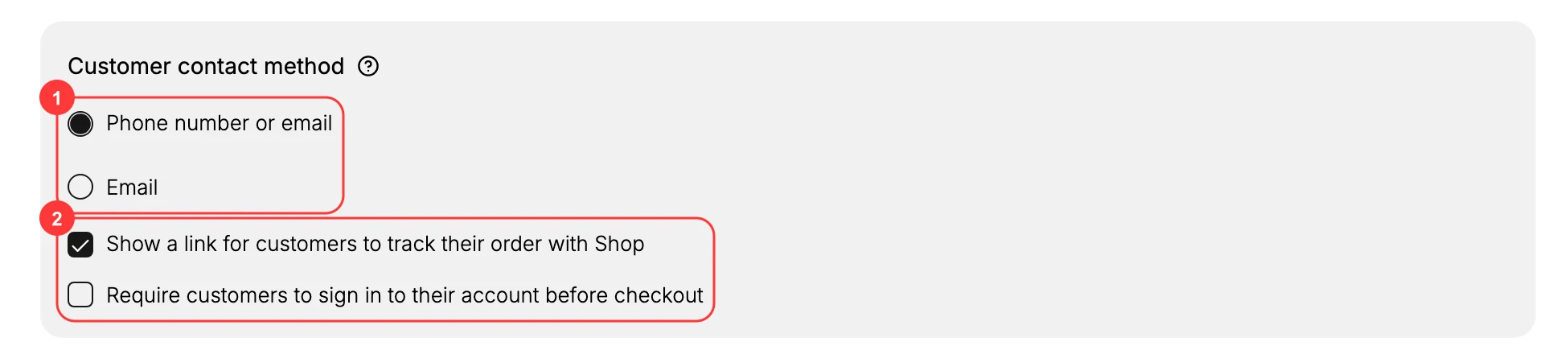
Nothing here saves on its own. Changing any of the three raises a You have unsaved changes bar at the top of the page, and the change reaches your live checkout when you click Save in that bar.
Decision one: what a shopper types to identify themselves
Phone number or email lets the shopper use whichever they have to hand. It is the lower-friction choice, and on a phone it is often the faster one. The cost is that you do not control which you get. A buyer who enters a phone number leaves you no email address, and anything that runs on email has nothing to send to: the order confirmation, the shipping update, an abandoned checkout reminder, and any marketing they later agree to.
Email requires an email address from everyone. It asks slightly more of the shopper, and in exchange every order you take arrives with an address you can write to. If your order notifications and follow-up go out by email, this is the setting that guarantees they can be delivered.
The question to ask is not which is friendlier but which one you can work with afterwards. A store that ships physical goods and emails tracking numbers is better served by Email, even at the cost of a few seconds at checkout. A store that confirms by phone, or sells in a market where email is uncommon, is better served by the looser setting.
Whichever you require, what the shopper types lands under Contact information on their customer record. That entry is what every later message to that buyer is sent to, which is why the choice outlives the order it was made on.
Decision two: the order-tracking link
Show a link for customers to track their order adds a way for the shopper to follow the order after they have bought, rather than writing to you to ask where it is.
Turning it on costs you nothing at checkout. It does not add a field or a step; it changes what a buyer is given after paying. Turning it off does not make the information private, it only makes the buyer ask you for it, which is the single most common message most stores receive.
Decision three: whether an account is required
Require customers to sign in to their account before checkout removes guest checkout. Every buyer signs in first, so every order is attached to an existing customer record rather than to a one-off guest.
This is the setting on the page with the largest downside. A first-time buyer who is asked to create an account before they can pay is being asked to do unpaid work at the exact moment they had decided to buy, and a share of them will not. Leave it clear unless accounts are genuinely part of how you sell, such as a wholesale store, a members-only catalog, or a store where every buyer is already registered with you.
Verify the result
- The contact method you chose shows a filled radio and the other is clear.
- Each checkbox reflects the choice you made.
- The unsaved-changes bar has gone, and the settings are still there when you reopen the page.
Best practices
- Phone number or email suits most stores. It lets a shopper use whichever identifier they have.
- Choose Email if you follow up by email, so no order arrives without an address you can write to.
- Keep guest checkout on unless accounts are essential to how you sell.
- Leave the order-tracking link on. It answers the most common question you would otherwise be asked.
Common mistakes
- Requiring sign-in for every shopper, which turns away first-time buyers who do not want an account.
- Choosing Email when most of your customers reach you by phone, so follow-up lands somewhere they never read.
- Changing the contact method after launch without checking that order notifications still reach customers.
Next steps
Related articles
Still stuck?
- Ask Tanqory AIAsk in your own words. It answers from these articles and links the ones it used.
- Ask in your adminThe assistant in your Tanqory admin answers and makes the change for you once you confirm.
- Contact TanqoryWrite to our privacy, security or legal teams, or talk to sales about a plan or a move.