Marketing Consent at Checkout
Marketing consent is not something you set for a customer. It is something a shopper grants, channel by channel, so agreeing to email is not agreeing to texts. What counts as consent and what does not, where each permission lands on the customer record, and what happens when someone changes their mind are all taken here.
On this page
Marketing consent is the permission a shopper gives you to send them marketing. It is not something you set for a customer; it is something they grant, and at checkout the Marketing opt-in section is where that happens.
The distinction matters more than it sounds. Someone who bought from you has given you their email address so you can confirm the order. That is not permission to send them a campaign next month. The sign-up in this section is what turns the one into the other, and it is one of the few things on the Checkout settings page that changes what you may do after the order rather than how checkout looks.
Before you begin
- Your privacy policy explains how you will use what you collect. Consent given against no stated purpose is worth little, and Store Policies is where that policy is written.
- Open Settings > Checkout and scroll to Marketing opt-in.
How consent is captured
The section holds an Email row (1) and an SMS row (2). Each is a dropdown that decides where its sign-up is shown, with a fixed preview of the label the shopper will read beside it.
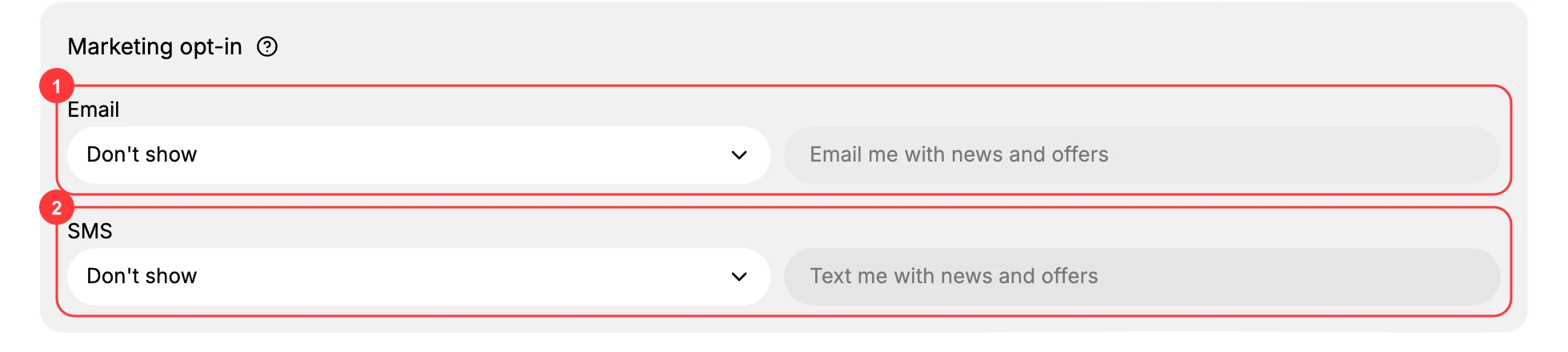
Wherever you place a sign-up, it appears as something the shopper can accept. Accepting is the consent. Nothing else counts: not the fact that they bought, not that they typed an address into the contact field, not that they created an account.
The two channels are independent. A shopper can accept email and ignore SMS, and you hold permission for exactly one of them.
| Channel | Label the shopper reads | Where it can appear |
|---|---|---|
| Email me with news and offers | Checkout, sign-in page, or both | |
| SMS | Text me with news and offers | Checkout |
Each channel name links to the article that covers setting it up in full.
Setting a channel to Don't show removes its sign-up, and from then on no shopper can consent to that channel at checkout, whatever else they do.
Why the label is worth reading
The preview beside each dropdown is not editable, and it is the whole of what the shopper agreed to. Email me with news and offers is a promise about news and offers. It is not consent to a daily send, to a partner's mailing, or to anything you would not describe with those words.
That is a constraint on what you send later, not on what you configure now, which is why it belongs here rather than in the setup articles.
Where consent is recorded
Consent given at checkout is recorded per channel on the customer record. Its Marketing block lists each channel on its own line, reading Email subscribed or Email not subscribed, and the same for SMS, so you can see exactly what one shopper agreed to.
The Customers list shows the same thing across everyone: an Email subscription column per customer, and an Email subscribers total at the top of the page. That total is the practical size of the list you may market to. Everyone else on the page is a customer you may contact about their order and nothing else.
When a shopper changes their mind
Consent is not permanent, and someone who opted in at checkout can withdraw it later. The customer record is where that is reflected, so decide before you turn a sign-up on who watches for withdrawals and acts on them. Email Marketing Consent and SMS Marketing Consent cover the customer record side.
Verify the result
- Each row shows the placement you chose.
- The previews read Email me with news and offers and Text me with news and offers.
- The placements are still there when you reopen the page.
Best practices
- Treat consent as opt-in only. A shopper who never accepted the sign-up has not consented.
- Keep what you send inside the label. News and offers is what they agreed to.
- Put the sign-up where it will be seen. Checkout is the moment a shopper is most likely to accept.
- Ask for each channel separately, since permission for one is not permission for the other.
Common mistakes
- Marketing to a shopper who left the sign-up untouched.
- Treating an order confirmation address as a marketing address.
- Turning both channels off while expecting the marketing list to grow.
- Collecting consent with no privacy policy to say what you will do with it.
Next steps
Related articles
Still stuck?
- Ask Tanqory AIAsk in your own words. It answers from these articles and links the ones it used.
- Ask in your adminThe assistant in your Tanqory admin answers and makes the change for you once you confirm.
- Contact TanqoryWrite to our privacy, security or legal teams, or talk to sales about a plan or a move.