Email Marketing Opt-in at Checkout
The email opt-in is the sign-up that lets a shopper join your list while they are buying, and there is exactly one thing to decide about it: where it appears. Four placements are available, each putting the sign-up at a different moment in the flow. A shopper who accepts becomes an email subscriber, which is the only list you are permitted to market to, so the placement deserves more thought than it first looks worth.
On this page
The email marketing opt-in is the sign-up that lets a shopper join your email list while they are buying. It lives in the Marketing opt-in section of the Checkout settings page, on the Email row, and there is exactly one thing to decide about it: where it appears.
That single choice is worth more thought than it looks, because it is the difference between a marketing list that grows with every order and one that never grows at all.
Before you begin
- You have a way to send email marketing. This setting collects permission, it does not send anything, so with nothing set up to send, the consent you gather sits unused.
- Your privacy policy is published, since it is what tells a subscriber how their address will be used. Store Policies covers writing one.
- Open Settings > Checkout and scroll to Marketing opt-in.
The one control
The Email row (1) holds a dropdown and, beside it, a preview of the line the shopper will read. The SMS row (2) below is a separate sign-up for texts, set the same way and covered in SMS Marketing at Checkout.
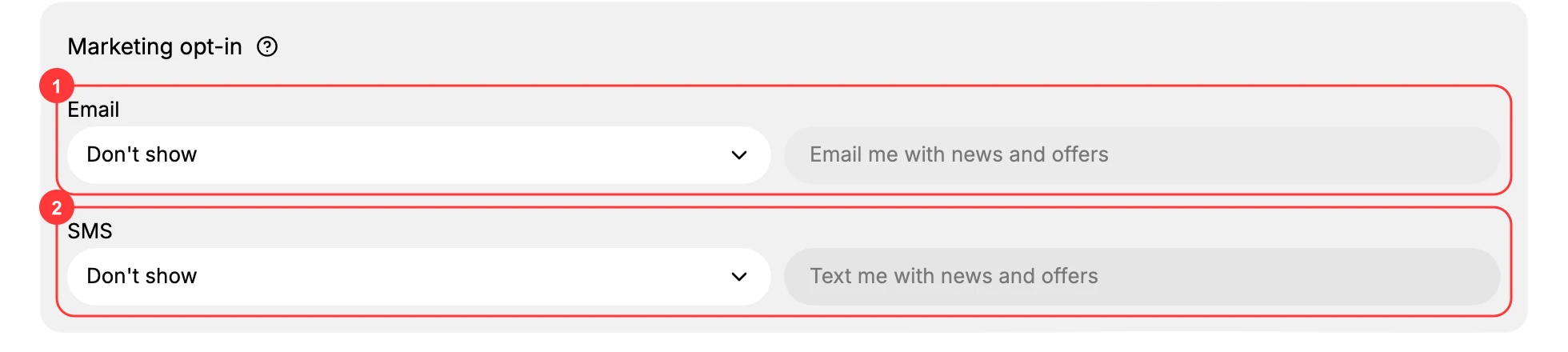
The preview reads Email me with news and offers and cannot be edited. What you are choosing is where that line is put in front of a shopper, not what it says. Open the dropdown, pick a placement, and click Save on the You have unsaved changes bar that appears at the top of the page. Until you save, checkout is unchanged.
Choosing a placement
The four options differ in who is offered the sign-up and at what moment.
| Option | Who is offered the sign-up | What it is good for |
|---|---|---|
| Don't show | Nobody. | A store with no email marketing, or one that gathers subscribers somewhere else entirely. |
| Checkout only | Every buyer, at the moment they are paying. | The straightforward choice. It reaches everyone who actually buys. |
| Sign-in page only | Anyone signing in, whether or not they go on to buy. | Stores where most shoppers have accounts and sign in before browsing. |
| Checkout and sign-in page | Both of the above. | The widest reach, since a shopper who passed it once meets it again. |
Checkout only is the setting most stores want. A buyer at the payment step has already decided they like you, which is the point at which someone is most likely to agree to hear from you again.
Checkout and sign-in page reaches more people, since a shopper who passed the sign-up on one screen meets it on the other. Whether that reads as thorough or as repetitive depends on how much the list matters to you.
Don't show is a real choice, not a failure to configure. If you have no email marketing, collecting permission you cannot act on gives a shopper an expectation you will not meet.
What a shopper actually does
Wherever it appears, the sign-up is something they accept, not something already accepted for them. Someone who reads the line and moves on has not subscribed, and never will be counted as one. That is the whole mechanism: the list only ever holds people who agreed to be on it.
How your subscriber list grows
A shopper who accepts the sign-up is recorded as a subscriber, and you can see it in two places.
- On their customer record, the Marketing block reads Email subscribed.
- On the Customers list, the Email subscription column reads Subscribed for them, and they are counted in the Email subscribers total at the top of the page.
That count is the practical size of your email marketing list, so it is the number that moves when this setting is on and shoppers accept. Leaving the placement on Don't show leaves it flat, however many orders you take.
Verify the result
- The Email dropdown shows the placement you chose.
- The preview beside it reads Email me with news and offers.
- The unsaved-changes bar has gone, and the placement is still there when you reopen the page.
Best practices
- Put it where shoppers will see it. Checkout and sign-in page reaches the most people.
- Turn it on only when you have something to send. A subscriber who hears nothing for six months is worth less than one you never asked.
- Do not assume consent. Only a shopper who accepted the sign-up is a subscriber, and some markets require exactly that.
Common mistakes
- Leaving it on Don't show while expecting the email list to grow.
- Turning it on with no email marketing set up, so nobody who signs up ever hears from you.
- Reading the SMS row as the email one. They are separate settings and each has to be placed on its own.
Next steps
Related articles
Still stuck?
- Ask Tanqory AIAsk in your own words. It answers from these articles and links the ones it used.
- Ask in your adminThe assistant in your Tanqory admin answers and makes the change for you once you confirm.
- Contact TanqoryWrite to our privacy, security or legal teams, or talk to sales about a plan or a move.