Customer Information Fields
Customer information is five dropdowns, one per field. Each decides whether checkout asks a shopper for that detail and whether they can move past it without giving it. The fields become the address on the order, so anything you choose not to ask for is a gap nobody can fill at fulfillment. Against that, every field you require is one more thing between a shopper and paying you, and the five are weighed up here one at a time.
On this page
Customer information is the second section on the Checkout settings page. It is five dropdowns, one per field, and each decides whether checkout asks a shopper for that detail and whether they can move on without it.
There is no order to work through them in. Take each field on its own and ask the same question: if this is missing from an order, can I still fulfill it? That answer decides the setting, and it is a different answer for a store shipping furniture than for one selling downloads.
Before you begin
- You know what you ship and where. The address detail worth collecting depends on what leaves your warehouse and which countries it goes to.
- You know whether you sell to businesses, since the company name and VAT fields exist for those buyers.
- Open Settings > Checkout. This is the second section on the page.
The five fields
Each row is a field name with a dropdown beside it: Full name (1), Company name (2), Company VAT number (3), Address line 2 (4), and Shipping address phone number (5).
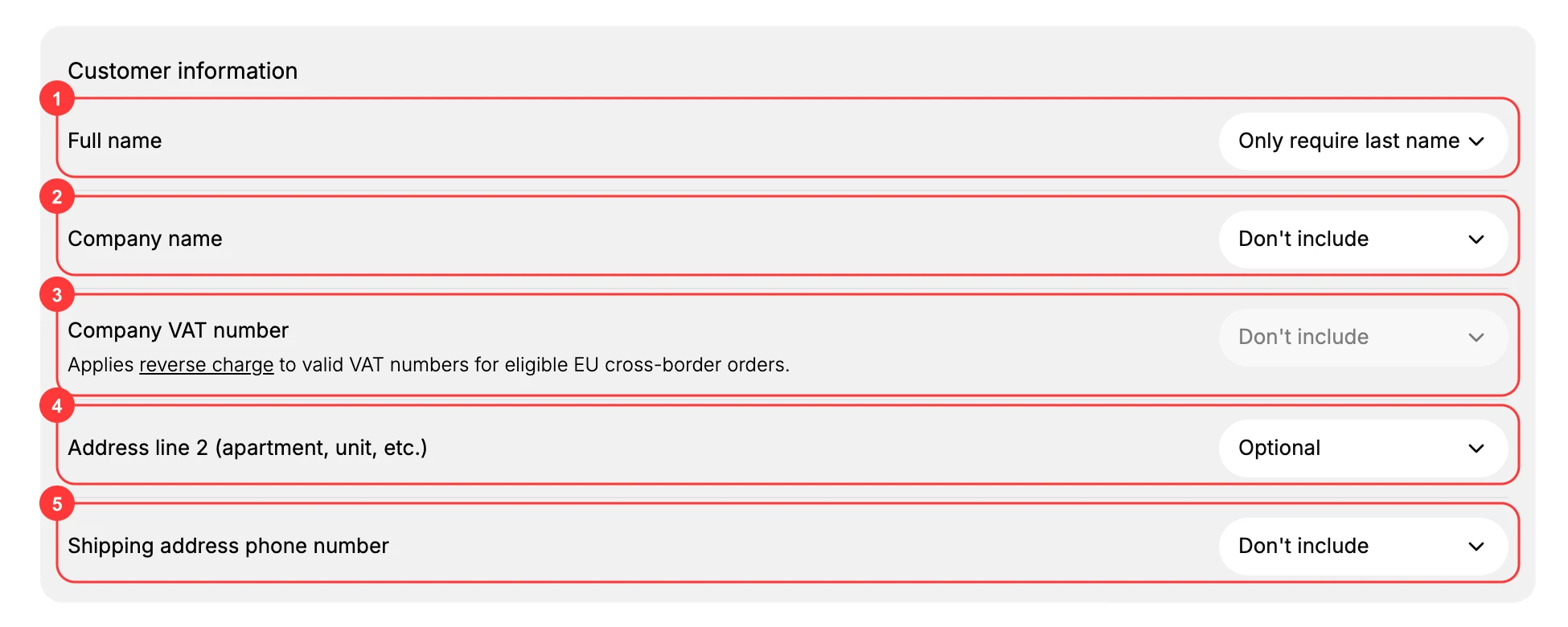
Four of the five offer the same three settings, and they mean the same thing wherever they appear.
| Setting | What a shopper sees | When to choose it |
|---|---|---|
| Don't include | No field at all. | You will never use the detail, and you accept that no order will ever carry it. |
| Optional | The field, which they may leave empty. | Some buyers need it and the rest should not be delayed. This is the safe default for most fields. |
| Required | The field, and they cannot pay until it is filled. | You genuinely cannot fulfill the order without it. |
Changing any dropdown raises a You have unsaved changes bar at the top of the page. The new form reaches your live checkout when you click Save there.
Full name
The one field with its own pair of settings rather than the three above. Require first and last name asks for both. Only require last name asks for less, which is faster for the shopper.
A full name is worth having if you print shipping labels, address customers by name in email, or need to match a buyer against a payment record. If none of that applies, the shorter setting is one less thing to type.
Company name
A free-text business name, for a buyer ordering on behalf of a company rather than themselves.
Set it to Optional if you sell to both businesses and individuals, which is the common case: business buyers who need it on their paperwork can fill it in, and everyone else passes over an empty field. Required only makes sense in a store that sells to businesses exclusively, and Don't include only in one that never does.
Company VAT number
A VAT number. The note under the field reads, applies reverse charge to valid VAT numbers for eligible EU cross-border orders.
On this store the dropdown is greyed out and cannot be set, so there is nothing to change here. If yours is editable, treat it the same way as Company name: optional where you have both kinds of buyer, since a business buyer in another EU country needs it and a domestic consumer has nothing to enter.
Address line 2
The apartment, unit, floor, or suite line of the address. On screen the field is labeled Address line 2 (apartment, unit, etc.).
This is the field most worth thinking about, because getting it wrong is invisible until a delivery fails. Set to Don't include, a shopper in an apartment building has no way to tell you which door is theirs, and the parcel reaches the building with the rest of the address correct. Optional is the right setting for almost every store: it costs a house-address buyer nothing and saves the apartment buyer's delivery.
Shipping address phone number
A phone number attached to the delivery, for the courier rather than for you.
Whether it earns its place depends entirely on your carrier. Couriers that call ahead, and services delivering to buildings with no reception, use it. Where yours does not, requiring it takes an extra field from every buyer and gives nobody anything, so Optional or Don't include is the honest setting.
Why a missing field cannot be fixed later
These fields are the address you ship to. Whatever checkout collects is what appears on the order and under Default address on the customer record, and what your courier is given.
A detail you did not ask for is not recoverable afterwards. If checkout never offered an apartment line, no order has one, and the only way to get it is to contact the buyer and ask. That is why the cost of these settings is paid at fulfillment rather than at checkout.
Verify the result
- Each dropdown shows the option you chose.
- Company VAT number stays greyed out.
- The unsaved-changes bar has gone, and the settings are still there when you reopen the page.
Best practices
- Keep required fields to a minimum. Each one is a step between a shopper and paying.
- Set Company name to Optional if you sell to both businesses and individuals.
- Leave Address line 2 as Optional. Apartment buyers need it and nobody else is delayed by it.
- Require a delivery phone only when your courier uses it.
Common mistakes
- Requiring a company name in a store that mostly sells to individuals.
- Setting Address line 2 to Don't include, which leaves apartment shoppers no way to enter their unit and their parcel goes to the wrong door.
- Requiring a delivery phone by default, which costs orders where it was never needed.
Next steps
Related articles
Still stuck?
- Ask Tanqory AIAsk in your own words. It answers from these articles and links the ones it used.
- Ask in your adminThe assistant in your Tanqory admin answers and makes the change for you once you confirm.
- Contact TanqoryWrite to our privacy, security or legal teams, or talk to sales about a plan or a move.