Email Marketing Consent (Per Customer)
Email marketing consent records that a customer agreed to receive your marketing emails. It is what the Accepts Marketing tab and any segment built on that consent read, and you can set it on the Add Customer form, in Edit marketing status on an existing record, or for a batch of customers in Bulk Edit.
On this page
Email marketing consent is the record that a customer agreed to receive marketing emails from your store. It is one of three channel consents Tanqory keeps on a customer, alongside SMS and WhatsApp, and Customer Marketing Subscription covers the three together on the record.
Email is the one worth understanding on its own, for two reasons. It is the only channel with a column shown on the Customers list by default, and the only one with a tab of its own, so it is the state you will see most often. It is also the one most easily set by mistake. The Add Customer form marks the email address as required, so every customer you create is already reachable by email, and nothing but your own care stops the consent box being ticked for someone who never asked. The create form is where the admin spells that rule out in writing.
Consent is not the email address
Holding a customer's email address and being allowed to market to it are two different things, and the record keeps them apart. The address sits under Contact information; the permission sits under Marketing. Changing one does not touch the other, and removing the consent does not remove the address.
The setting is worded as marketing consent throughout, on the form, in the window, and in the Email Marketing segment field. The label is the scope of the setting: it is about marketing, and it makes no claim either way about the other mail your store sends.
Where email consent gets recorded
There are three places, and they suit different moments.
| Where | Use it when |
|---|---|
| The Marketing section of the Add Customer form | You are creating the customer and already have their agreement |
| Edit then Edit marketing settings on the record | The customer has asked to subscribe or unsubscribe |
| Bulk Edit from the Customers list | You are recording consent you already hold for a batch of customers |
Before you begin
- You have the Manage customer subscriptions permission, since the admin records marketing consent as a subscription. Creating a customer with consent already ticked also needs Create customers.
- The customer has agreed, and you can say how and when. The record stores the state, not its origin, so anything you might need to show later has to be kept somewhere else.
- Open Customers in the admin sidebar, then either open the customer or select Add Customer to create one.
Steps
1. Set it when you create the customer
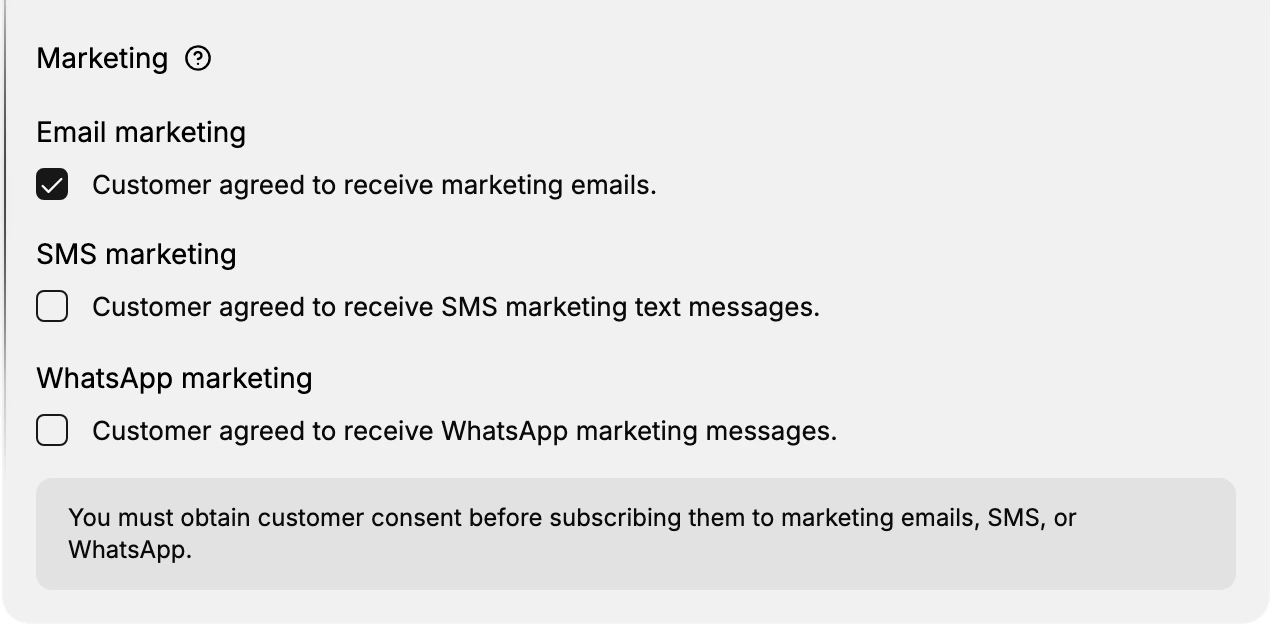
The Add Customer form carries its own Marketing section with a checkbox for each channel. The email one is worded as the customer's agreement rather than as a setting: Customer agreed to receive marketing emails. Tick it only if that sentence is true.
Below the three checkboxes, the form states the rule: "You must obtain customer consent before subscribing them to marketing emails, SMS, or WhatsApp." This is the clearest statement of the principle anywhere in the admin. It applies equally to the other two places you can set consent, whether or not they repeat it on screen.
2. Change it on an existing customer
Open the customer, and on the Customer card open Edit then Edit marketing settings. The Edit marketing status window shows the Email row with a badge reading Subscribed or Not subscribed, the email address the channel will use, and a switch. Turn the switch on to subscribe, off to unsubscribe, then select Save.
Read the address in that row before you save. It is the address the marketing will actually go to, and on a customer record that has been edited or merged it is not always the one you had in mind.
3. Record it for several customers at once
Tick the customers on the Customers list and select Bulk Edit. In the spreadsheet that opens, add Accepts email marketing from Columns and set it per row. This is the route for consent you already hold and are entering after the fact, such as opt-ins collected at an event.
It is not a way to subscribe a list. The consent has to exist before you record it, and doing this to a group you have not heard from is the same breach as ticking the box on the form would be.
If something goes wrong
- The customer still receives marketing after unsubscribing. Reopen Edit marketing status and check the badge reads Not subscribed, since closing that window without Save leaves the old state in place.
- The state is wrong after a merge. Open the record you merged in, read its email consent there, and set it on the record you kept.
- You cannot find the column in Bulk Edit. Add Accepts email marketing from the Columns control at the top.
- Edit marketing settings is missing from the Edit menu. Your role may not include Manage customer subscriptions. Ask an owner or admin.
Next steps
Related articles
Still stuck?
- Ask Tanqory AIAsk in your own words. It answers from these articles and links the ones it used.
- Ask in your adminThe assistant in your Tanqory admin answers and makes the change for you once you confirm.
- Contact TanqoryWrite to our privacy, security or legal teams, or talk to sales about a plan or a move.