Customer Privacy
Customer privacy is spread across three places in the admin: a settings page for what applies to everybody, the actions on one customer for what one person has asked, and a queue of requests waiting to be approved or rejected. This article maps the settings page row by row and says which of the three you want.
On this page
Customer privacy in Tanqory is not one screen, and knowing which of the three you want saves most of the hunting.
| Where | What it is for |
|---|---|
| Settings > Customer privacy | What applies to everybody: your policy, checkout consent, where data lives |
| More actions on a customer | What one person has asked you to do about their own data |
| Customers > Data requests | The queue of requests waiting for somebody to approve or reject them |
This article is the settings page. Handle Customer Privacy Requests takes the other two, the actions and the queue, from start to finish.
The settings page, card by card
Go to Settings, then Customer privacy. Changing anything here takes the Edit privacy settings permission, which the roles screen lists under Customer privacy settings beside View privacy settings; writing the policy itself takes Edit privacy policy, which is separate again.
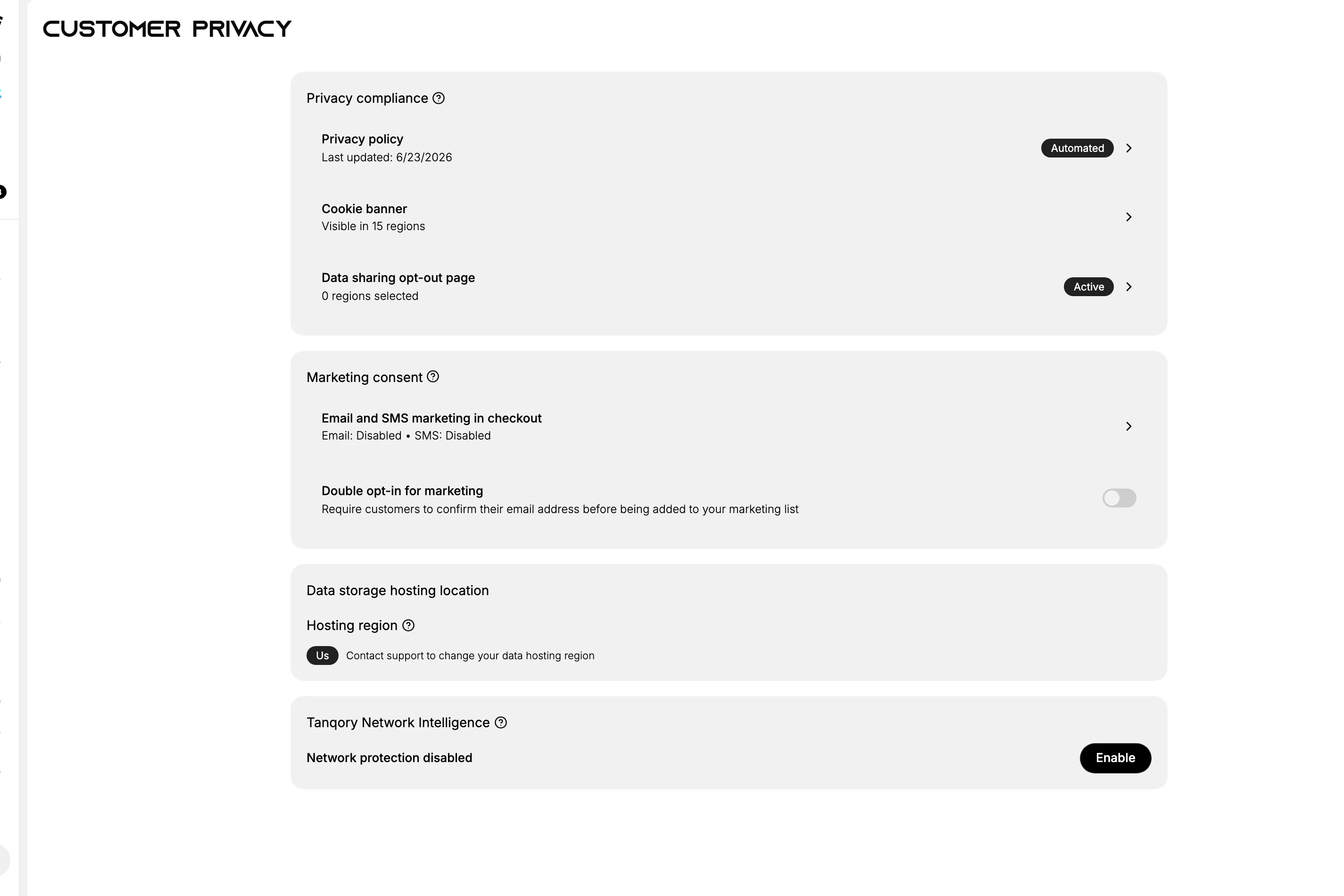
Four cards, and the controls are not all the same kind. Most rows carry a chevron and open something else, but Double opt-in for marketing is a toggle you switch here, the hosting region is a label with no control at all, and network protection has its own Enable button. Read the right-hand end of a row before you expect it to open.
| Card | What it holds |
|---|---|
| Privacy compliance | Privacy policy, with the date it last changed and a badge saying it is maintained automatically; Cookie banner, with the number of regions it is visible in; and Data sharing opt-out page, with the number of regions it is switched on for and a badge saying whether it is active |
| Marketing consent | Email and SMS marketing in checkout, which reads enabled or disabled for each channel separately; and Double opt-in for marketing, a toggle described on the page as requiring customers to confirm their email address before being added to your marketing list |
| Data storage hosting location | The region your customer data is stored in, shown as a chip. It is reported, not chosen: the line beside it says to contact support to change it |
| Tanqory Network Intelligence | A network protection setting, off on this store, with an Enable control |
Double opt-in is the row to look at first if you send marketing. It is the difference between a list of people who typed an address at checkout and a list of people who confirmed one, and it is off until you turn it on.
The hosting region is worth reading even though you cannot change it here. Where customer data is held is a question you will be asked eventually, and this page is where the answer is written down.
Where these settings show up elsewhere
Privacy is not a corner of its own. Three of these rows are the same thing you will meet under another name.
| On the privacy page | Where else it appears |
|---|---|
| Privacy policy | The policy itself is written under Settings > Policies, alongside the terms of service and the return rules. This page only reports its date and whether it is automated |
| Email and SMS marketing in checkout | Decides whether shoppers are asked to opt in while buying. What each of them then agreed to is recorded per person, on the Marketing lines of their record |
| Double opt-in for marketing | Governs how someone joins the marketing list at all, so it sits behind the email and SMS consent you read on each customer |
Reading the policy's date here tells you whether it is current; changing it happens on the Policies page.
What the per-customer side does
A privacy request is about one person, so it is handled on their record rather than here. More actions at the top of a customer's page carries three privacy entries among its seven: Request customer data, Erase personal data and Delete Customer.
Requests that arrive from elsewhere do not appear on this settings page either. They queue under Customers > Data requests, each with a due date and an Approve and a Reject, and nothing in the admin chases them.
An erasure is scheduled rather than immediate, and it can be cancelled up to its date. After that date the dialog says the data cannot be retrieved. It is repeated here because it is the one thing worth knowing before anyone on your team opens that menu.
Which one you want
| The situation | Where to go |
|---|---|
| A customer has emailed asking for their data | Their record, More actions |
| Something is already waiting for an answer | Customers > Data requests |
| You are asked what your store does with data in general | This page |
| You want to stop adding unconfirmed emails to marketing | This page, Double opt-in for marketing |
| Someone asks where the data is held | This page, Data storage hosting location |
| You need to hand someone a spreadsheet of their record | Export Customers |
If something goes wrong
- The privacy actions are missing from More actions. Your role may lack Edit customers, which is what those actions sit behind rather than the privacy permissions on this page.
- A row will not open. Check what is at its right-hand end. A toggle, a chip and an Enable button all look like rows that should open something, and none of them does.
- You cannot change the hosting region. It is not editable from this page by design, and the page says to contact support.
- You can read the page but nothing on it responds. Your role may hold View privacy settings without Edit privacy settings.
Next steps
Related articles
Still stuck?
- Ask Tanqory AIAsk in your own words. It answers from these articles and links the ones it used.
- Ask in your adminThe assistant in your Tanqory admin answers and makes the change for you once you confirm.
- Contact TanqoryWrite to our privacy, security or legal teams, or talk to sales about a plan or a move.