Customer Marketing Subscription
A customer record holds a separate marketing consent for each of three channels: email, SMS, and WhatsApp. You read all three on the Customer card and change them in Edit marketing status, and because they record the customer's agreement rather than your preference, you change them only when the customer asks.
On this page
The Marketing part of a customer's record holds one fact: which of your marketing channels this person has agreed to receive messages on. Tanqory tracks three, Email, SMS, and WhatsApp, and each is a separate agreement. A customer can be subscribed to email, refuse SMS, and never have been asked about WhatsApp, and the record shows all three states at once.
This is a record of consent rather than a setting you choose. The marketing figures elsewhere in the admin are built from it: who the Accepts Marketing tab on the customer list returns, and who a segment built on a consent can include. Turning a channel on for someone who did not agree does more than annoy them. It puts your store on the wrong side of the rules you are subject to, and the admin says as much on the form where you first set it.
The three channels and where the state comes from
Each channel is tied to a piece of contact information, which is why a customer can be impossible to subscribe on a given channel even when they have agreed.
| Channel | Uses | Shows on the record as |
|---|---|---|
| The customer's email | Email subscribed, or Email not subscribed | |
| SMS | The customer's phone | SMS subscribed, or SMS not subscribed |
| The customer's phone | WhatsApp subscribed, or WhatsApp not subscribed |
SMS and WhatsApp both read the phone number, so a customer with no phone on file cannot be subscribed to either, whatever they have agreed to. Add the phone first, then set the consent.
Before you begin
- You have the Manage customer subscriptions permission, since the admin records marketing consent as a subscription. View customers is enough to read the state without changing it.
- The customer has asked for the change. Nothing in the admin checks this for you, which is why the form carries a written warning rather than a validation rule.
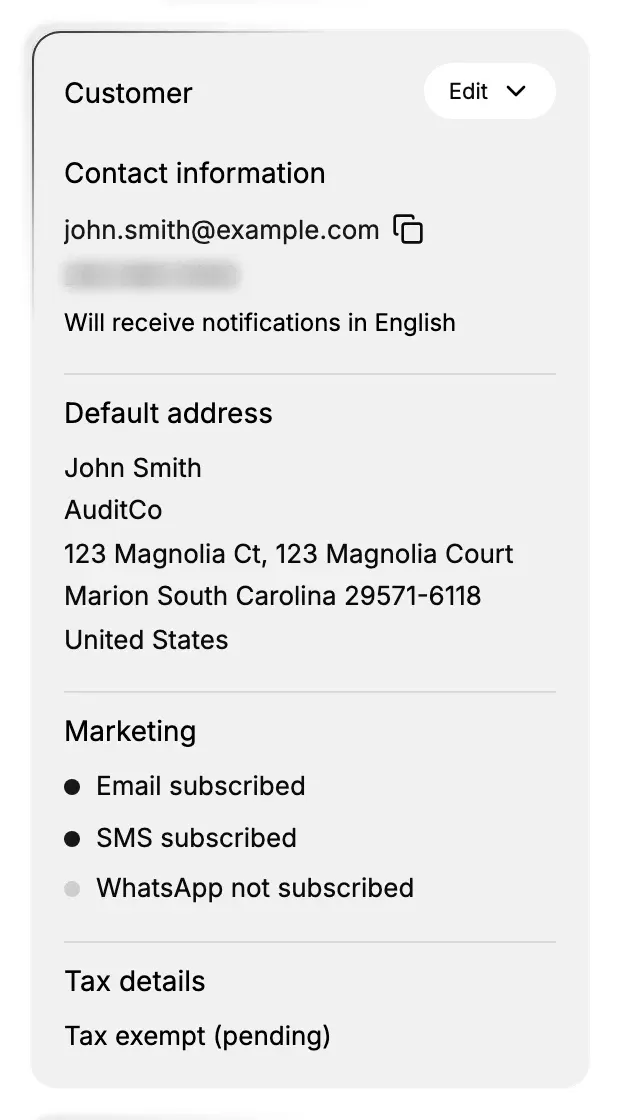
- Open Customers in the admin sidebar and open the customer you want to work on. The Marketing part sits on the Customer card in the right column, under Default address.
Steps
1. Read the current state on the Customer card
The Marketing part lists all three channels every time, so an absent channel is never ambiguous: it reads not subscribed rather than going missing. The dot beside each line is filled when the customer is subscribed and hollow when they are not, which lets you take in all three at a glance without reading the words.
2. Open Edit marketing settings
At the top right of the Customer card, open Edit and choose Edit marketing settings. The menu holds five entries in all, the other four being Edit contact information, Manage addresses, Edit tax details and Add to company, so marketing consent sits alongside the rest of the record rather than in an area of its own.
3. Set the channels the customer agreed to
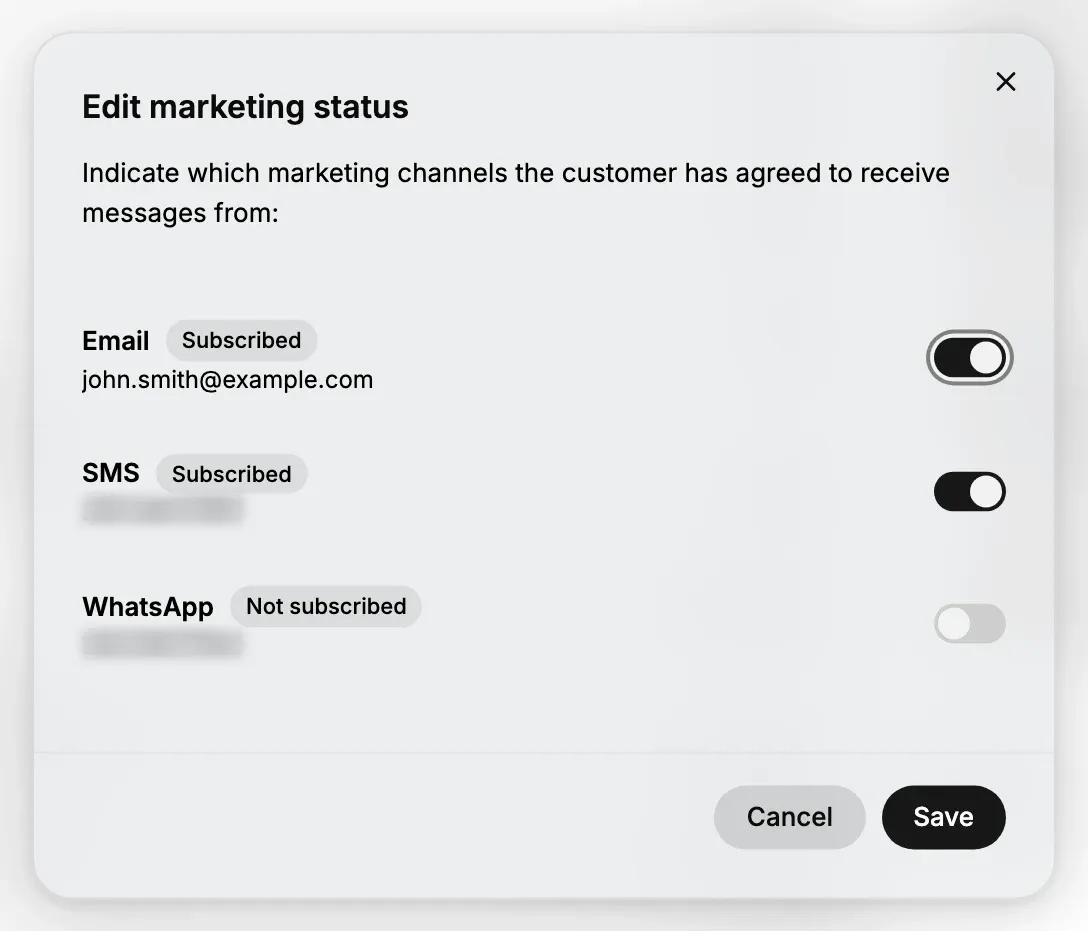
The window is headed Edit marketing status and says what it is for: "Indicate which marketing channels the customer has agreed to receive messages from". Each channel gets a row with three things worth reading before you touch the switch.
| What you see | What it tells you |
|---|---|
| The channel name | Email, SMS, or WhatsApp |
| A status badge | Subscribed or Not subscribed, the state before you change anything |
| The contact value | The email address or phone number the channel will actually use, so you can see it is the right one |
| The switch | On subscribes the customer to that channel, off unsubscribes them |
Switch on only the channels the customer has agreed to, then select Save. Cancel closes the window without changing anything, which matters here because nothing is saved as you flip the switches.
Where the customer has no phone number, the SMS and WhatsApp rows show a dash instead of a number and their switches cannot be moved. That is the record telling you the channel has nothing to send to, not a permission problem.
The other two places consent is set
That window is the place to change one customer, but it is not the only way consent gets recorded, and knowing the other two saves a lot of clicking.
When you create the customer. The Add Customer form has its own Marketing section with a checkbox per channel, worded as the customer's agreement rather than as a switch: "Customer agreed to receive marketing emails", and the same for SMS and WhatsApp. It also carries the notice "You must obtain customer consent before subscribing them to marketing emails, SMS, or WhatsApp." Email Marketing Consent covers that form.
For many customers at once. Tick rows on the Customers list and select Bulk Edit, and the spreadsheet that opens can show Accepts email marketing, Accepts SMS marketing, and Accepts WhatsApp marketing as columns you add from Columns. This is for recording consent you already hold, such as a batch of customers who opted in on paper, and never for switching a list on.
Where the state shows up in the rest of the admin
| Where | What it shows |
|---|---|
| The Customers list | An Email subscription column by default, reading Subscribed or Not subscribed |
| Manage columns on that list | SMS subscription and WhatsApp subscription as columns you can add |
| The Accepts Marketing tab | Only the customers you may email, with a count beside the tab name |
| Customer segments | A segment can select on a consent. The store's SMS Subscriber segment reads smsMarketingConsent = "SUBSCRIBED" |
That is what makes consent worth keeping accurate: it is the thing a segment selects on, so an unsubscribed customer drops out of the group by itself. What this part of the record does not tell you is whether anyone reads what you send. It is permission, not interest.
Two settings elsewhere decide how this state gets filled in the first place. Double opt-in for marketing, under Customer Privacy, decides whether a shopper who types an address has to confirm it before joining the list, and the same page holds whether checkout asks for consent at all. Neither of them changes what you set here; they decide what arrives on its own.
One thing that does not follow the customer: merging two customer records does not move marketing consent onto the record you keep. If you merge a subscribed duplicate into an unsubscribed record, the consent stays behind on the record you merged in. Merge Customers covers what a merge does and does not carry across, and after one it is worth opening this part of the record and setting it by hand.
If something goes wrong
- The SMS or WhatsApp switch will not move. The customer has no phone number. Add one under Edit contact information and come back.
- The state is wrong after a merge. Open the record you merged in, read its Marketing part, and set the value on the record you kept.
- A customer still receives email after unsubscribing. Reopen Edit marketing status and confirm the badge reads Not subscribed, since a window closed without Save changes nothing.
- The Edit menu has no Edit marketing settings. Your role may not include Manage customer subscriptions. Ask an owner or admin.
Next steps
Related articles
Still stuck?
- Ask Tanqory AIAsk in your own words. It answers from these articles and links the ones it used.
- Ask in your adminThe assistant in your Tanqory admin answers and makes the change for you once you confirm.
- Contact TanqoryWrite to our privacy, security or legal teams, or talk to sales about a plan or a move.