Domain Transfer-In Flow
What a domain transfer looks like day by day: what has to be true before you can start, what the form asks, what the five to seven day wait is actually doing, and what changes at the end.
On this page
Transferring a domain into Tanqory moves the domain's registration from your current registrar to Tanqory, so you manage and renew it in one place. It is different from connecting a domain you own, where the registration stays with your current provider and the change takes effect quickly. A transfer is a multi-day process with a few clear stages, and this article walks through the whole journey so you know what happens and roughly when. Transfer a Domain to Tanqory has the click-by-click of starting a transfer, and Domain Transfers follows one that is under way.
Before you begin
- Your role includes Domain settings.
- The domain has been registered for at least 60 days and is unlocked at your current registrar, with the authorization code to hand.
- Open Settings > Domains in the admin sidebar to start or follow a transfer.
Before the transfer: getting your domain ready
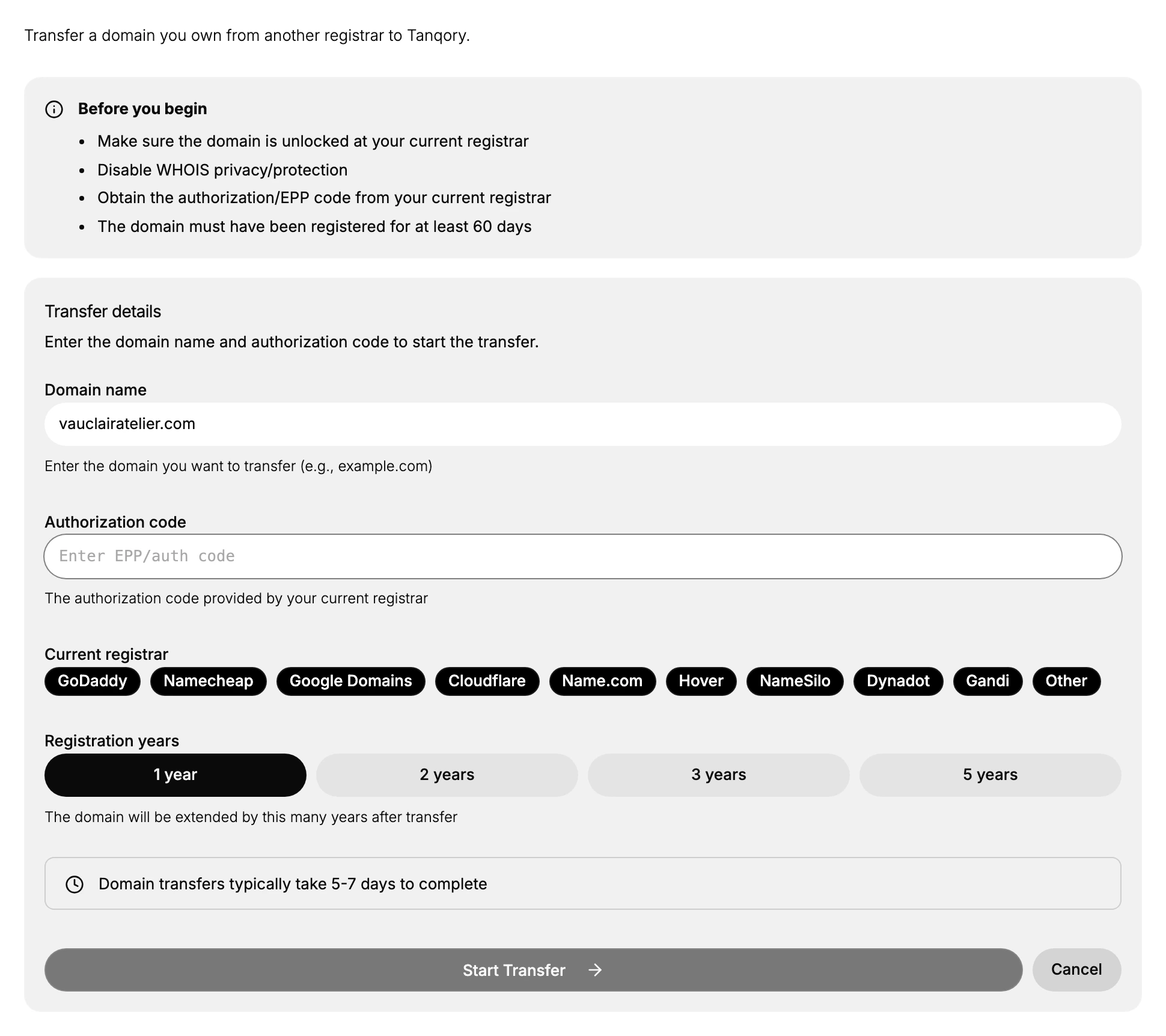
A transfer cannot begin until the domain is eligible, and the transfer form opens with a Before you begin checklist of exactly what to prepare, shown above. You do each of these at the registrar where the domain is currently held.
- Unlock the domain. A locked domain has its transfer rejected, so the transfer lock must be removed first.
- Disable WHOIS privacy or protection. Some registries need the contact details visible to process a transfer.
- Obtain the authorization code. This is the EPP or auth code from your current registrar, and it is your proof that you authorize the move.
- Confirm the domain is at least 60 days old. A domain cannot be transferred within 60 days of being registered or of a previous transfer.
How long this stage takes depends on you and your current registrar, since it is work you do on their side before anything starts in Tanqory.
Starting the transfer
Once the domain is ready, you begin the transfer from the Transfer In button on the Domain Transfers page. In the form you enter the domain and its authorization code, choose your current registrar, and pick how many years to extend the registration. Starting the transfer itself takes only a few minutes. The full walkthrough of each field is in Transfer a Domain to Tanqory.
During the transfer: the wait
After you start it, the transfer moves into a waiting period while the registration is handed off between the two registrars. As the form states, this typically takes 5 to 7 days to complete. This wait is part of how domain transfers work across the industry, not a delay you can skip. A few things matter while it runs.
- A registrar transfer does not change your DNS, so if the domain already points at your store it keeps working during the wait.
- Keep access to your current registrar account and to the domain's contact email, in case an action or confirmation is needed before the transfer can finish.
- Leave the domain unlocked and its settings unchanged at your current registrar until the transfer completes, so nothing interrupts it.
You follow the transfer on the Domain Transfers page during this time.
When the transfer completes
When the wait is over and the transfer completes, the domain's registration lives in Tanqory. From then on you manage and renew the domain here rather than at your old registrar. The domain is ready to use with your store, and if you want it to be the address customers see, set it as your primary domain in Set Your Primary Domain.
How long each stage takes
| Stage | What happens | Roughly how long |
|---|---|---|
| Getting ready | You unlock the domain, disable privacy, and get the authorization code at your current registrar | Depends on you and your registrar |
| Starting | You submit the domain and authorization code in the transfer form | A few minutes |
| Transfer period | The registration is handed off between registrars | Typically 5 to 7 days |
| After completion | You manage and renew the domain in Tanqory | Ongoing |
Best practices
- Start well before expiry. Begin the transfer with time to spare, not just before the domain is due to renew at your current registrar.
- Prepare everything first. Have the domain unlocked, privacy off, and the authorization code in hand before you open the form, so the transfer is not held up.
- Keep your access live. Stay signed in to your current registrar and able to read the domain's contact email through the whole window.
- Use a fresh authorization code. These codes can expire, so get a new one if yours is old.
Common mistakes
- Starting before the domain is eligible, for example while it is still locked or under 60 days old.
- Leaving WHOIS privacy on, which can block the transfer from processing.
- Losing access to the contact email, so a confirmation that is needed during the wait is missed.
- Changing the domain at your current registrar mid-transfer, which can interrupt the hand-off.
Where each article picks up
Three articles cover transferring in, and they answer different questions.
- This one is the timeline: what has to be true first, what the wait consists of, and what changes at the end.
- Transfer a Domain to Tanqory is the decision and the form: whether to transfer at all rather than connect the domain, and what each field on the form wants.
- Domain Transfers is the page a request sits on while it runs, and where you go back to check on it.
If the transfer completes and the domain still is not the address customers see, that is expected. Transferring moves the registration, not the storefront address. Set Your Primary Domain covers the last step.
Next steps
Related articles
Still stuck?
- Ask Tanqory AIAsk in your own words. It answers from these articles and links the ones it used.
- Ask in your adminThe assistant in your Tanqory admin answers and makes the change for you once you confirm.
- Contact TanqoryWrite to our privacy, security or legal teams, or talk to sales about a plan or a move.