Abandoned Checkouts
An abandoned checkout is one a customer started but left before paying, and Tanqory keeps a list of them so you can follow up and try to win the sale back. The Abandoned checkouts page shows how many there are and their total value, groups them by whether you have contacted the customer yet, and lets you send a recovery email to the ones you choose. This article explains the page, its metrics and status tabs, and how a checkout becomes recovered.
On this page
An abandoned checkout is one a customer started but left before paying. Tanqory keeps a list of them so you can follow up and try to win the sale back. The Abandoned checkouts page shows how many there are and their total value, groups them by whether you have contacted the customer, and lets you send a recovery email to the ones you choose. This article explains the page. Abandoned Checkout Detail opens a single one, and Send Recovery Email follows up.
You find it under Orders > Abandoned.
Before you begin
- Your role includes View orders.
- Your store has abandoned checkouts. A new store shows the page with every metric at zero.
- Open Orders > Abandoned in the admin sidebar.
The metrics
Across the top, four cards summarize your abandoned checkouts. Each card carries a label, a number, and a line underneath saying what it counts.
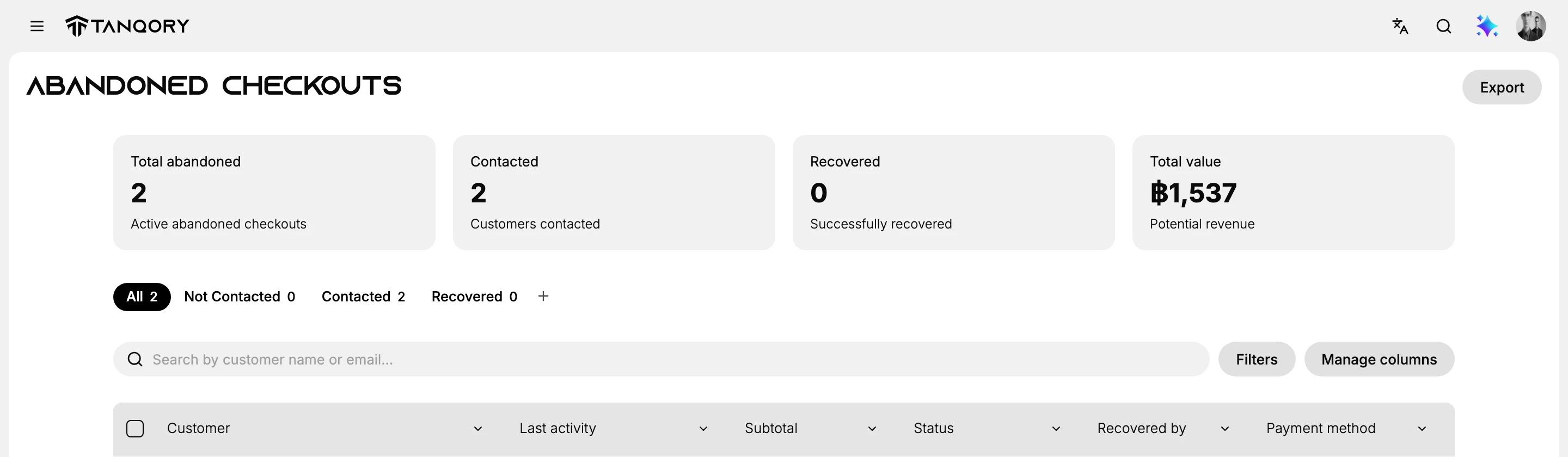
- Total abandoned counts the active abandoned checkouts, meaning the ones still sitting unpaid.
- Contacted counts the customers you have already sent a recovery email to.
- Recovered counts the ones that were successfully recovered, where the customer came back and paid.
- Total value is the potential revenue those checkouts represent, which is what tells you how much the follow-up is worth.
Read the first three together. Total abandoned minus Contacted is the work still waiting for you, and Recovered against Contacted is how well the follow-up is actually working.
The status tabs
Below the metrics, tabs group the checkouts by how far along the follow-up is:
- All shows every abandoned checkout.
- Not Contacted shows the ones you have not yet followed up on.
- Contacted shows the ones a recovery email has been sent for.
- Recovered shows the ones the customer came back and paid.
A checkout starts as Not Contacted, moves to Contacted once a recovery email goes out, and moves to Recovered if the customer completes the purchase.
The table and actions
The table lists one row per abandoned checkout, with the columns Customer, Last activity, Subtotal, Status, Recovered by, and Payment method. Last activity gives both a relative time and the exact date, so you can tell a checkout left an hour ago from one left last month without doing arithmetic. Recovered by and Payment method stay empty until a checkout is actually recovered.
Above the table, Search by customer name or email finds one checkout, Filters narrows the list, and Manage columns chooses which columns appear. Export at the top right of the page downloads the list.
To follow up, select one or more checkouts and choose Send recovery emails, which emails those customers a link back to their checkout. This is covered in Send Recovery Email.
Best practices
- Follow up sooner rather than later, since a checkout is more likely to be recovered while the customer still remembers it.
- Watch the Not Contacted tab, so no abandoned checkout is left without a follow-up.
- Use Total value and Potential revenue to judge how much effort the follow-up is worth.
Common mistakes
- Ignoring abandoned checkouts, which leaves recoverable sales on the table.
- Contacting the same customer repeatedly, rather than checking the status first.
Next steps
Related articles
Still stuck?
- Ask Tanqory AIAsk in your own words. It answers from these articles and links the ones it used.
- Ask in your adminThe assistant in your Tanqory admin answers and makes the change for you once you confirm.
- Contact TanqoryWrite to our privacy, security or legal teams, or talk to sales about a plan or a move.