Saved Views
Save a search or filter on the Products list as a named view, so you can re-apply a recurring lookup with one click instead of rebuilding it.
On this page
A Saved View captures the filters you have applied on the Products list, such as a status tab, a name search, or both, under a name you choose. Once saved, you re-apply it in one click instead of rebuilding the same filter every time.
You'll work under Products in the admin sidebar.
Where Saved Views live
Saved Views appear as tabs above the product list, alongside the built-in tabs (All, Active, Draft, Low stock, Out of stock, Archived). Your custom views sit in the same row, so a saved view is always one click away.
Before you begin
- You have the View products permission.
- Open Products in the admin sidebar and apply the tab or search you want to save.
Steps
1. Open Products and narrow the list
Go to Products in the admin sidebar, then apply what you want to save: click a status or stock tab (1), type in the search bar (2), or both. (See Filter Products and Search the Product List.)

2. Click Save as
Once a search or filter is applied, a Save as (1) button appears next to the search bar (after Cancel). Click it.

3. Name the view and click Create
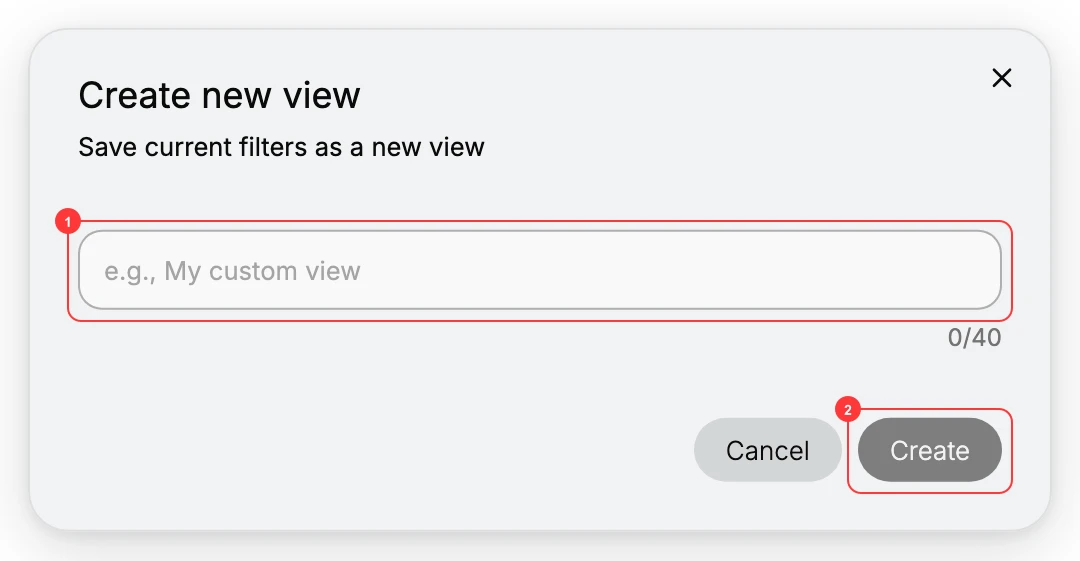
The Create new view dialog opens, showing Save current filters as a new view. Type a clear name (1) (up to 40 characters) and click Create (2). Name views by intent, for example Drafts to publish rather than Draft.
4. Re-apply it any time
The new view appears as a tab in the list. Click it to re-apply its filters instantly.
Verify the result
- A new tab with your view's name appears in the tab row.
- Clicking it re-applies the filters and shows the matching products.
Best practices
- Name views by intent, not by filter: Drafts to publish reads better than Draft status.
- Save the filters you rebuild often, such as a Low stock sweep or your drafts queue, so they are one click away.
- Keep the set small. A handful of well-named views beats a long row you have to scan.
Common mistakes
- Cryptic names like View 3: no one (including future you) knows what they do.
- Saving one-off filters as views: only save the ones you will genuinely reuse.
If something goes wrong
- Save as does not appear: apply a search or tab first; with nothing applied there is nothing to save.
- The view shows no products: the saved filter may no longer match anything (for example, you cleared the low-stock items); re-create it from a current filter.
- Permission denied: your role lacks the View products permission.
Next steps
Related articles
Still stuck?
- Ask Tanqory AIAsk in your own words. It answers from these articles and links the ones it used.
- Ask in your adminThe assistant in your Tanqory admin answers and makes the change for you once you confirm.
- Contact TanqoryWrite to our privacy, security or legal teams, or talk to sales about a plan or a move.