Discount Redemptions
On a discount, redemptions are shown as a used count in the Performance area, not as a list of the orders that used it. This companion explains where to see how many times a discount has been redeemed and where to look for more, and links to the detail page.
On this page
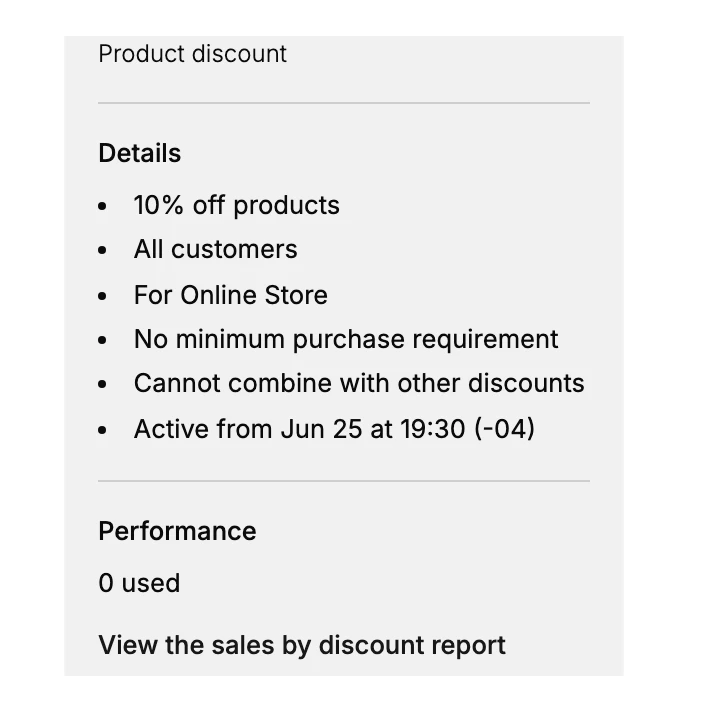
On a discount's page, a redemption is counted rather than listed. The Performance area in the Summary panel shows a used count, which is how many times the discount has been redeemed, and that is the redemption information the discount itself gives you. There is no table on the discount that lists each order that used it, so the number is a total, not a breakdown by order. This article explains how to read that count and where to go for more; and Discount Detail Page takes the whole discount page.
Because the discount shows a count and not a list, you read the number to know how much the discount has been used. When you want more than that single count, use the View the sales by discount report link on the discount, or the store Analytics page. This keeps the discount page simple while still telling you whether the discount is being redeemed.
What the discount shows about redemptions
| Item | What it is |
|---|---|
| Used count, in Performance | The total number of times the discount has been redeemed |
| View the sales by discount report link | A link toward the report for a closer look |
| A list of orders that used the discount | Not shown on the discount; the discount gives a count, not a list of individual orders |
Before you begin
- Your role includes View discounts.
- Open Discounts in the admin sidebar and open the discount you want to work on.
Steps
1. Open the discount and read the used count
Open the discount from the Discounts list and read the used count under Performance in the Summary panel. This tells you how many times the discount has been redeemed in total. See Discount Detail Page.
2. Use the report link for more than the count
Select View the sales by discount report on the discount when the used count alone is not enough, since the discount itself does not list the orders that used it. Discount Analytics shows how discounts appear in the store Analytics.
Verify the result
- The Performance area shows a used count for the discount.
- A new discount shows zero until it is redeemed.
- No list of individual orders of redemptions appears on the discount, since it shows a count.
Best practices
- Read the used count to gauge activity, since it is the redemption figure the discount gives you.
- Go to the report or Analytics for detail, because the discount page keeps to the count.
- Read the count together with the discount's status, since a discount that is not active will not be gaining redemptions.
Common mistakes
- Looking for a list of orders on the discount, when the discount shows a used count rather than a list of individual orders.
- Reading a zero count as a fault, when a new or unredeemed discount has not been used yet.
If something goes wrong
- The used count is zero when you expected redemptions. Confirm the discount is active, within its dates, and that customers are meeting its rules.
- You need detail at the order level. Use the sales by discount report from the link, since the discount shows only the count.
- You cannot open the discount. Your role may not have permission to view discounts.
Next steps
Related articles
Still stuck?
- Ask Tanqory AIAsk in your own words. It answers from these articles and links the ones it used.
- Ask in your adminThe assistant in your Tanqory admin answers and makes the change for you once you confirm.
- Contact TanqoryWrite to our privacy, security or legal teams, or talk to sales about a plan or a move.