Discount Types
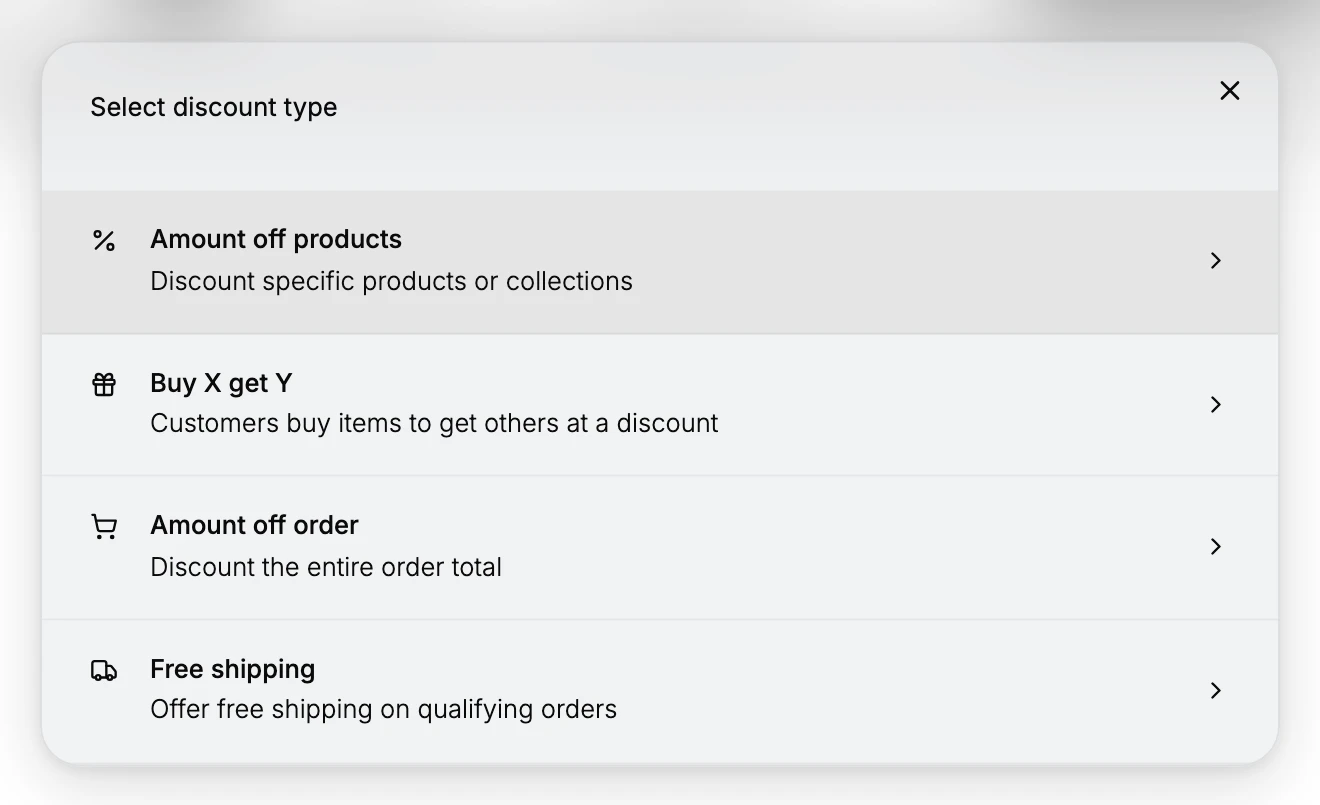
Tanqory has four discount types, chosen when you create a discount: Amount off products, Buy X get Y, Amount off order, and Free shipping. The type decides what the discount reduces, while the value and whether it uses a code are set on the form afterward.
On this page
When you create a discount, the first choice is its type, which decides what the discount reduces. Tanqory offers four types in the Select discount type dialog: Amount off products, Buy X get Y, Amount off order, and Free shipping. Choosing a type opens the matching form, where you set the rest of the discount. This article explains what each type does so you can pick the right one for a campaign.
The type is separate from two other choices you make on the form. The value sets how much is taken off, such as a percentage or a fixed amount, and the method sets whether customers enter a code or the discount applies automatically. So a single type, such as Amount off products, can be a percentage code for a newsletter or an automatic sale that takes a fixed amount off, depending on those two settings.
Before you begin
- Your role includes Edit discounts.
- You know what the offer should do for the customer, since the type you pick decides what the rest of the form can express.
- Open Discounts in the admin sidebar, then select Create discount to see the types offered.
The four types
| Type | What it reduces | Good for |
|---|---|---|
| Amount off products | Specific products or collections you choose | A sale on a range, such as a summer collection |
| Buy X get Y | Reward items when the customer buys qualifying items | A "buy two, get one" style offer |
| Amount off order | The entire order total | A storewide sale on any order |
| Free shipping | The shipping charge | Encouraging checkout, often above a spend threshold |
Amount off products
Discounts specific products or collections. On the form you set the value as a percentage or a fixed amount, then choose the products or collections it applies to. Use this when the offer should cover a defined set of items rather than the whole order. See Limit a Discount to Specific Products.
Buy X get Y
Rewards a customer for buying one set of items by discounting another set. You set what the customer buys and what they get, and the reward can be a percentage off, an amount off, or free. Use this for offers such as bundles. See Buy X Get Y Discounts.
Amount off order
Discounts the entire order total by a percentage or a fixed amount. Use this for a storewide offer that applies to the whole cart rather than chosen items.
Amount off products and Amount off order look similar but differ in scope: Amount off products reduces only the items or collections you select, while Amount off order reduces the whole order total. Choose the one that matches what the offer should cover.
Free shipping
Waives the shipping charge on qualifying orders. Instead of a value, you choose the countries it covers and can exclude shipping rates over a certain amount. Pair it with a minimum purchase amount to offer free shipping above a set spend. See Free Shipping Discounts.
Choosing a type
Start from what the offer should reduce. If it is a set of items, use Amount off products. If it is the whole cart, use Amount off order. If it rewards buying to get more, use Buy X get Y. If it removes the shipping charge, use Free shipping. Then set the value and, under Method, decide whether it is a code customers enter or an automatic discount. See Create a Discount Code and Automatic Discounts.
Verify the result
- The type you chose appears on the new discount and in the Type column of the Discounts list.
- The form shows the fields for that type, such as Applies to for Amount off products or Countries for Free shipping.
- At checkout, the discount reduces what the type is meant to reduce.
Best practices
- Match the type to what the offer covers, so the discount applies to the right part of the order.
- Use Amount off order for storewide sales and Amount off products for a specific range, rather than forcing one to do the other.
- Set the value and method after the type, since the same type can be a percentage or fixed amount and a code or automatic discount.
Common mistakes
- Choosing Amount off order when only certain items should be discounted, which reduces the whole cart instead of the range.
- Expecting a value field on Free shipping, when Free shipping waives the shipping charge and has no percentage or amount.
Next steps
Related articles
Still stuck?
- Ask Tanqory AIAsk in your own words. It answers from these articles and links the ones it used.
- Ask in your adminThe assistant in your Tanqory admin answers and makes the change for you once you confirm.
- Contact TanqoryWrite to our privacy, security or legal teams, or talk to sales about a plan or a move.