Free Shipping Discounts
A free shipping discount removes the shipping charge at checkout, either when a customer enters a code or automatically once their order qualifies. You create it like any other discount and choose Free shipping as the type, then set which countries the offer covers and, if you want, exclude shipping rates over a certain amount so very expensive options are not given away for free. To encourage larger orders, add a minimum purchase amount under purchase requirements, so customers get free shipping once their order reaches a set amount.
On this page
A free shipping discount removes the shipping charge at checkout, so a qualifying order ships for free. It is one of two routes to the same result: the other is to price a shipping rate at zero, covered in Free Shipping Rates. A discount is the route to choose when the offer is temporary, needs a code, or applies only to some customers, while a free rate is the one to use when shipping is free for everyone in a zone. You create it the same way as other discounts, but choose Free shipping as the type. Instead of asking for a discount value, the form asks which Countries the offer covers and lets you exclude shipping rates over a certain amount, so a premium or oversized shipping option is not given away for free. To run a "free shipping over a set amount" offer that encourages larger carts, add a Minimum purchase amount under purchase requirements. Like any discount, it can be a code customers enter at checkout or an automatic discount that applies on its own.
What a free shipping discount sets
| Section | What it controls |
|---|---|
| Method | Whether customers enter a code or the discount is automatic |
| Countries | The countries the free shipping applies to (for example, All countries) |
| Shipping rates | Exclude shipping rates over a certain amount, so you do not give away very expensive shipping |
| Purchase requirements | A Minimum purchase amount for a "free shipping over X" offer |
Before you begin
- Your role includes Edit discounts.
- You have shipping set up for the countries you want the offer to cover.
- Open Discounts in the admin sidebar, then select Create discount.
Steps
1. Open Discounts and choose Free shipping
Open Discounts, click Create discount, and in the Select discount type dialog choose Free shipping. See Discounts Overview.
2. Choose the method and set the countries and rates
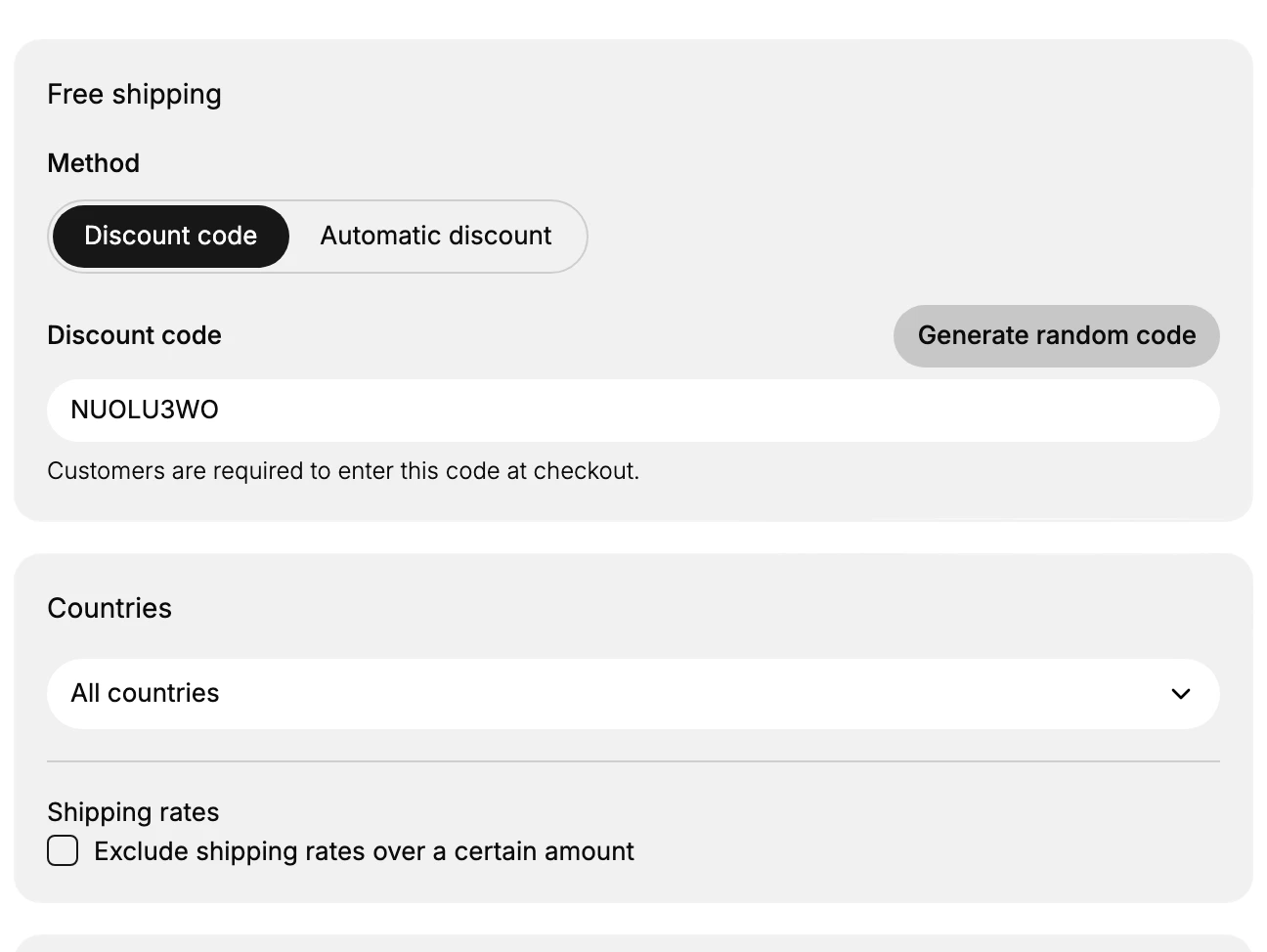
Set Method to Discount code and enter or Generate random code a code, or set it to Automatic discount and give it a title. Under Countries, choose where the free shipping applies, such as All countries. Under Shipping rates, turn on Exclude shipping rates over a certain amount if you do not want to cover unusually expensive shipping options.
3. Set a minimum purchase amount for a threshold offer
To run "free shipping over a set amount", open Purchase requirements and choose Minimum purchase amount, then enter the amount. Leave it on No minimum requirements to offer free shipping on any order.
4. Set who can use it
Under Eligibility, choose All customers, Markets, Specific customer segments, or Specific customers. See Apply a Discount to a Customer Segment.
5. Set usage limits and combinations
Under Usage limits, optionally cap total uses or limit one use per customer. Under Combinations, choose whether this offer can combine with Product or Order discounts.
A free shipping discount combines with product and order discounts only. It is itself the shipping discount, so there is no separate shipping discount combination to turn on.
6. Set the active dates
Under Active dates, set the Start date and Start time, and turn on Set end date if the offer should stop on a certain day. See Schedule Discounts.
7. Save, then test
Save the discount. At checkout, build an order that qualifies and confirm shipping shows as free, then build one that does not meet the minimum and confirm shipping is charged.
Verify the result
- The discount appears in the Discounts table with the type Free shipping.
- A qualifying order shows free shipping at checkout.
- An order below the minimum purchase amount is still charged for shipping.
Best practices
- Set a minimum purchase amount when you want free shipping to encourage larger orders rather than apply to every order.
- Exclude shipping rates over a certain amount so a very expensive shipping option is not given away.
- Limit the countries to the regions you can afford to ship to for free.
- Give the offer an end date if it is a promotion rather than a permanent policy.
Common mistakes
- Free shipping on every order with no minimum, which removes shipping revenue you may have planned for.
- Covering all rates, so a premium or oversized shipping rate is also free.
- No end date on a promotional free shipping offer, so it runs longer than intended.
If something goes wrong
- Shipping is still charged. Check the order meets the minimum purchase amount and ships to a covered country, and that the discount is Active.
- An expensive rate became free unexpectedly. Turn on Exclude shipping rates over a certain amount and set the limit.
- You cannot create a discount. Your role may not have permission to manage discounts.
Next steps
Related articles
Still stuck?
- Ask Tanqory AIAsk in your own words. It answers from these articles and links the ones it used.
- Ask in your adminThe assistant in your Tanqory admin answers and makes the change for you once you confirm.
- Contact TanqoryWrite to our privacy, security or legal teams, or talk to sales about a plan or a move.