Blog Settings
Each blog has its own settings for its title, web address, comments, metafields, and theme template. You set them when you create the blog and can change them anytime.
On this page
Each blog in your store has its own settings: its title, its web address, whether readers can comment, any metafields, and which theme template displays it. These settings apply to every article in that blog. You manage blogs from the Blog Posts page under Content.
Before you begin
- Your role includes Edit online store.
- Open Content > Blog Posts in the admin sidebar, select Manage blogs, then open the blog you want to change.
Create or edit a blog
To create a blog, open the Blog Posts page, select Manage blogs, then Add blog. To change an existing blog, open it from the same Manage blogs list. Either way you reach the blog form, where you set the following.
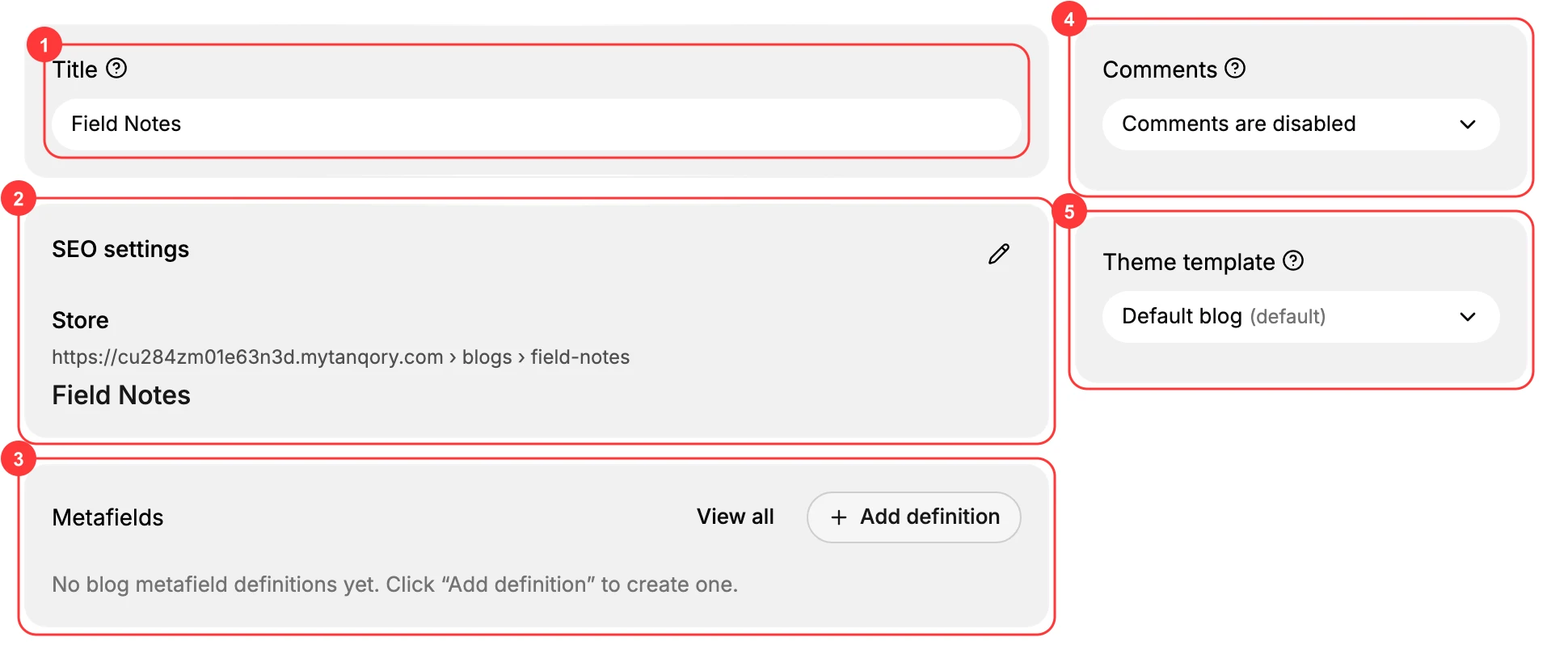
- Title (1) is the blog's name, such as Field Notes. It is shown to customers and groups all of the articles that belong to this blog.
- SEO settings (2) control how the blog appears in search results. The blog's web address is generated from the title, for example /blogs/field-notes. Use the edit control to change the page title or the address.
- Metafields (3) let you store extra structured data on the blog. Click Add definition to create a blog metafield definition. See Blog Metafields.
- Comments (4) set how customer comments on this blog's articles are handled. Choose one of:
- Comments are disabled, so customers cannot leave comments.
- Comments are pending moderation, so each comment waits for your approval before it appears.
- Comments are automatically published, so comments appear as soon as they are posted.
- Theme template (5) chooses which theme template renders the blog. Default blog is used unless your theme provides other blog templates.
When the settings are right, Save the blog. It then appears in the Manage blogs list, ready for you to add articles.
Note: When comments are set to pending moderation, you approve or remove the ones that come in from Manage comments on the Blog Posts page.
Best practices
- Use pending moderation if your blog attracts spam, so nothing is published until you have approved it.
- Give each blog a clear title, since its web address is generated from the title and is awkward to change once articles are linked and shared.
- Group related articles into separate blogs, for example a news blog and a tutorials blog, so customers can browse a focused feed.
Next steps
Related articles
Still stuck?
- Ask Tanqory AIAsk in your own words. It answers from these articles and links the ones it used.
- Ask in your adminThe assistant in your Tanqory admin answers and makes the change for you once you confirm.
- Contact TanqoryWrite to our privacy, security or legal teams, or talk to sales about a plan or a move.