When to Use a Draft Order
A draft order is an order you create yourself in the admin instead of one a customer places at checkout, which makes it the right tool for a sale you take over the phone, by email, or in person. You build the order, decide how it is paid, and either send the customer an invoice or record that it is already paid. This article explains what draft orders are for and how they fit together, and points you to creating one and to the Drafts list.
On this page
A draft order is an order you create yourself in the admin, rather than one a customer places at checkout. Because you build it by hand, it is the right tool whenever a sale happens away from your storefront. This article explains when to reach for a draft order and how the pieces fit together. Create Draft Order builds one, and Draft Orders finds the ones you have made.
You start one from Create order on the Orders overview, reached from Orders > Drafts.
Before you begin
- Your role includes Edit orders.
- You know what the sale is: the products, the customer, and how it will be paid.
- Open Orders > Drafts in the admin sidebar.
When a draft order is the right tool
Use a draft order when the sale does not come through the storefront checkout, for example:
- A sale you take over the phone, by email, or in person, where you enter the products for the customer.
- An order you want the customer to pay by invoice, such as a business or wholesale buyer who will pay later.
- An order you are still building, which you save and come back to before it is finalized.
What a draft order looks like
An open draft holds the same parts as a normal order, but you fill them in yourself. The products card is where you search your catalog, browse it, or add a custom item that is not in the catalog at all. The payment card totals the order and carries the two ways to finish it, Send invoice and Mark as paid. The customer card holds who the order is for, and the market and currency are set on the right.
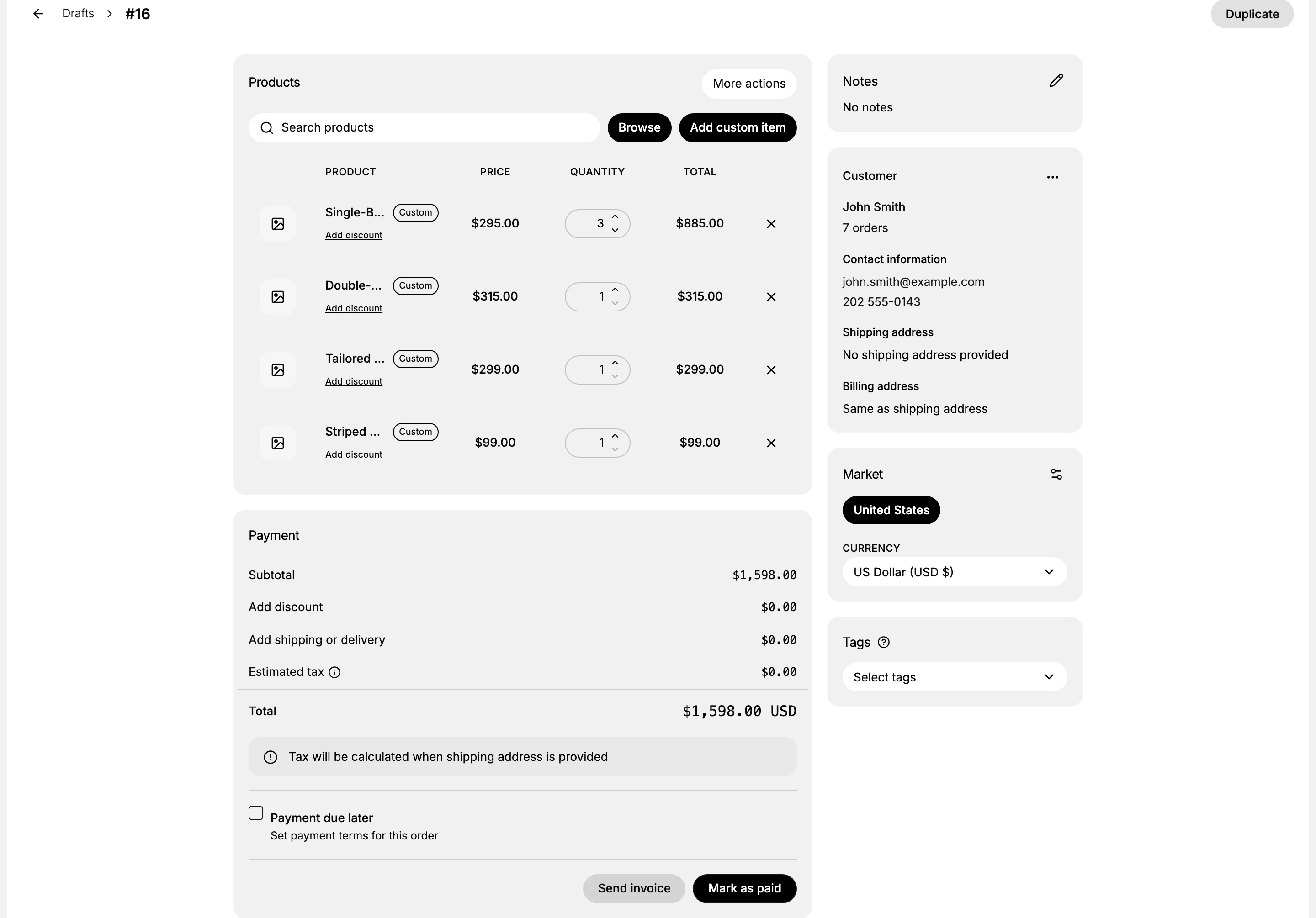
Two details in this card explain why a draft is useful. Add custom item lets you charge for something that is not a catalog product, such as a bespoke service or a one-off fee. Payment due later, with its payment terms, is what turns the draft into an invoice a business customer settles after the fact rather than a sale paid on the spot.
How draft orders fit together
A draft order moves through a few stages, each covered by its own article:
- Create it. You add the products, set the customer, and choose how it is paid on the draft order form. See Create Draft Order.
- Finish it. You either email the customer an invoice to pay, or record that it is already paid. See Send an Invoice and Mark an Order as Paid.
- Track it. Your drafts are listed on the Drafts page, grouped by status, so you can see which are Open, Invoice sent, or Completed. See Draft Orders.
Draft order or storefront order
A draft order is not a replacement for the storefront. Customers browsing your store still place their own orders at checkout, which arrive as normal orders. A draft order is for the times you are the one entering the sale on the customer's behalf.
Best practices
- Use a draft order for off-storefront sales, rather than asking the customer to place the order themselves.
- Send an invoice when the customer will pay later, so they get a link to pay.
- Mark it as paid only once you have actually received the money.
Common mistakes
- Using a draft order for a sale the customer could place themselves, when the storefront checkout is simpler.
- Marking a draft as paid before the money has arrived, which records a payment you do not have.
Next steps
Related articles
Still stuck?
- Ask Tanqory AIAsk in your own words. It answers from these articles and links the ones it used.
- Ask in your adminThe assistant in your Tanqory admin answers and makes the change for you once you confirm.
- Contact TanqoryWrite to our privacy, security or legal teams, or talk to sales about a plan or a move.