Gift Card Analytics
See your gift card liability and redemption state from two places: the Outstanding Gift Card Balance metric in Analytics, and the status filters on the Gift Cards page.
On this page
Tanqory shows the health of your gift card program in two places. Analytics reports the Outstanding Gift Card Balance, the unredeemed value still sitting on issued cards. The Gift Cards page breaks the cards down by status, so you can see how much has been used.
Before you begin
- You have the View analytics permission to open Analytics, and access to the Gift Cards page.
- Open Analytics for the balance, and go to Products then Gift Cards for the per-card status.
What you can see
| Where | What it shows |
|---|---|
| Analytics: Outstanding Gift Card Balance | The total value still loaded on issued gift cards. This is your outstanding liability |
| Gift Cards page status filters | How many cards are Full, Partial, Empty, or Deactivated, and which are Redeemable |
| Gift Cards list | Each card's code, status, customer, recipient, created date, and current and initial balance |
Gift card statuses
| Status | What it means |
|---|---|
| Redeemable | The card still has a usable balance |
| Full | None of the balance has been used yet |
| Partial | Some of the balance has been used |
| Empty | The balance has been used up |
| Deactivated | The card has been turned off and cannot be used |
Steps
1. Check the Outstanding Gift Card Balance
Open Analytics and find the Outstanding Gift Card Balance metric. This total is the value your customers can still redeem, which you carry as a liability. The figure is shown in your reporting currency for the date range you select.
2. Open the Gift Cards page
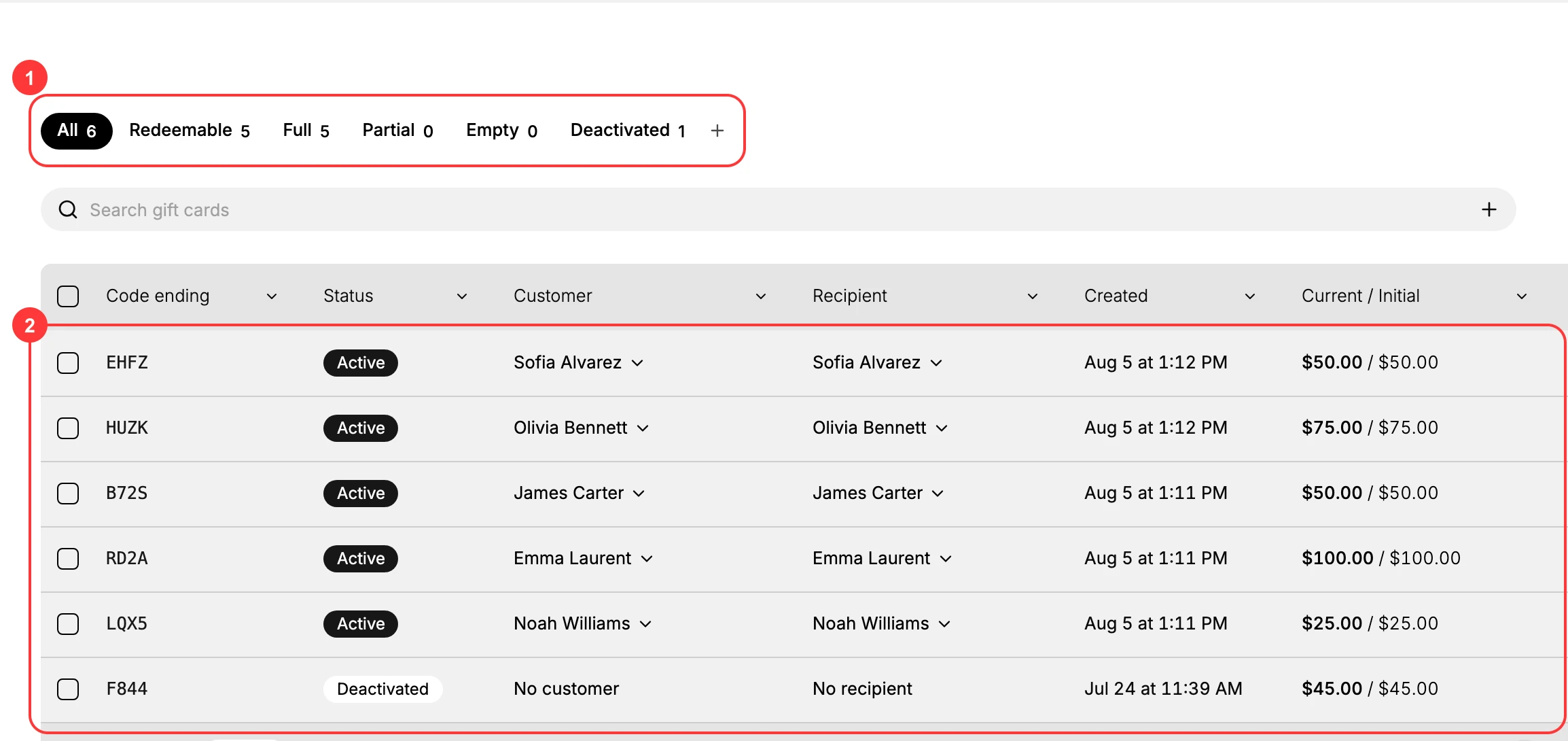
Go to Products > Gift Cards. The list (2) shows every gift card with its code, status, customer, recipient, created date, and current and initial balance.
3. Filter by status
Use the status filters (1) at the top of the list, Redeemable, Full, Partial, Empty, and Deactivated - to see how cards are being used and which are no longer active. Each filter shows a count, so the numbers give you the breakdown without opening a single card.
4. Open a card for detail
Click a gift card to see its remaining balance, expiry date, and status.
Verify the result
- The Outstanding Gift Card Balance in Analytics reflects the unredeemed value across cards.
- The status filters add up to the total number of gift cards.
Best practices
- Reconcile the Outstanding Gift Card Balance with your accounting records on a regular schedule.
- Watch the Partial and Full counts to understand how much value is still waiting to be redeemed.
- Review Deactivated cards so you know which were turned off and why.
Common mistakes
- Not tracking the Outstanding Gift Card Balance, which leaves a gap between the store and your books.
- Confusing Empty and Deactivated. Empty means the balance is used up; Deactivated means the card was turned off.
If something goes wrong
- The balance does not match your records. Check recent redemptions and any deactivated cards.
- A card is missing from a filter. Confirm its status, since each filter shows only cards in that state.
- Permission denied. Your role lacks the View analytics permission for Analytics.
Next steps
Related articles
Still stuck?
- Ask Tanqory AIAsk in your own words. It answers from these articles and links the ones it used.
- Ask in your adminThe assistant in your Tanqory admin answers and makes the change for you once you confirm.
- Contact TanqoryWrite to our privacy, security or legal teams, or talk to sales about a plan or a move.