Manage Your Team
Access granted once tends to stay granted. This is the upkeep pass: reading the Active tab as a question, clearing invitations nobody accepted, moving roles when someone changes job, and closing access when they leave.
On this page
Setting up a team is a one-time act. Keeping it right is not. People join, change jobs and leave, invitations go unanswered, and access that made sense a year ago quietly stops making sense. None of it undoes itself: a role stays granted until somebody takes it away.
So this is a habit rather than a task you are prompted into. A pass through Settings > Users once a quarter is enough for most stores, and it takes minutes when nothing has changed. The point of putting it on a schedule is that the alternative is doing it after something has already gone wrong.
Everything below needs a role that includes People settings, the permission covering changes to the people on your store. Without it the controls described here are not on your screen, and the review belongs to an owner or an admin instead.
Read the Active tab as a question
The question is not who is on the list. It is whether every one of these people should be able to sign in to your store today.
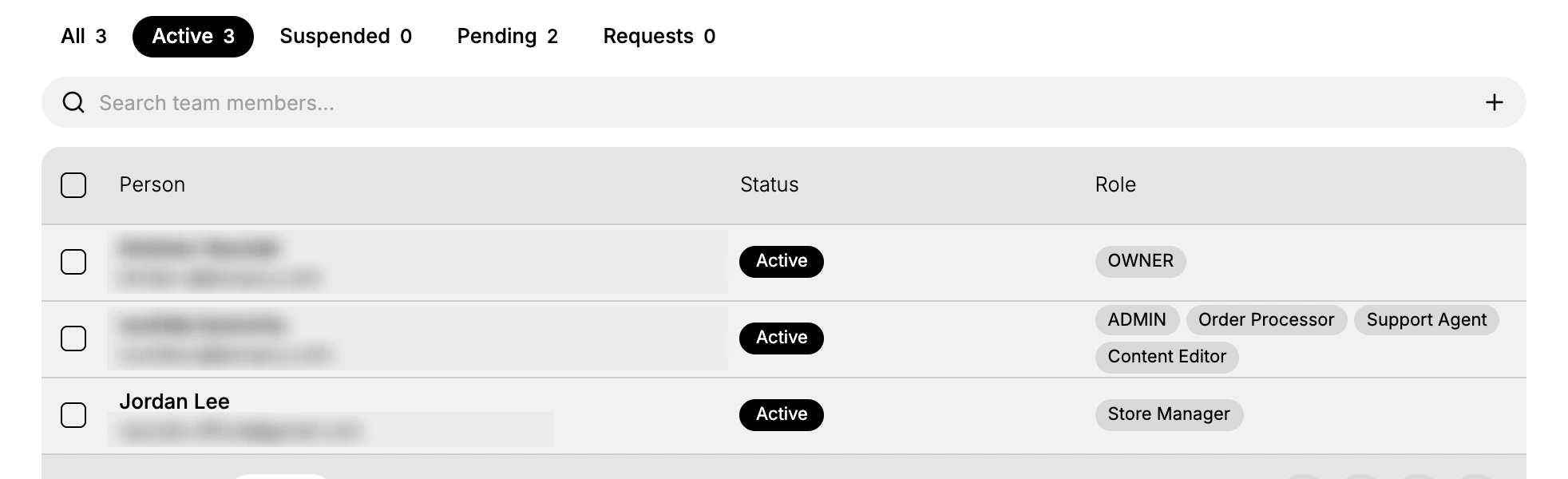
The answer drifts over time, and it drifts in one direction. People are added when they need something and are rarely removed when they stop needing it. A contractor who helped for a month, an agency you no longer work with, a colleague who moved to another team: each one is a way into your store that nobody is watching.
Two things on this screen make the pass quick. The count beside Active tells you the size of the job before you read a single row. The Role column shows what each person can do, and because someone can hold several roles at once, a row carrying three or four of them is where a mistake would cost the most. Start there and work down.
Clear out invitations nobody accepted
The Pending tab collects invitations that were sent and never taken up, and a quarterly pass is what stops them accumulating. Work down it asking one question of each row: does this person still need access?
- Yes. Resend it if the row reads Expired, and if it does not, chase the person rather than sending a second invitation.
- No. Cancel it. An invitation nobody will accept is noise on a list you are trying to read carefully, and it makes the Pending count meaningless as a signal.
The actions themselves sit above the list once a row is ticked, and Invite Team Members explains what each one does to the invitation.
Move the roles when someone's job changes
A change of job is the moment access should change, and the moment it is easiest to forget. Someone promoted keeps the role they had and gains nothing they now need. Someone moved to another team keeps reaching things that are no longer their business.
Change their roles rather than their presence on the list. Select the person's name to open their page, then use Assign to add what the new job needs and the three-dot menu beside an old role to take it away. Removing them and inviting them back reaches the same place the long way round, and it puts the person through accepting an invitation again for a job they never left.
Close access when someone leaves
This is what the whole review is for, and the review is worth nothing if you stop short of it. Ticking a person's row on the Users page offers two ways to close their access, and the choice between them is a judgement about whether they are coming back.
Suspend fits a departure that may not be permanent: a contractor between projects, someone on long leave, or an account behaving oddly that you want shut while you work out why. Remove fits someone who has left for good.
When you cannot tell which, suspend. Deciding to remove a week later costs nothing; discovering you removed the wrong person costs an invitation and their time. Manage Users covers both actions and where they leave the person afterwards.
What people get wrong
- Treating access as permanent because it was granted for a good reason once. The reason expires; the access does not.
- Reviewing names but not roles. The right people holding too much is still the same exposure.
- Leaving expired invitations in place, which turns the Pending count into a number nobody trusts.
- Reviewing the list and forgetting the accounts. Who has access matters less if those accounts are easy to take over, which is what a second sign-in step is for.
Next steps
- Roles and Permissions for building a role that matches a job nothing existing covers.
- Users for the page itself, if you want it described rather than used.
Related articles
- Two-Factor Authentication covers the second sign-in step the last point above refers to.
Still stuck?
- Ask Tanqory AIAsk in your own words. It answers from these articles and links the ones it used.
- Ask in your adminThe assistant in your Tanqory admin answers and makes the change for you once you confirm.
- Contact TanqoryWrite to our privacy, security or legal teams, or talk to sales about a plan or a move.