Compare Plans
The Compare plans page lays the five Tanqory plans side by side, with monthly or annual pricing, team-member and location limits, transaction fees, and included features. It also has tabs to buy AI Credits, top up a Shipping Balance, and migrate your store to a managed cloud.
On this page
The Compare plans page is where you weigh the Tanqory plans against each other before you choose one. It lays all five plans side by side with their prices and features, lets you switch between monthly and annual pricing, and adds tabs to buy AI Credits, top up a Shipping Balance, and migrate your store to a managed cloud. You reach it from Settings > Billing, from the Plan comparison link, or by selecting Change plan on your Plan page.
Before you begin
- You have a sense of your team size, your locations, and the features your business needs.
- Your role includes Billing settings.
- Open Settings, open Billing, and select Plan comparison, or select Change plan on the Plan page.
What every plan includes
The core of the platform is the same on every plan, so the differences are in scale, transaction fees, and advanced features. Every plan includes unlimited products and unlimited orders per month, and a 3-day free trial is offered on the monthly plans. The price shown on each plan is for running on the default managed cloud, DigitalOcean; the Migrate Store tab shows the price on other clouds.
The plans side by side
The page has a row of tabs, Plans, AI Credits, Shipping Balance, and Migrate Store, and a Monthly billing and Annual billing toggle. The Plans tab lays out the five plans, with your current plan marked and an action to move to each of the others.
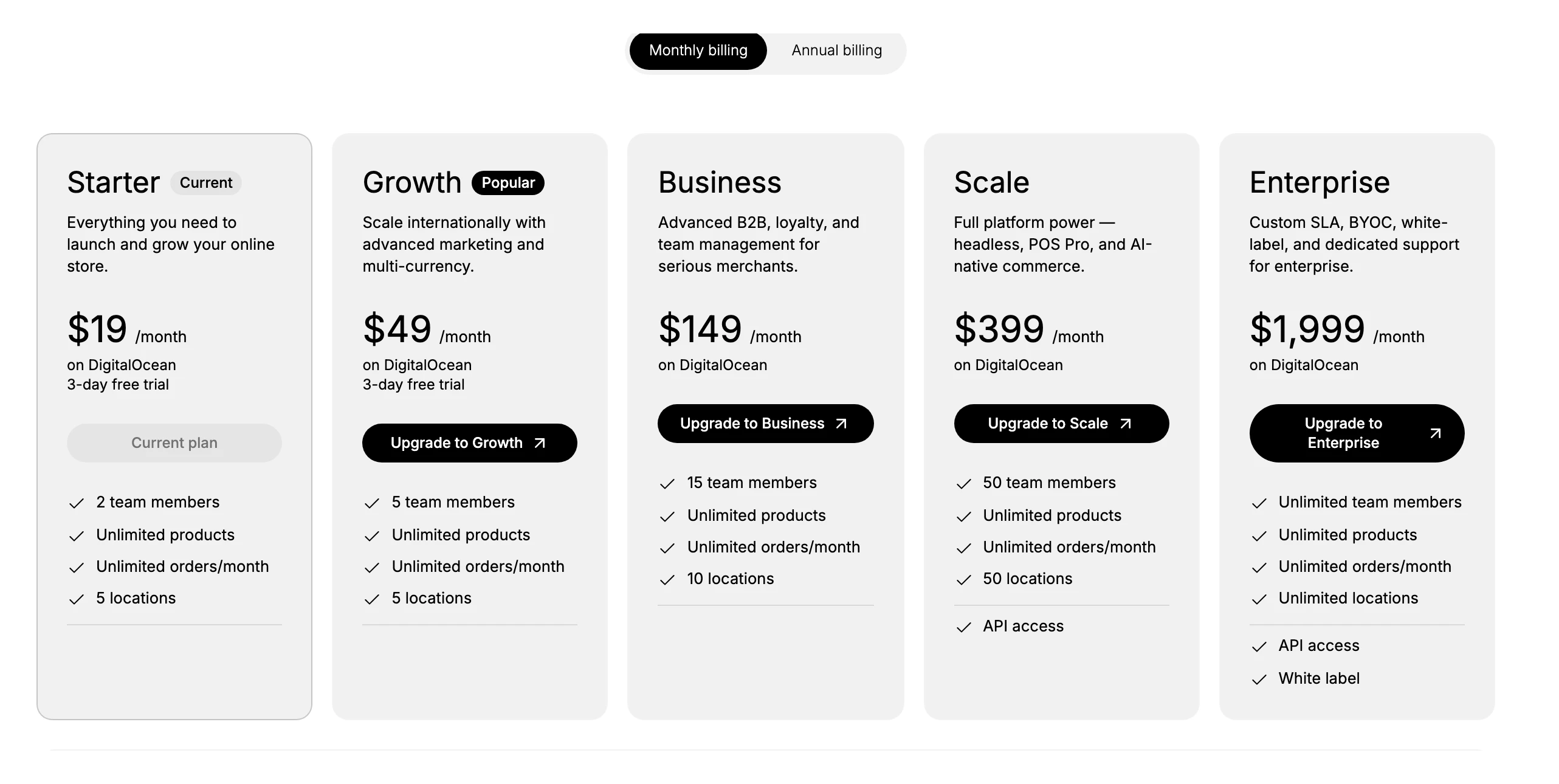
| Plan | Monthly | Annual (billed yearly) | Team members | Locations | Transaction fee |
|---|---|---|---|---|---|
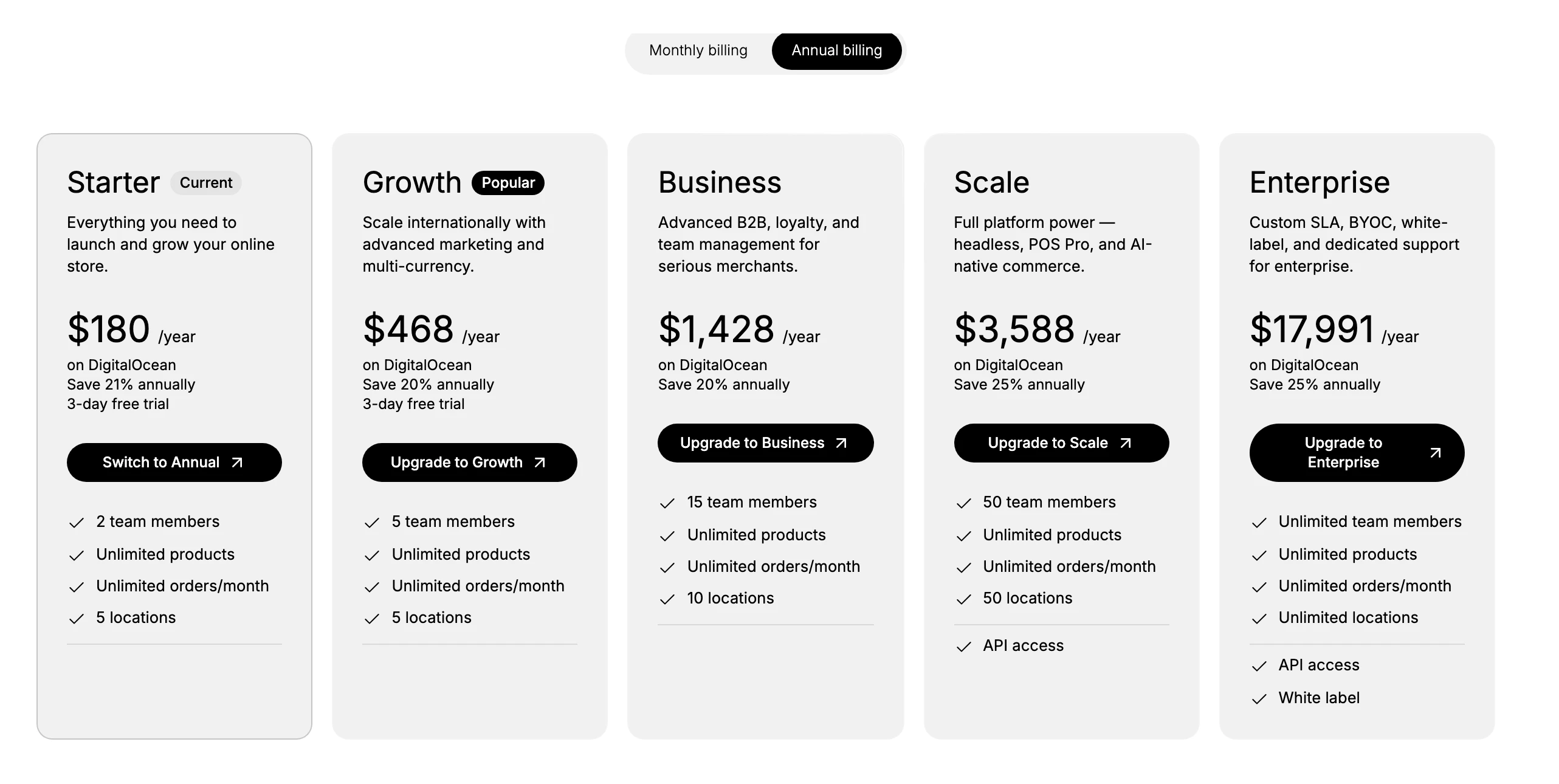
| Starter | $19/month | $180/year ($15/month) | 2 | 5 | 2% |
| Growth | $49/month | $468/year ($39/month) | 5 | 5 | 1% |
| Business | $149/month | $1,428/year ($119/month) | 15 | 10 | 0.5% |
| Scale | $399/month | $3,588/year ($299/month) | 50 | 50 | 0% |
| Enterprise | $1,999/month | $17,991/year ($1,499/month) | Unlimited | Unlimited | 0% |
Scale and Enterprise add API access, and Enterprise adds white label and BYOC (bring your own cloud) with a custom SLA and dedicated support. Products and orders are unlimited on every plan.
Moving to a plan
Your current plan is marked Current, and every other plan shows an action to move to it: a higher plan shows Upgrade to that plan, and when Annual is selected your current plan shows Switch to Annual. To move, select the action on the plan you want and confirm. Pick Your Plan has the full upgrade and downgrade steps, and what a change does to your billing.
Monthly and annual billing
The toggle at the top switches every price between monthly and annual. Paying annually is billed once for the year and works out cheaper per month, with a saving of roughly 20 to 25 percent depending on the plan. Set the toggle to the period you intend to pay before you compare, so you are comparing the prices you would actually be charged.
Tip: Compare on the few things that actually differ for you, such as team members, locations, transaction fee, or API access, rather than reading every line. A plan a little ahead of your current size can save a change later.
What each plan is for
Each plan targets a different stage of business, which its description on the page reflects.
| Plan | Best for |
|---|---|
| Starter | Launching and growing your online store |
| Growth | Scaling internationally with advanced marketing and multi-currency |
| Business | Advanced B2B, loyalty, and team management for serious merchants |
| Scale | Full platform power, including headless, POS Pro, and AI-native commerce |
| Enterprise | Custom SLA, BYOC, white label, and dedicated support for enterprise |
Transaction fees
The comparison table lists a transaction fee that falls as you move up: 2% on Starter, 1% on Growth, 0.5% on Business, and 0% on Scale and Enterprise. As the page notes, you can connect any payment gateway at no extra cost, so the fee is Tanqory's platform fee on a transaction, not a charge for using a particular gateway. If your order volume is high, a higher plan's lower fee can offset its price.
AI Credits
The AI Credits tab is where you buy credits for the platform's AI features, so it helps to know what those credits actually do. AI Credits are a balance that Tanqory's AI tools draw on as they work for you. Three tools use them:
- The AI Assistant, the built-in helper you ask in plain language, uses credits to write content such as product descriptions, draft replies to customer support messages, answer questions about your store, and summarize your analytics. See AI Assistant App.
- The AI Image Generator, one of the sources in the media picker when you add a product or collection image, uses credits to generate a brand-new image from a prompt you type, so you can create a picture instead of uploading one. See Managing Product Images.
- The theme builder's AI mode uses credits when you describe a change to your storefront in words and the AI edits the page for you, instead of you editing it by hand. See Edit Theme Code.
Usage is counted in two units, which is why the tab shows two allowances. Tokens measure text work, so writing descriptions, drafting replies, answering questions, summarizing analytics, and the theme AI all spend tokens; the more the AI reads and writes, the more tokens it uses. Images measure picture generation, so each image the AI Image Generator creates uses one from your image allowance.
Every plan includes a free AI tier that resets each period, giving you a set number of tokens and images at no extra cost. While you still have allowance, these AI tools just work; once you use it up, they pause until the tier resets or you top up. Buying a one-time pack from this tab raises your limit straight away, and larger packs cost less per credit.
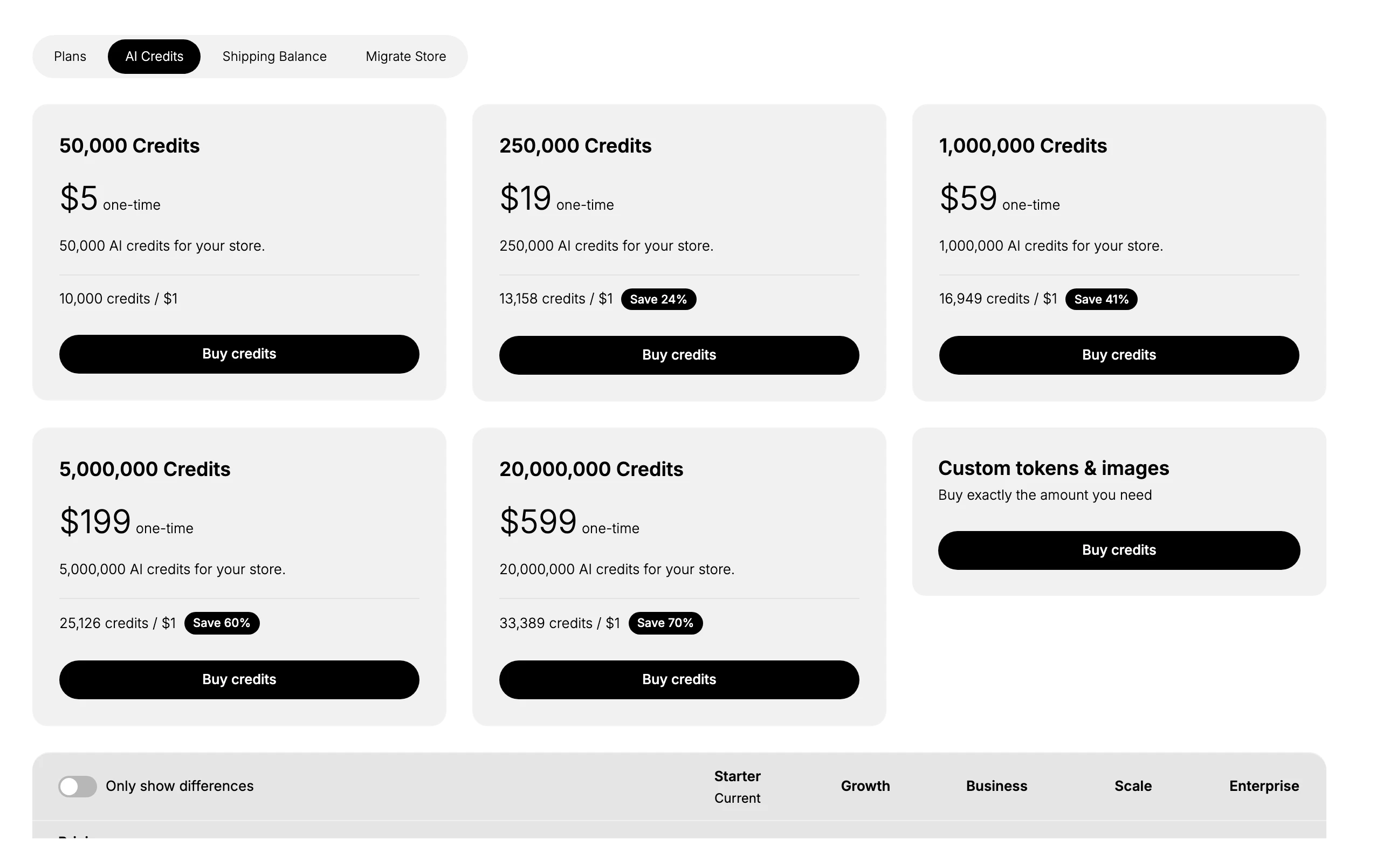
| Pack | Price | Rate |
|---|---|---|
| 50,000 credits | $5 one-time | 10,000 credits per $1 |
| 250,000 credits | $19 one-time | 13,158 per $1 (Save 24%) |
| 1,000,000 credits | $59 one-time | 16,949 per $1 (Save 41%) |
| 5,000,000 credits | $199 one-time | 25,126 per $1 (Save 60%) |
| 20,000,000 credits | $599 one-time | 33,389 per $1 (Save 70%) |
There is also a Custom tokens and images option to buy exactly the amount you need. Credits are a one-time purchase, separate from your plan fee.
Shipping Balance
The Shipping Balance tab holds a prepaid balance for buying shipping labels. As the page states, you buy labels at cost and Tanqory adds no markup, and label purchases draw down this balance instead of charging your card each time. You top it up with a one-time amount.
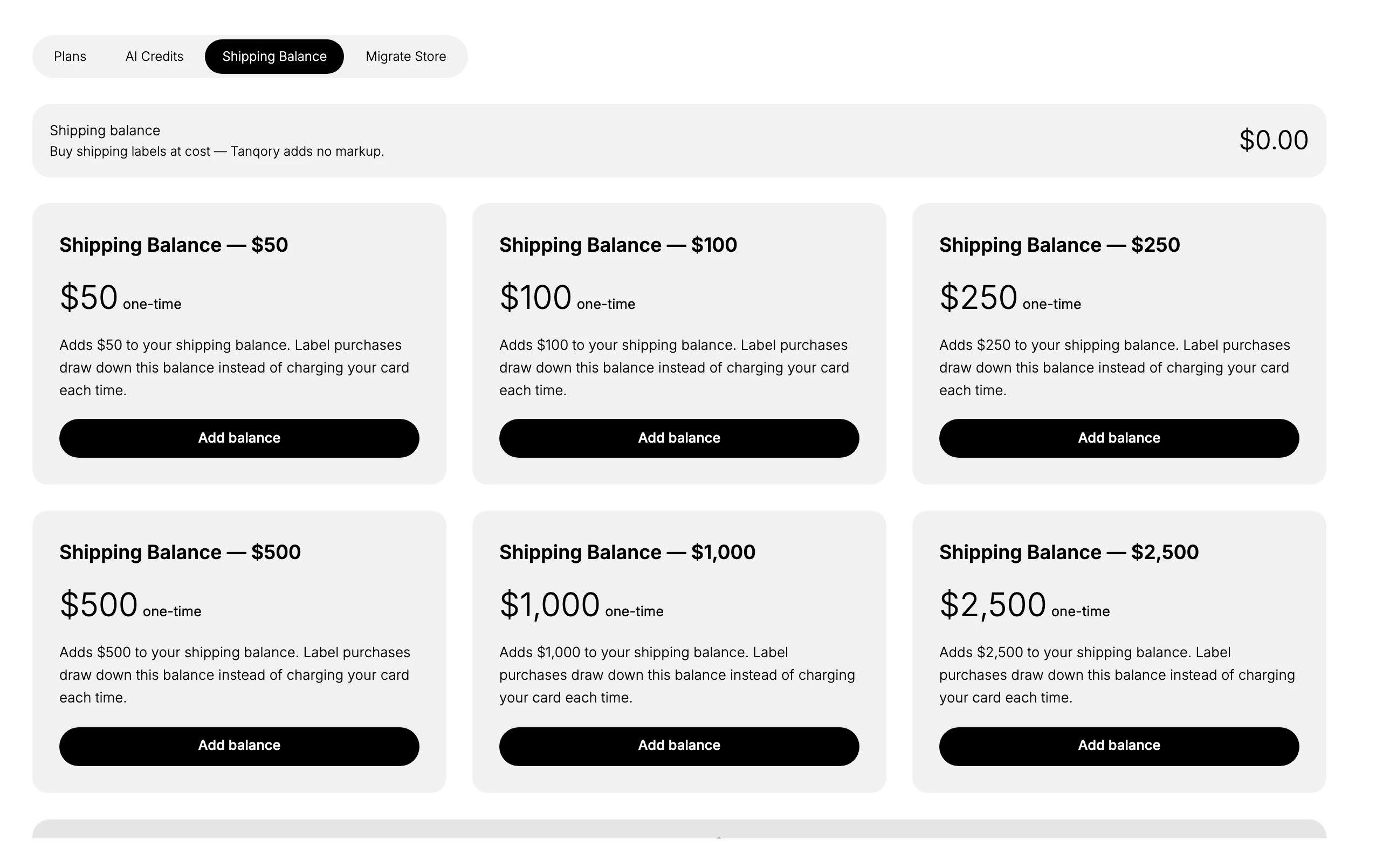
Top-ups are available at $50, $100, $250, $500, $1,000, and $2,500. Add a balance before you print labels so purchases draw down the balance rather than charging your card each time.
Migrate Store
The Migrate Store tab moves your store onto a managed cloud. You pick a destination, then the plan you want to run on it, and the cloud is included in the plan price shown. The destinations are DigitalOcean, which is the default, Amazon Web Services, and Google Cloud, and the price varies by cloud.
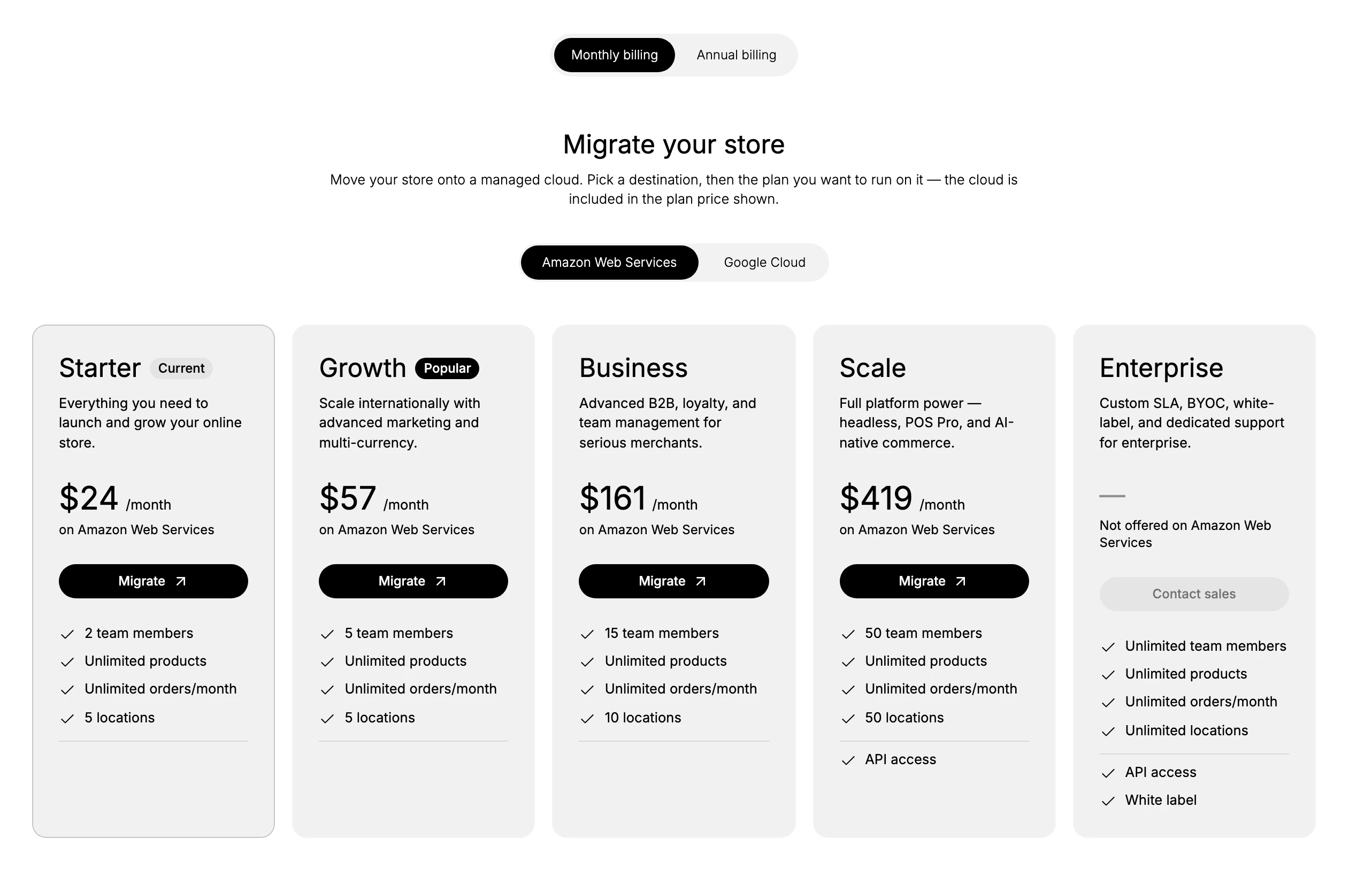
For example, on Amazon Web Services the Starter plan is $24 per month rather than the $19 on DigitalOcean, with Growth at $57, Business at $161, and Scale at $419; Enterprise is not offered on Amazon Web Services and shows Contact sales. Google Cloud has its own prices. Use this tab when you want your store hosted on a specific cloud, and read the price for that cloud before you migrate.
Free trial
Every monthly plan opens with a free trial, and it runs on whichever plan you picked. The sequence matters when you are reading the prices above, because none of those figures is what you pay in your first weeks.
| When | What happens |
|---|---|
| The first 3 days | Free. No card is asked for, and the plan's full features are open to you |
| When those days are up | An email offers the same plan for one more month at $1 |
| When that month ends | You are asked whether to subscribe or renew at the plan's listed price |
| If you decide not to | Some features close off and stay closed until a plan is taken up again. Nothing is deleted |
So the prices in the table above are what a plan costs once that first month is behind you, not what you are charged to begin. Create a Tanqory Account is where the trial starts, and Subscription Overview covers how charging works once you are paying.
Best practices
- Compare the same billing period. Set Monthly or Annual first so the prices you compare are like for like.
- Weigh the transaction fee against the price. At higher order volumes, a plan with a lower fee can cost less overall.
- Buy add-ons only as you need them. AI Credits and Shipping Balance are one-time top-ups, separate from your plan.
- Check the cloud price before migrating. The Migrate Store tab prices differ by cloud.
If something goes wrong
- A price looks off. Confirm whether Monthly or Annual billing is selected, and which cloud is chosen on the Migrate Store tab.
- You are unsure which plan fits. Match your team size, locations, and needed features to the table, then pick the smallest plan that covers them.
- You cannot change plans. Your role may not allow managing billing. Ask an owner or admin.
Next steps
Related articles
Still stuck?
- Ask Tanqory AIAsk in your own words. It answers from these articles and links the ones it used.
- Ask in your adminThe assistant in your Tanqory admin answers and makes the change for you once you confirm.
- Contact TanqoryWrite to our privacy, security or legal teams, or talk to sales about a plan or a move.