Contact Information
The Contact information editor is where you provide the business contact details customers use to reach you. It is the one written policy Tanqory marks as required. You can start from a template, generate it, or write your own, from Settings, Policies.
On this page
The Contact information is where you provide the business contact details customers use to reach you. As the editor explains, this includes your business name, phone number, email, physical address, and any tax identifiers required in your jurisdiction. On the Policies page it is the one written policy marked Required, so complete it before you launch. You write it in a rich-text editor and can begin from a template, have it generated, or start from scratch. You reach it from the Policies page in your store settings, then the Contact information entry under Written policies.
What has to be in it
The editor's own note lists what belongs here, and every line of it exists so a customer can reach a person.
| Detail | Why it is there |
|---|---|
| Business name | The name you trade under, which is what a customer looks for when they check who they bought from |
| Phone number | A number your team answers, since a published number nobody picks up is worse than none |
| Email address | An inbox that is monitored, because this is where a complaint arrives before it becomes a dispute |
| Physical address | Where the business actually is, which several regions require to be published |
| Tax identifiers | Any registration or tax number your own jurisdiction expects a seller to show |
The last row is the one that varies. Tanqory does not know which identifiers your region asks for and does not check whether you supplied them, so that part is yours to establish before you write.
Before you begin
- Have your real business details to hand: the name you trade under, a phone number, an email address, and a postal address.
- Check what your own jurisdiction requires you to publish, since some regions expect specific details such as a registration or tax number.
- Open Settings > Policies in the admin sidebar, then under Written policies select Contact information.
Writing it
Opening the policy, choosing whether to start from a template, a generated draft or an empty editor, and saving it all work the same way as every other policy on the page. Use the Policy Editor covers that once so it does not have to be repeated here.
Two things are specific to this policy. The first is that a template arrives with example values in place of real ones, and those examples are published exactly as they read if you save without replacing them. The Important legal disclaimer under the editor is the second: it says the template is provided for informational purposes only and does not constitute legal advice, which in practice means the accuracy of every detail above is yours rather than the template's.
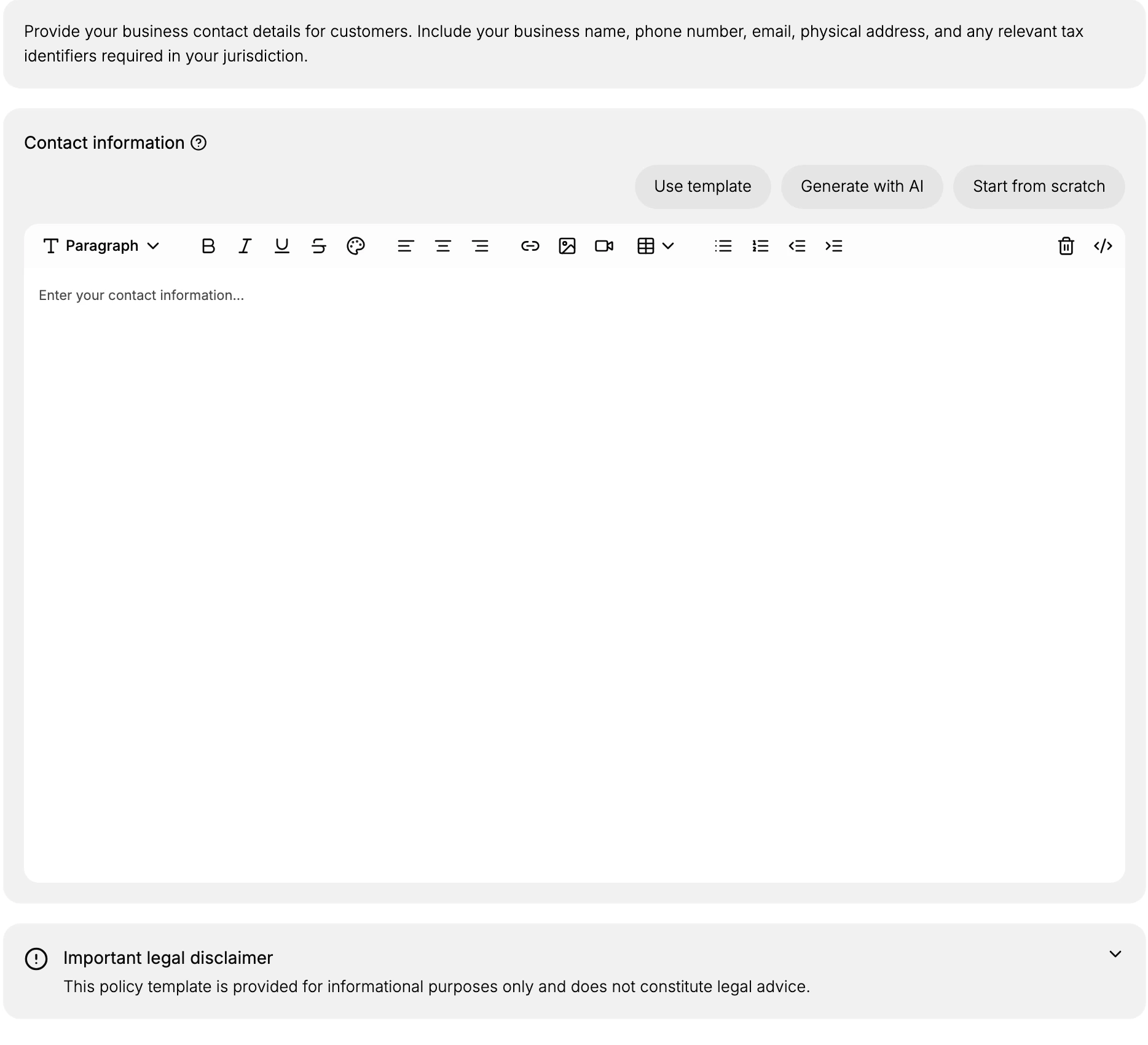
Contact information is the one policy Tanqory marks Required, so leaving it unset is visible to anyone who opens the Policies page. What the disclaimer means in practice is that the wording stays yours to stand behind: the editor supplies a template and a place to type, and neither checks that the details you entered are ones a customer can actually reach you on.
Best practices
- Complete it before launch. This is the one written policy marked required, so do not leave it empty.
- Give reachable details. Use a phone number and email your team actually monitors so customers get a response.
- Include what your region requires. Add any tax identifiers or registered details your jurisdiction expects.
- Keep it current. Update the details after any change of address, number, or email so customers always reach you.
If something goes wrong
- Customers cannot find how to reach you. The contact information is linked from your store once it is set, so confirm you saved it.
- A template has placeholder details. Replace the template's example values with your real business details before you rely on it.
- You cannot edit the details. Your role may not allow managing settings. Ask an owner or admin.
Next steps
Related articles
- Storefront Contact Information for where the details appear to customers.
- Store Details
- Privacy Policy
Still stuck?
- Ask Tanqory AIAsk in your own words. It answers from these articles and links the ones it used.
- Ask in your adminThe assistant in your Tanqory admin answers and makes the change for you once you confirm.
- Contact TanqoryWrite to our privacy, security or legal teams, or talk to sales about a plan or a move.