Inventory Policy
Track quantity and Sell when out of stock together decide what happens when a product runs out. The three combinations worth using, which one is the safe default, and why the second is a promise rather than a setting.
On this page
Two switches in a product's Inventory section decide how it behaves when stock runs out: Track quantity and Sell when out of stock. Separately they look like small options. Together they are the product's inventory policy, and they answer the only question that matters at zero, which is whether a customer can still place the order.
Getting the pair wrong is not visible in the admin. It shows up as orders you cannot fulfill, or as a product quietly refusing sales you could have made.
Before you begin
- You have the Edit products permission.
- Open a product and scroll to its Inventory section.
What each switch does
| Setting | What it does |
|---|---|
| Track quantity | When on, Tanqory counts stock for the product at each location and shows Unavailable, Committed, Available, and On hand. When off, stock is not counted and the product is always available to buy |
| Sell when out of stock | When on, customers can place an order even when Available is zero, which allows overselling or backorders. When off, the product cannot be bought once it is out of stock |
The three combinations worth using
| Track quantity | Sell when out of stock | Result |
|---|---|---|
| On | Off | Stock counts down with each sale and the product stops selling when Available reaches zero. This is the usual setup |
| On | On | Stock still counts down, but customers can keep ordering past zero, for backorders |
| Off | Not applicable | Stock is not counted and the product can always be bought, for made-to-order items or services |
The first row is the right answer for most physical products and the safe default. The second is a promise: you are choosing to take orders you cannot ship today, so it belongs only on products where you know when the stock is coming and the product page says so. The third is for things that cannot run out.
Note the last row carefully. With Track quantity off, the product is always available, so Sell when out of stock has no effect at all, even though the setting stays visible on the page.
What the section looks like in each state
With Track quantity on, stock is listed per location, and On hand is the sum of the other three.
| Column | What it shows |
|---|---|
| On hand | The units physically at the location |
| Available | The units that can be sold right now |
| Committed | The units in placed orders not yet fulfilled |
| Unavailable | The units on hand that are not for sale, for example reserved or damaged |
View adjustment history links out to the record of past changes, and More details holds the SKU, Barcode and Sell when out of stock.
Turn Track quantity off and the per-location table and its columns disappear entirely, leaving only the SKU, Barcode and Sell when out of stock. That is worth knowing before you switch it off on a stocked product: you are not hiding the counts, you are ending the counting.
Setting it
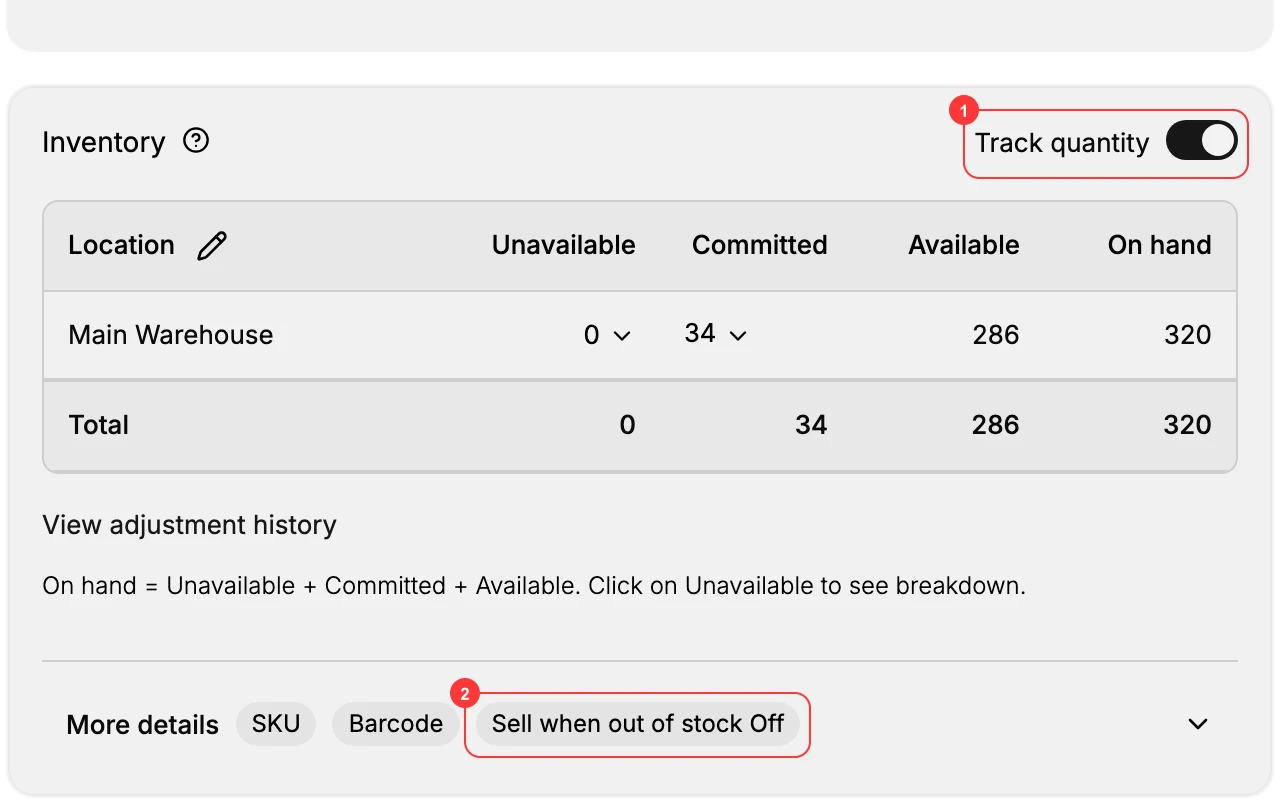
- Set Track quantity (1). On to count stock for this product per location, off to leave it untracked and permanently available.
- Set Sell when out of stock (2). On to let customers order past zero, off to stop sales when Available reaches zero.
- Save the product. The policy takes effect on the storefront right away, with no further step and no preview.
Because it takes effect immediately and silently, the policy is worth revisiting the first time a product actually runs out. That is the moment it does something, and the moment you find out whether the choice was the one you wanted. Manage Inventory is where the effect is visible across the whole catalog.
Verify the result
- With Track quantity on, the location table shows On hand, Available, Committed, and Unavailable, and stock counts down as orders come in.
- With Sell when out of stock off, the product cannot be bought once Available reaches zero.
- With Sell when out of stock on, customers can still order at zero Available.
Best practices
- Use Track quantity on with Sell when out of stock off for normal stocked products.
- Turn Sell when out of stock on only when you can fulfill backorders, and tell customers the wait on the product page.
- Leave Track quantity off for made-to-order items or services that never run out.
Common mistakes
- Selling out of stock without a plan to fulfill, which leads to late orders.
- Tracking quantity but never updating On hand, so Available drifts from reality.
- Turning off Track quantity on a stocked product, which hides stockouts and risks overselling.
If something goes wrong
- The product still sells at zero stock. Turn off Sell when out of stock.
- Stock does not count down. Confirm Track quantity is on.
- The counts have drifted from the shelf. Tracking records sales, not miscounts and breakages. Correct it with Update On-Hand Quantities.
- Permission denied. Your role lacks the Edit products permission.
Next steps
Related articles
Still stuck?
- Ask Tanqory AIAsk in your own words. It answers from these articles and links the ones it used.
- Ask in your adminThe assistant in your Tanqory admin answers and makes the change for you once you confirm.
- Contact TanqoryWrite to our privacy, security or legal teams, or talk to sales about a plan or a move.