Blogs
A blog is a container for your blog posts, with its own URL handle, comments setting, and theme template. You manage blogs from Content, then Blog Posts.
On this page
A blog in Tanqory is a container that groups related blog posts under one web address. Each blog has its own URL handle, a comments setting, and a theme template, and every blog post you write is assigned to one blog. You manage blogs from the Blog Posts area of your admin, so you can keep separate streams such as company news and how-to guides without mixing them together.
Blogs and blog posts
A blog is the container; a blog post is an article inside it. The blog sets the shared web address (for example /blogs/news) and the template that its posts use. When you write a post, you pick which blog it belongs to using the Blog field on the post, so the same store can run more than one blog at once. Blog Posts covers writing the posts.
Before you begin
- Your role includes Edit content.
- Open Content > Blog Posts, then click Manage blogs to reach your blogs.
Steps
1. Open Manage blogs
Go to Content, then Blog Posts. In the top right, click Manage blogs. This is where your blogs are listed and created, separate from the posts themselves.

From the same row, Manage comments reviews reader comments across your blogs, and Add blog post writes a new post.
2. Create a blog and set its details
Add a blog, then fill in its fields.
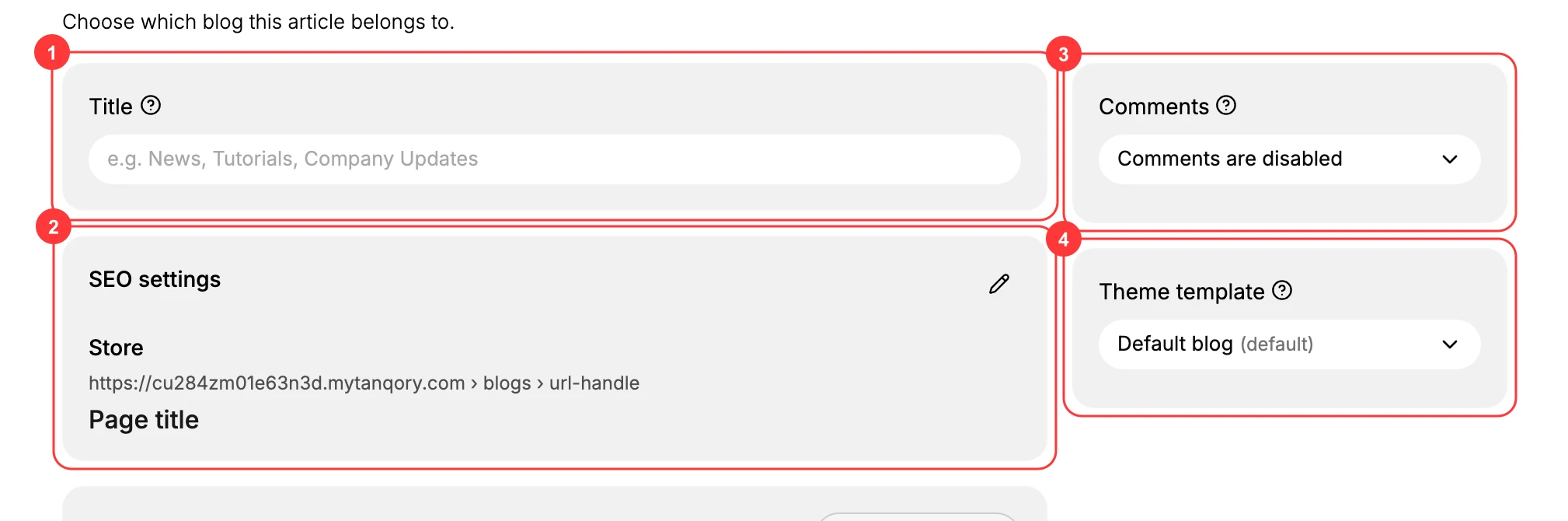
- Title (1) is the blog's display name, such as News, Tutorials, or Company Updates. It is what readers and your menus refer to.
- SEO settings (2) control how the blog appears in search results and its web address. The Store line shows the blog's address as
/blogs/url-handle; edit it to set the handle and a page title that describe the blog. - Comments (3) decides whether readers can comment on posts in this blog. The options are Comments are disabled, Comments are pending moderation (held for you to approve), and Comments are automatically published (shown right away). Use moderation, or keep comments off, unless you can review them regularly.
- Theme template (4) sets which template the blog and its posts render with. Every post in the blog uses it. Default blog is selected unless your theme provides another blog template.
The Metafields card below is optional, for storing extra custom data on the blog. See Metafields if you need it.
Save the blog. It now appears in the Blog field whenever you add a blog post, so you can publish articles into it. Add your posts from Blog Posts, and add the blog's address to your storefront navigation in Menus so readers can find it.
Next steps
- Blog Posts to write and publish articles in a blog.
- Menus to link a blog from your storefront navigation.
- Pages for standalone content that is not part of a blog.
Related articles
Still stuck?
- Ask Tanqory AIAsk in your own words. It answers from these articles and links the ones it used.
- Ask in your adminThe assistant in your Tanqory admin answers and makes the change for you once you confirm.
- Contact TanqoryWrite to our privacy, security or legal teams, or talk to sales about a plan or a move.