Preferred Carriers
The preferred carriers list shows the carriers Tanqory can buy discounted labels from, grouped by destination country. Each carrier shows how many of its service levels are enabled, and you can estimate rates before you buy. Managing which carriers and services are preferred is a higher-plan feature.
On this page
Preferred carriers are the shipping carriers Tanqory can buy discounted labels from when you fulfill an order, organized by where the parcel is going. The list groups carriers under each destination country and shows, for every carrier, how many of its services are enabled, so you can see which carriers and service levels are available when you buy a label for that destination. Knowing what is on the list helps you understand which options appear when you buy labels and estimate rates. You find it in Settings, under Shipping and delivery, inside the Shipping labels section.
Before you begin
- You know which countries you ship to, because the list is grouped by destination and a carrier only appears under the countries it can carry a parcel to.
- Your plan is above Starter if you intend to change the list. Viewing the carriers and estimating a rate need no upgrade; opening Manage preferred carriers on the Starter plan returns a message that the feature is not included.
- Your role includes Shipping settings, the permission that lets you change the store's shipping configuration.
- Go to Settings, open Shipping and delivery, and expand the Shipping labels section.
Where to find it
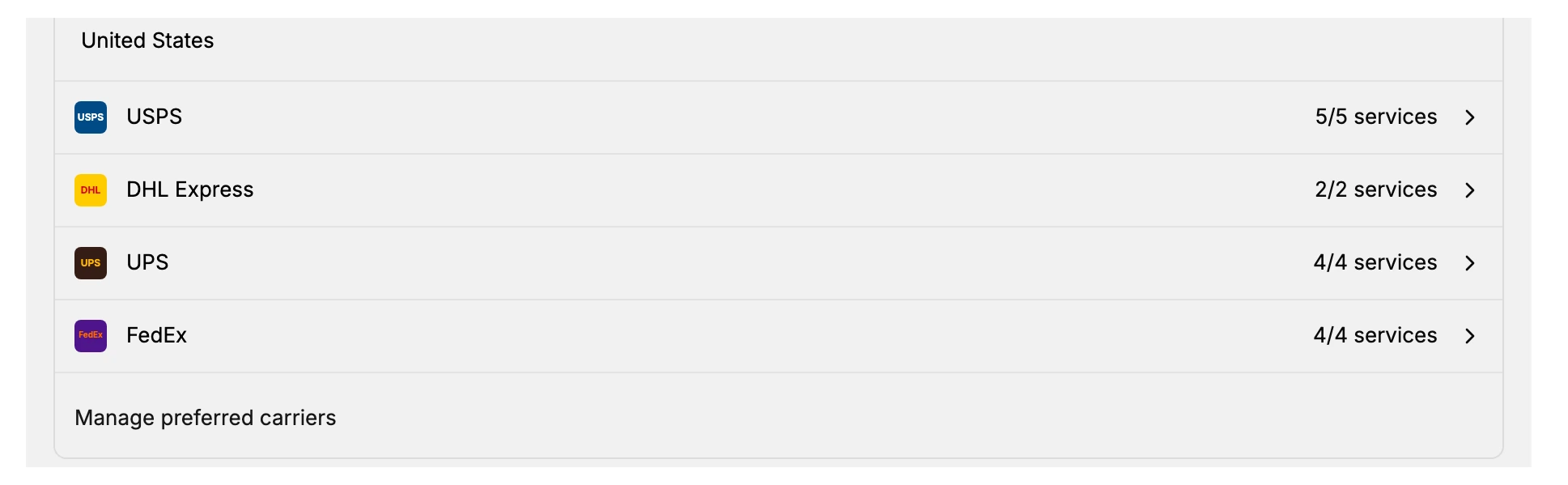
In your admin, open Settings > Shipping and delivery, and expand the Shipping labels section. It is introduced with the line about getting the lowest shipping rates and managing carriers for faster fulfillment, and it holds a Calculate rates action, the carrier list grouped by destination, and a Manage preferred carriers link. The image below shows the United States group as an example of how each carrier appears.
How the list is organized
Carriers are grouped by destination country, because which carriers can ship a parcel depends on where it is going. Under each country, every carrier is listed with a count such as five of five services, which shows how many of that carrier's service levels are enabled out of the total available. A service level is a specific speed or product a carrier offers, such as an express or a standard option. Selecting a carrier opens its services so you can review them.
The carriers shown on this store, by destination, are the following.
| Destination | Carriers and services enabled |
|---|---|
| Germany | DHL Germany (1 of 1 services) |
| Canada | Canada Post (14 of 14), DHL Express (2 of 2), UPS (5 of 5), Purolator (3 of 3) |
| United States | USPS (5 of 5), DHL Express (2 of 2), UPS (4 of 4), FedEx (4 of 4) |
The exact carriers and destinations available can differ by store and region, so treat the list above as an example of how it is presented rather than a fixed set.
Estimating a rate
The Calculate rates action in this section opens the shipping rate calculator, where you enter an origin, a destination, and the parcel size to estimate what a label would cost at the discounted rates before you buy. The same calculator is described in Shipping Labels.
Managing preferred carriers
The Manage preferred carriers link opens the carrier management screen, where the carriers and services on the list are edited. This management screen is a plan feature: on the Starter plan it shows a message that the feature is not included and offers to compare plans, so a higher plan is required before you can change which carriers and services are preferred. Viewing the list and estimating rates does not require the upgrade; only managing the carriers does.
Notes and best practices
- Match the carrier to the destination. The list is grouped by country, so check the group for where you ship most to see your options there.
- Read the services count. A count such as two of two tells you how many of that carrier's service levels are turned on and available when buying a label.
- Estimate before you commit. Use Calculate rates to compare a cost before buying a label, which does not require a plan upgrade.
- Plan for management. Changing preferred carriers needs a higher plan than Starter, so factor that in if you want to customize the list.
If something goes wrong
- Manage preferred carriers asks you to upgrade. The management screen is not included in the Starter plan; you can still view the list and calculate rates.
- A carrier you expect is not listed. Carriers are grouped by destination, and the available set can differ by store and region; check the group for the country you are shipping to.
- You cannot change these settings. Your role may not allow managing store settings. Ask an owner or admin.
Next steps
Related articles
Still stuck?
- Ask Tanqory AIAsk in your own words. It answers from these articles and links the ones it used.
- Ask in your adminThe assistant in your Tanqory admin answers and makes the change for you once you confirm.
- Contact TanqoryWrite to our privacy, security or legal teams, or talk to sales about a plan or a move.