Profile Information
Your profile holds the details that belong to you rather than to the store: your name and photo, the address you log in with, a phone number, and the language, timezone and number format your own screen uses. Changing any of it affects nobody else on the team. The exception worth knowing is your name, which the page says appears on orders and invoices.
On this page
Your profile is the one page in Tanqory that is about you rather than about the store. Everything on it is personal, which is the point worth holding on to: change any of it and nothing changes for your colleagues, your customers, or the shop itself.
That matters because several settings here have a twin in the store settings with almost the same name. The timezone is the clearest case, and the page says so itself.
Before you begin
- You are logged in to the account you want to edit. The profile page only ever shows your own.
Getting there
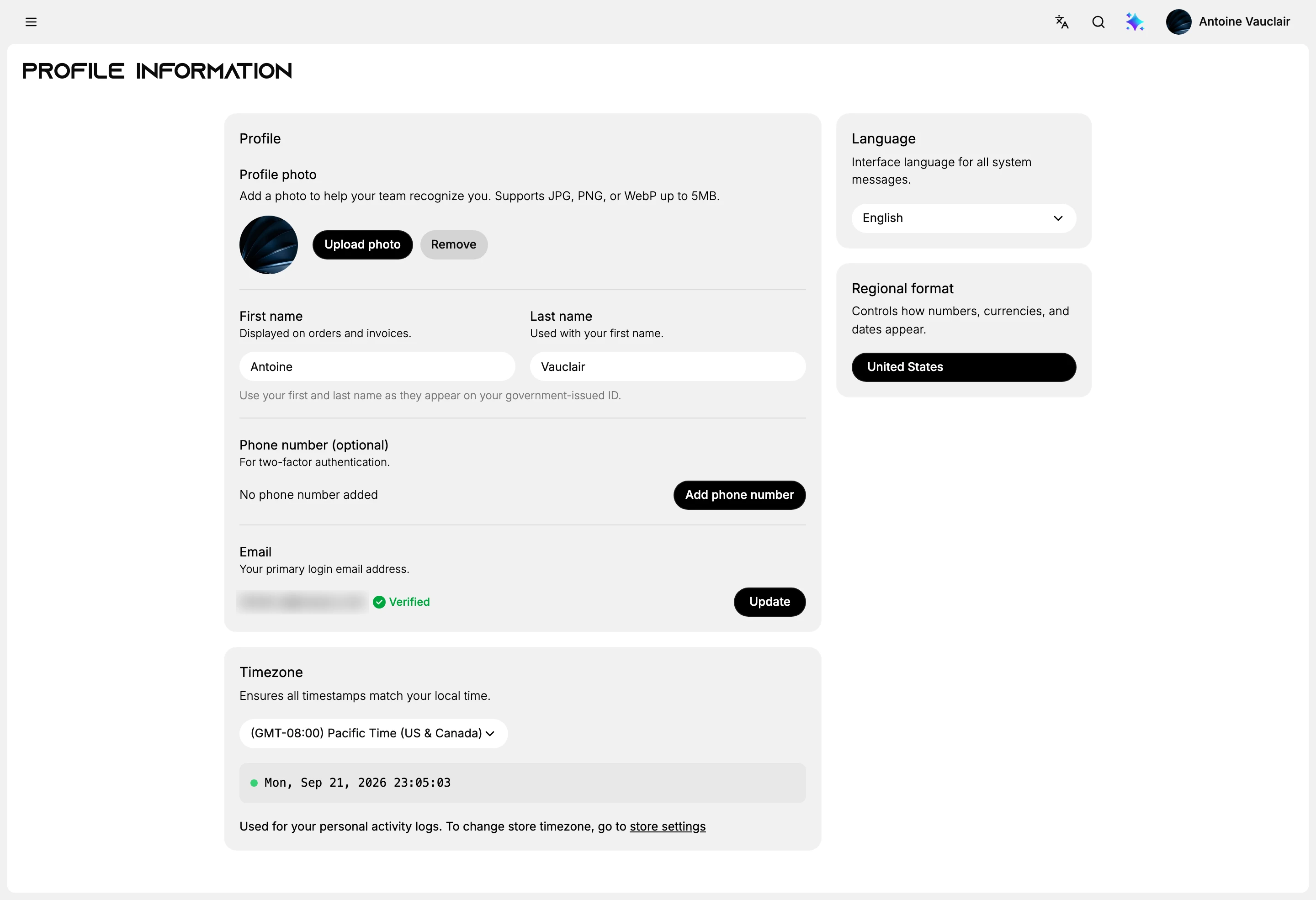
Open the profile picture at the top right of the admin and choose Your profile. The page opens on Profile Information.
Saving, and the part that catches people
Nothing on this page saves by itself, and the controls that save it are not there when you arrive. Edit any field, or pick a different option in any of the three selectors, and a black bar appears at the top of the page reading You have unsaved changes, carrying Discard and Save.

Until you select Save, the change lives only on your screen. The field shows the new value, which is what makes this worth knowing: leave the page without saving and the old value comes back, with nothing to tell you it has. Discard throws the change away on purpose.
Two things do not work this way. Upload photo and Add phone number open their own flow, and Update beside the email starts the email change separately.
What is on the page
| Setting | What it is for |
|---|---|
| Profile photo | How your team recognises you. JPG, PNG or WebP, up to 5MB |
| First name | Shown on orders and invoices, so it leaves the admin and reaches documents |
| Last name | Used alongside the first name |
| Phone number | Optional, and described on the page as being for two-factor authentication |
| The address you log in with, marked Verified once confirmed | |
| Timezone | Which clock your own timestamps are shown in |
| Language | Which language the admin speaks to you in |
| Regional format | How numbers, currencies and dates are written for you |
Your name, and where it ends up
The name fields carry a warning the rest do not: First name is described as displayed on orders and invoices, and the page asks for your first and last name as they appear on your government-issued ID.
So this is not a nickname field. What you type can appear on a document a customer receives, and the page asks for the name on your ID rather than the one your colleagues call you. Treat it accordingly.
The photo is the opposite, with no consequence beyond recognition. It is there so a colleague scanning a list of team members can tell who is who.
Your email and phone
The Email row shows the address you log in with and marks it Verified. Update is what changes it, and it changes the address you will log in with from then on, so it is not a contact preference but a credential.
The Phone number row is optional and sits under one line of explanation: it is for two-factor authentication, the second step some accounts are asked for at log-in on top of the password. Nothing on the page says the number is used for anything else, so it is not a contact number for your customers or your team.
Timezone, language and format, and the twins in store settings
These three are where the personal and the store versions are easiest to confuse, so read what each one claims.
Timezone states that it ensures all timestamps match your local time, and shows the current time beneath the selector so you can check it against your own clock. It then says plainly what it covers: it is used for your personal activity logs, and to change the store timezone you go to store settings. The two really are independent, and on the store used to write this they held different zones at the same moment.
Timezone covers the store one, which is the setting that decides the times your whole team sees.
Language is the interface language for system messages, and it is yours alone. Each person on the team sets their own, and it does nothing to your storefront. Language goes through it.
Regional format is the quieter of the three and the easiest to overlook: it controls how numbers, currencies and dates appear, which is why the same order total can be punctuated differently for two people looking at the same screen.
Best practices
- Put your real name in. It reaches orders and invoices, and the page asks for the name on your ID.
- Keep the email current. It is the address you log in with and the one password recovery is sent to.
- Set your timezone before you read any log. Times are shown in it, so a wrong zone makes every entry look wrong by the same amount.
- Look at the top of the page before you leave it. If the black bar is still there, nothing you changed has been kept.
If something goes wrong
- Your name looks wrong on an order. It comes from this page, not from the store settings.
- The times in your activity log look shifted. Check the Timezone here rather than the store's; this one is what your own logs are shown in.
- Your colleague sees the admin in another language. That is their own profile setting. There is no team-wide language control here.
- A change does not seem to apply anywhere else. That is expected. Nothing on this page reaches beyond your own account.
- Your change went back to what it was. It was never saved. The value you typed stays on screen until the page is loaded again, so this usually turns up later rather than at the time.
Next steps
Related articles
Still stuck?
- Ask Tanqory AIAsk in your own words. It answers from these articles and links the ones it used.
- Ask in your adminThe assistant in your Tanqory admin answers and makes the change for you once you confirm.
- Contact TanqoryWrite to our privacy, security or legal teams, or talk to sales about a plan or a move.