Setting Up Payment Methods
High-level setup path for accepting payments: pick provider(s), connect, configure capture mode, test, go live. Pairs with provider-specific articles for detail.
On this page
This article is the high-level setup path for accepting payments. For provider-specific detail, see the per-provider articles linked below.
You'll work at /admin/store/{storeId}/settings/payments.
Setup sequence
- Pick provider(s): cards, alt-pay, manual.
- Connect each provider: OAuth or API key.
- Configure capture mode: global default + per-provider override.
- Test in sandbox: every scenario.
- Switch to live mode.
- Run a small real transaction for final validation.
- Set up backup / failover: at least 2 providers.
- Monitor failure rate: drift signals issues.
Before you begin
- You are signed in to your Tanqory store admin.
- You have Manage payments permission (Owner for OAuth onboarding).
- You have provider accounts created (Stripe, PayPal, etc.).
Steps
1. Open Settings > Payments
The Payments page renders with 5 sections.
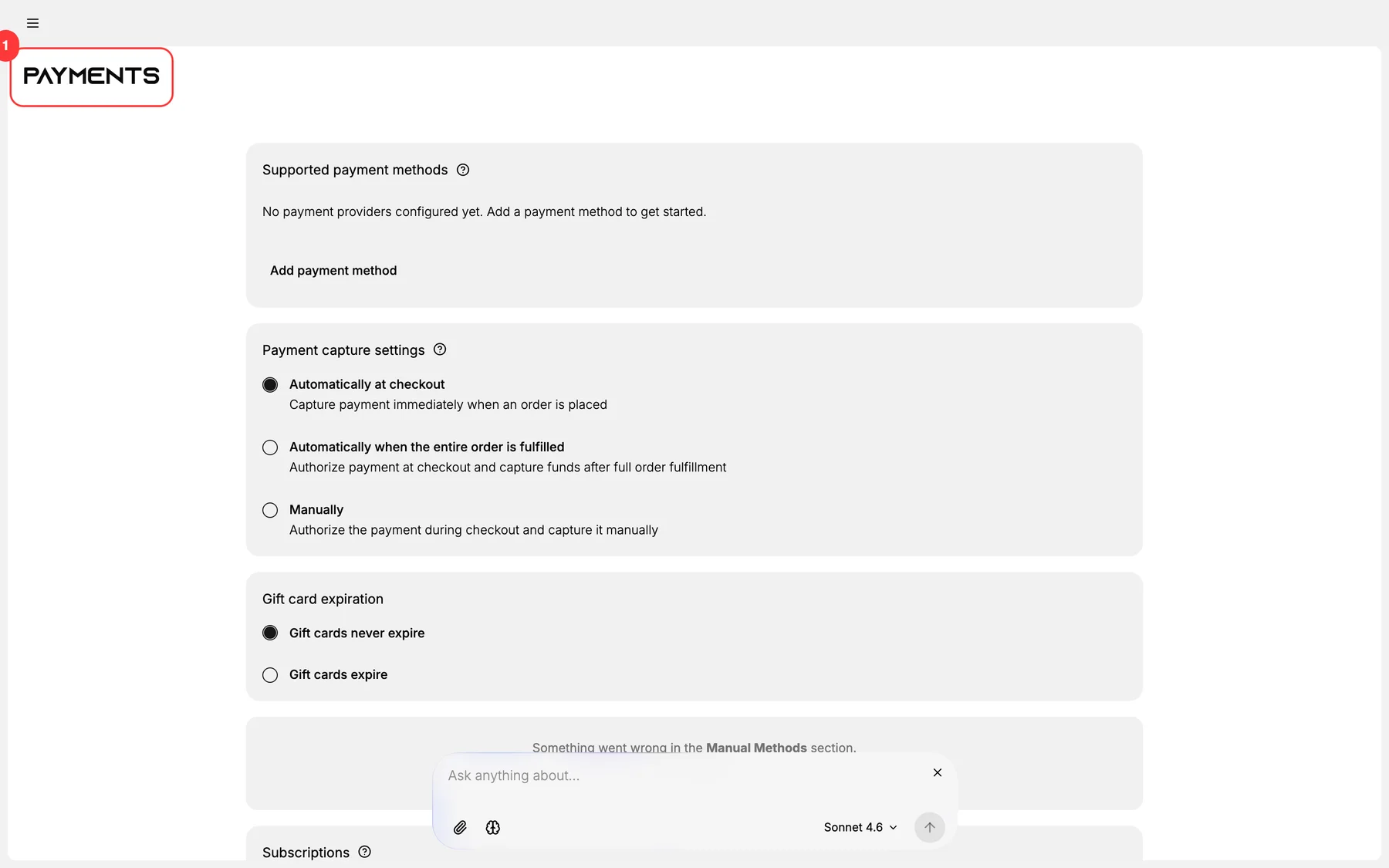
2. Pick + connect at least one card provider
Most common: Stripe.
3. Configure capture mode
See Payment Processing.
- Auto-capture for digital goods.
- Manual capture for high-fraud categories.
4. (Optional) Add manual methods
Bank transfer, COD, PromptPay etc. See Manual Payment Methods.
5. (Optional) Add alternative pay
Klarna, Afterpay, Affirm for BNPL.
6. Test thoroughly
See Testing Payments.
7. Switch each provider to live
After tests pass.
8. Run a small real transaction
Verify with $1 charge.
9. Set up backup provider
For redundancy.
10. Monitor + iterate
Watch failure rate; adjust as needed.
Verify the result
- At least one card provider connected + live.
- (Recommended) backup provider connected.
- Capture mode set deliberately.
- Test transactions completed.
- Small real transaction succeeded.
Best practices
- Multi-provider setup: single-point-of-failure risk.
- Test before launch: every scenario.
- Auto-capture for fast cash flow: but manual for high-fraud.
- Backup provider so outages don't kill checkout.
- Monitor failure rate weekly.
Common mistakes
- Single-provider only: outage = no payments.
- Skipping test mode.
- Wrong capture mode for the category.
- No backup: your store is one provider outage from offline.
- Generic statement descriptor: drives chargebacks.
If something goes wrong
- Provider connection fails: verify OAuth callback / API credentials.
- Test transactions fail: verify test mode + test card numbers.
- High failure rate post-launch: verify provider, 3DS configuration.
- Permission denied: Owner may be required for OAuth.
Next steps
Related articles
Still stuck?
- Ask Tanqory AIAsk in your own words. It answers from these articles and links the ones it used.
- Ask in your adminThe assistant in your Tanqory admin answers and makes the change for you once you confirm.
- Contact TanqoryWrite to our privacy, security or legal teams, or talk to sales about a plan or a move.