Order Not Received by Customer
A customer says their order has not arrived, and you need to tell whether it has shipped, is still being prepared, or is held for another reason. The answer comes from the order's payment and fulfillment statuses, so this explains what each status means and what to do about it, so you can reply with a real answer and a tracking link rather than a guess.
On this page
When a customer says their order has not arrived, the first job is to find out where it actually is, and an order's own statuses answer most of that. Every order carries a payment status and a fulfillment status, and together they say whether the order has been paid, whether it has shipped, and whether something is holding it up. Rather than a fixed sequence of steps, this comes down to reading those two statuses and knowing what each one means, so the sections below explain how to read them and what to do in each case.
Before you begin
- Your role includes Edit orders.
- You have the order number or the customer's email, so you are reading the right order.
- Open Orders in the admin sidebar and open the order the customer is asking about.
Read the order's two statuses
Find the order on the Orders page by its number or email, and read its Payment status and Fulfillment status. The Fulfillment status says whether it has shipped, and the Payment status says whether it is paid. Together they point to which of the situations below you are in. The status tabs, such as Unfulfilled and Unpaid, also let you see all the orders in one state at once when several customers report the same thing.
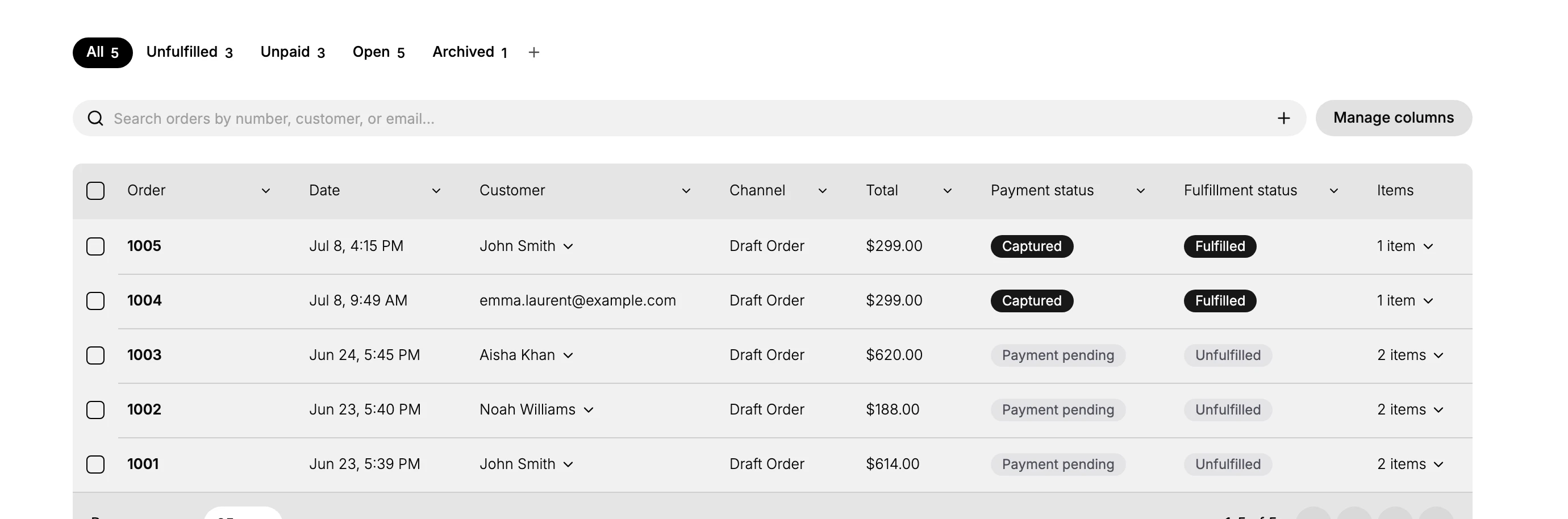
If the order is unfulfilled
An Unfulfilled order has not been dispatched, so there is nothing for the customer to receive yet. This is a common cause of an early complaint: the order was placed but has not shipped. Prepare and fulfill it, then tell the customer when to expect it. See Fulfill an Order for how to mark the items shipped, and Order Fulfillment for what the rest of the card holds.
If the order is fulfilled
A Fulfilled order has shipped and should carry tracking. Open the order and find its tracking details in the fulfillment section, then give the customer the tracking number or link so they can see where the parcel is. If the fulfillment carries no tracking yet, you can add it, which also emails it to the customer. See Add a Tracking Number. If tracking shows the order as delivered but the customer disagrees, the next step is with the carrier.
If only part of the order arrived
An order does not have to ship in one parcel. You can fulfill some of its items and leave the rest, which is normal when stock arrives at different times, and the order then holds shipped items and unshipped items at once. A customer who has received one parcel and is waiting on another will often report this as the order not arriving, because from their side the order is incomplete. Open the order and read which items are fulfilled and which are not, then tell the customer what is still to come and roughly when. See Fulfill an Order.
If payment is pending
An order at Payment pending may not have been prepared at all, since many stores wait for payment to clear before shipping. Confirm whether the payment has cleared, then either fulfill the order or let the customer know it is waiting on payment before it can ship. The order's payment card is where that state is read. See Order Payment Section.
Check the delivery address
Whatever the status, if an order shipped but did not arrive, open it and confirm the shipping address is correct and complete. A wrong or partial address is a common reason a dispatched order never reaches the customer, and it may need a reship to a corrected address. See Order Customer Details.
Note: Read the two statuses before you reply. They answer different questions, so an order can be paid but unfulfilled, or fulfilled but unpaid, and acting on one without the other is how a parcel gets sent twice. Payment status and Fulfillment status together answer most delivery questions on their own, so a quick look often turns a worried customer into one with a tracking link, without any guesswork on your side.
Verify the result
- You can say whether the order is paid, and whether it has shipped, from its statuses.
- A fulfilled order's tracking shows the customer where the parcel is.
- An unfulfilled or held order has a clear next action, and the customer knows what to expect.
Best practices
- Check the fulfillment and payment statuses before replying, so your answer matches where the order really is.
- Share a tracking link for shipped orders, which answers most delivery questions without further back and forth.
- Confirm the shipping address on any order that shipped but did not arrive, since a wrong address is a common cause.
- Watch the Unfulfilled tab so orders do not sit unshipped long enough for a customer to chase them.
Next steps
Related articles
Still stuck?
- Ask Tanqory AIAsk in your own words. It answers from these articles and links the ones it used.
- Ask in your adminThe assistant in your Tanqory admin answers and makes the change for you once you confirm.
- Contact TanqoryWrite to our privacy, security or legal teams, or talk to sales about a plan or a move.